Best answer

Stripe to Quickbooks

  • March 26, 2020
  • 4 replies
  • 289 views

Hi, 

Is it possible to create a Zap that takes a Stripe transaction and then creates a payment in an existing Quickbooks client?

I can only seem to setup the zap for one specific client or new client. 

This Zap would need to do a client lookup, from the Stripe Transaction Client Information,  before creating the payment in Quickbooks. 

Any advice?


Best answer by Danvers

Hi @Empower thanks for your question and I’m sorry for the delay in getting back to you on this!


Yes, you can absolutely set up a Zap to do this! It would look a little like this:

  1. Trigger - Stripe New Charge
  2. QuickBooks - Find Client (you can use the email address from the Stripe step
  3. QuickBooks - Create Payment (you’ll use the ID of the client from the previous step as a custom value to tell QuickBooks who to add the payment to)


​I hope that's clear, please let me know if you have any questions!

This post has been closed for comments. Please create a new post if you need help or have a question about this topic.

4 replies

Danvers
Forum|alt.badge.img+12
  • Zapier Staff
  • Answer
  • April 1, 2020

Hi @Empower thanks for your question and I’m sorry for the delay in getting back to you on this!


Yes, you can absolutely set up a Zap to do this! It would look a little like this:

  1. Trigger - Stripe New Charge
  2. QuickBooks - Find Client (you can use the email address from the Stripe step
  3. QuickBooks - Create Payment (you’ll use the ID of the client from the previous step as a custom value to tell QuickBooks who to add the payment to)


​I hope that's clear, please let me know if you have any questions!


  • Author
  • Beginner
  • April 1, 2020

Cool thanks! 


  • New
  • June 2, 2020

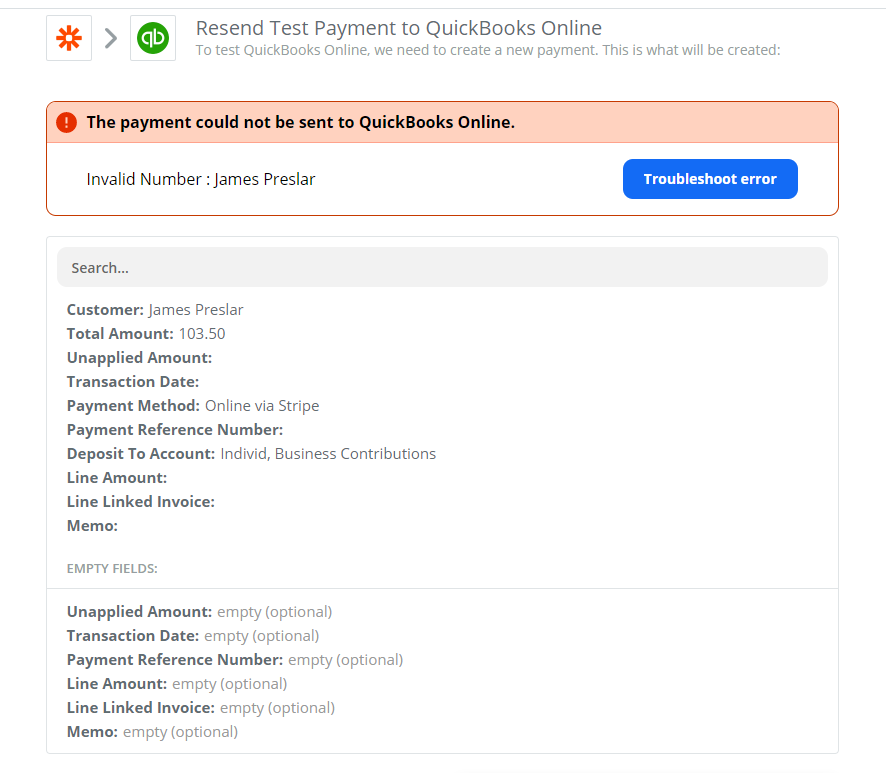
I am trying to do something similar but when I go to set up the “Create Payment” and test it, it gives me this error


Any suggestions?


Thanks


nicksimard
Forum|alt.badge.img+11
  • Zapier Staff
  • June 2, 2020

Hi @acm!

Based on your screenshot, it looks like the expected value for that field was a number (likely the Customer ID) but you’ve added a name there instead. If you were doing something like creating (or finding) a customer, and then trying to use that customer for the payment, then you would use a custom value and map the ID that you get from the Create/Find Customer step.

Does that sound like your workflow, and if so does my explanation help at all?