

Answer

Strava to Google Calendar - can't set event end time

  • February 21, 2021
  • 3 replies
  • 298 views

Hello.


I’m a runner and I’d like to use my google calendar as a log of my training of sorts. I’d like zapier to create events on my google calendar in sync with my runs. For example if today I went for a run of 21min13s starting at 11:00 am I’d like it to create an event starting at 11:00 am and ending at 11:21:13s.


The start date works just fine with the date-time stamp it pulls from strava. The problem is the end date. I tried setting it to be the “startdate+elapsedtimeinseconds/minutes/hours’ but it just doesn’t work and sets a duration of 8,9,10 hours.
Best answer by Anonymous

I’ve found a workaround for it.

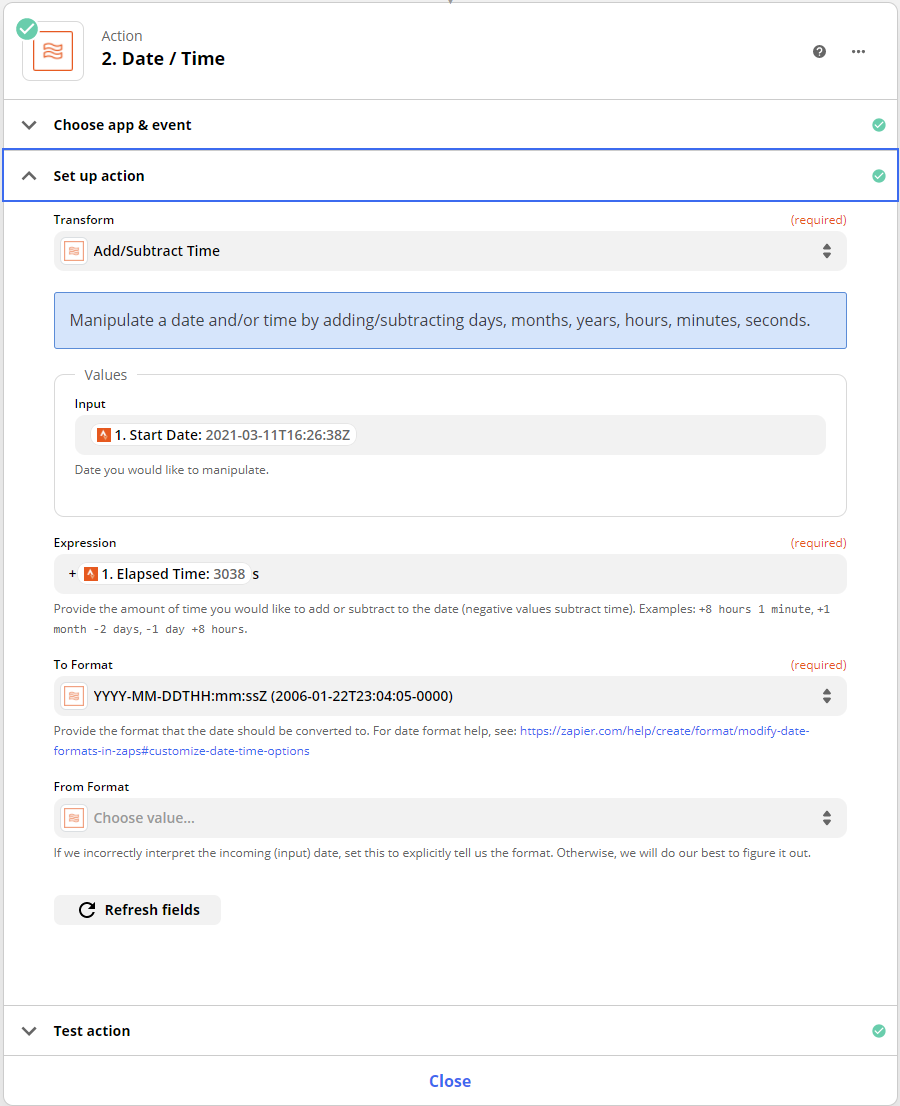
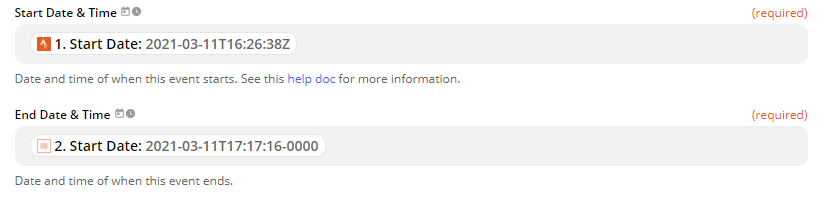
You need to add Formatter step between Strava and Google Calendar. Set it up so it will add elapsed activity time to start date of the activity and then convert it to usable format. Then in Calendar just use the output of that additional step. 


Here’s my configuration of Formatter: 


And here’s Google Calendar step setup for time and date.


If you need additional information about converting date and time or using formatter step, check it out here:

https://zapier.com/help/create/format/modify-date-and-time-formats-in-zaps

Good luck! 

This post has been closed for comments. Please create a new post if you need help or have a question about this topic.

3 replies

Troy Tessalone
Zapier Orchestrator & Solution Partner
Forum|alt.badge.img+14
  • Zapier Orchestrator & Solution Partner
  • February 22, 2021

  • Author
  • Beginner
  • February 22, 2021

Yes I have checked those articles but still cant get it to work. 


  • Answer
  • March 11, 2021

I’ve found a workaround for it.

You need to add Formatter step between Strava and Google Calendar. Set it up so it will add elapsed activity time to start date of the activity and then convert it to usable format. Then in Calendar just use the output of that additional step. 


Here’s my configuration of Formatter: 


And here’s Google Calendar step setup for time and date.


If you need additional information about converting date and time or using formatter step, check it out here:

https://zapier.com/help/create/format/modify-date-and-time-formats-in-zaps

Good luck!




