Question

Sending Enriched Clay Data to Salesforce as a new lead?

  • September 10, 2024
  • 8 replies
  • 122 views

Hi all,

Wondering if anyone has had any success connecting Clay to SalesForce via Zapier?

Basically, we want to receive form submission data from Jotform, which is sent to Clay, enriched, then sent to SalesForce as a lead.

Clay's SF integration requires you to upgrade to their $800 per month plan. Has anyone found a workaround?

When I try to add it in my current Jotform > Clay Zap, it only allows me to pull fields that existed in the original jotform, not any enriched fields.

TIA

This post has been closed for comments. Please create a new post if you need help or have a question about this topic.

8 replies

Troy Tessalone
Zapier Orchestrator & Solution Partner
Forum|alt.badge.img+14
  • Zapier Orchestrator & Solution Partner
  • September 10, 2024

Hi @dustin.s 

Map variables form Jotform to Clay, then from Clay to Salesforce.

For us to have more info, post screenshots with how your Zap steps are outlined and configured in EDIT mode.


  • Author
  • Beginner
  • September 10, 2024

Hi Troy, thank you for the response.


For example, I have a field in my Clay table called “Description” that is not on the Jotform - it is data that clay uses webscraping to find. 


When trying to link that description column to the description field in SalesForce, that option does not show up. I am only shown the fields that came in through the Jotform.


Troy Tessalone
Zapier Orchestrator & Solution Partner
Forum|alt.badge.img+14
  • Zapier Orchestrator & Solution Partner
  • September 10, 2024

@dustin.s 

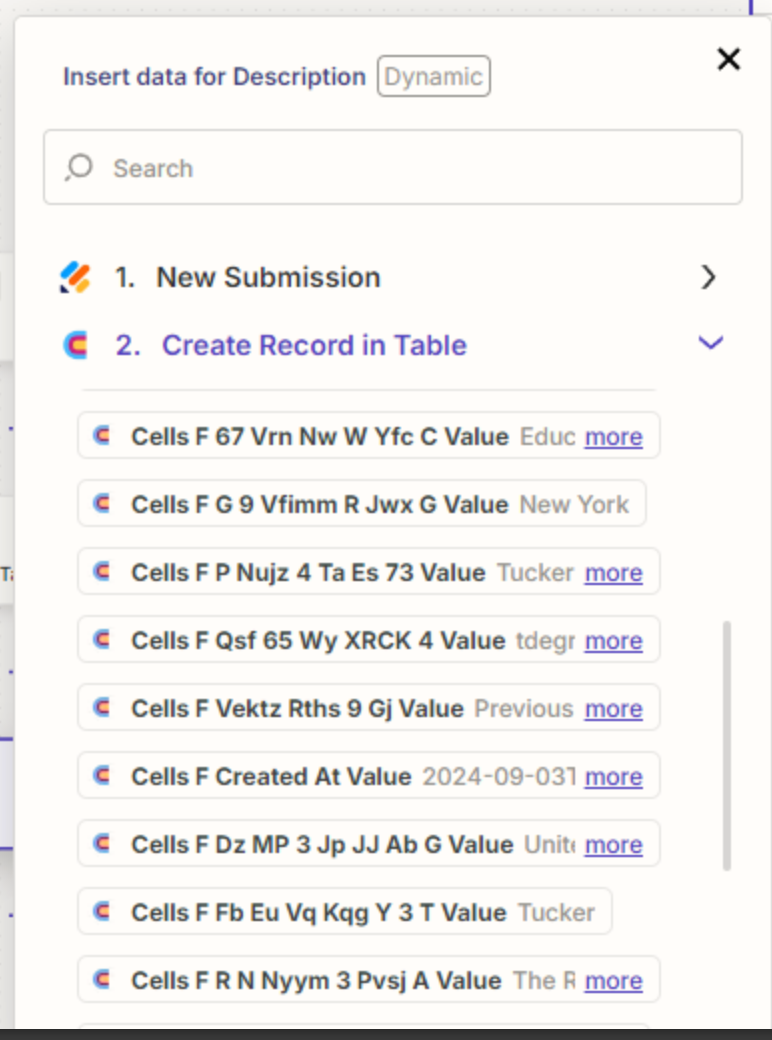
Looks like Clay returns the internal field IDs instead of the friendly field names.

Try searching for the expected Description value to help you narrow the list of variables to map.


Help link for using Clay in Zaps: https://help.zapier.com/hc/en-us/articles/24937325149965-How-to-get-started-with-Clay-on-Zapier#additional-authentication-instructions


  • Author
  • Beginner
  • September 10, 2024

Hi Troy,


I have tried that, but unfortunately the field is not there. I’ve tried refreshing but does not work.

I’ve got about 30 columns in my Clay table, and it is only showing me the columns that came directly from Jotform.


Troy Tessalone
Zapier Orchestrator & Solution Partner
Forum|alt.badge.img+14
  • Zapier Orchestrator & Solution Partner
  • September 10, 2024

@dustin.s 

Some apps only return columns that have values to minimize the data payload.

Try adding this Zap action: Clay - Find Row in Table

See if that returns the desired column.


  • Author
  • Beginner
  • September 11, 2024

Hi Troy, 


Those columns show up in the configuration stage of that action. However, it still does not allow me to select one of these enriched columns when linking them to SalesForce lead fields.


I’m wondering if the enriched columns for Clay are being considered “formulas” and that is why I cannot send that data to SF?


Troy Tessalone
Zapier Orchestrator & Solution Partner
Forum|alt.badge.img+14
  • Zapier Orchestrator & Solution Partner
  • September 11, 2024

@dustin.s 

The documentation for using Clay in Zaps says Custom Fields are not supported, so perhaps that is why.

Perhaps try reaching out to Clay Support for help with their Zap app integration.


SamB
Community Manager
Forum|alt.badge.img+11
  • Community Manager
  • September 13, 2024

Hi @dustin.s! 👋

I did some checking on our side and couldn’t see any mention of enriched column fields not being supported. But I did see a mention that “When adding a record to a table, fields that are Actions or Formulas will not be included.” So if it does consider enriched fields to be the same as formulas then you could well be right.

I’d suggest also contacting our Support team to submit a new feature request for enriched fields to be supported. You can do that here: https://zapier.com/app/get-help. This will help us to get it on the radar of the Clay app’s developers, and allow us to start tracking interest from other customers that would like this functionality too.

Please do keep us updated on how you get on with Clay’s Support team as well. Would love to hear whether they know of any workarounds! 🙂