Question

Searching Columns in Google Sheets

  • June 19, 2025
  • 9 replies
  • 67 views

Hi - I have this issue where I need to search for a column in google sheets using Zapier. I have seen other posts that have solutions such as using a lookup table - however this would not suit my situation as I have 50+ columns that need to be searched for. Basically, it is a timetable and I am easily able to find the row for the timing, but the dates are in the columns. (excerpt of sheet below)
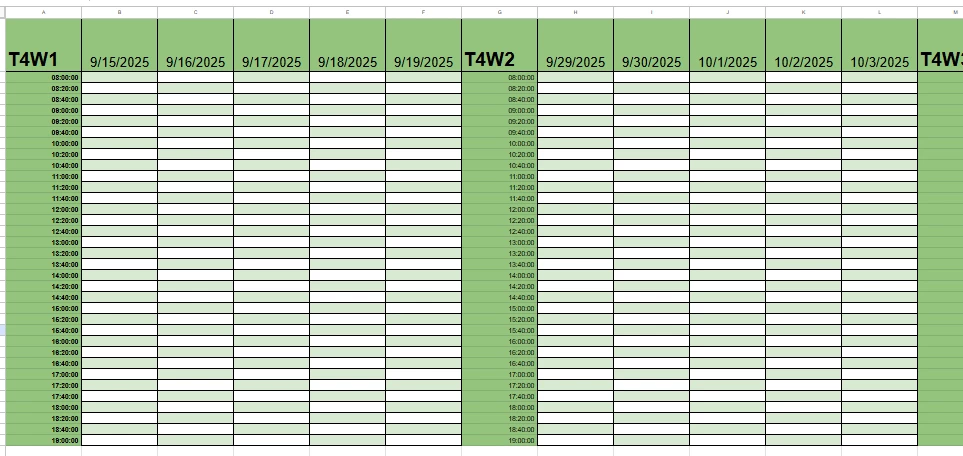
I can’t possibly create a new key-value pair in the lookup table every time a new week is appended to the sheet - so how can I search row 1 for the corresponding date column to write down a variable in that specific cell? [I take my information from firestore - but I dont think that matters]


This post has been closed for comments. Please create a new post if you need help or have a question about this topic.

9 replies

Troy Tessalone
Zapier Orchestrator & Solution Partner
Forum|alt.badge.img+14
  • Zapier Orchestrator & Solution Partner
  • June 19, 2025

Hi ​@teamX 

Why not structure the GSheet columns like this: 
Col A | Col B | Col C
Date | Time | Value


That way each combo of a Date + Time is it’s own row that you can search for. 


  • Author
  • New
  • June 19, 2025

Hi ​@Troy Tessalone - I thought about that, but I realised then that it would create 34 timeslots per day - which would add up quickly. I intend to use this sheet as a frontend to see at a glance which timeslots have been booked - so doing it this way would make it a hassle for someone to scroll to their date since there would be (34 x 5 x 10 = 17000) rows to skim through. Is there no other way to search it in its current configuration?


Troy Tessalone
Zapier Orchestrator & Solution Partner
Forum|alt.badge.img+14
  • Zapier Orchestrator & Solution Partner
  • June 19, 2025

@teamX 
Instead of using GSheets, consider using Airtable.
Airtable has Table Views, which are segments of data. (sort, filter, group, show/hide fields, reorder fields)
NOTE: This approach would require an Airtable paid plan for that many records.


Troy Tessalone
Zapier Orchestrator & Solution Partner
Forum|alt.badge.img+14
  • Zapier Orchestrator & Solution Partner
  • June 19, 2025

@teamX 

Otherwise, you have to use the GSheets API: https://developers.google.com/workspace/sheets/api/guides/concepts

Zap action: GSheets - API Request


Help links for using GSheets in Zaps: https://zapier.com/apps/google-sheets/integrations#help


  • Author
  • New
  • June 19, 2025

@Troy Tessalone 

I won’t be able to purchase any plans, and I’m also using google sheets as it was one of my client’s requests. Would there be any code workaround or obscure action that might be able to fix this issue? I am also open to reordering the information as long as it does not make it a hassle to search for the information (As that is the purpose of the sheet)


Troy Tessalone
Zapier Orchestrator & Solution Partner
Forum|alt.badge.img+14
  • Zapier Orchestrator & Solution Partner
  • June 19, 2025

@teamX 

It would require a custom solution involving the GSheets API and possibly custom Code to be able to query for a column, derive the row/column, then update the cell.

Try asking ChatGPT for help.


Otherwise, you have to use the GSheets API: https://developers.google.com/workspace/sheets/api/guides/concepts

Zap action: GSheets - API Request


Help links for using GSheets in Zaps: https://zapier.com/apps/google-sheets/integrations#help


  • Author
  • New
  • June 19, 2025

Alright, I’ll check that out. Thanks for the help!


Troy Tessalone
Zapier Orchestrator & Solution Partner
Forum|alt.badge.img+14
  • Zapier Orchestrator & Solution Partner
  • June 19, 2025

@teamX 

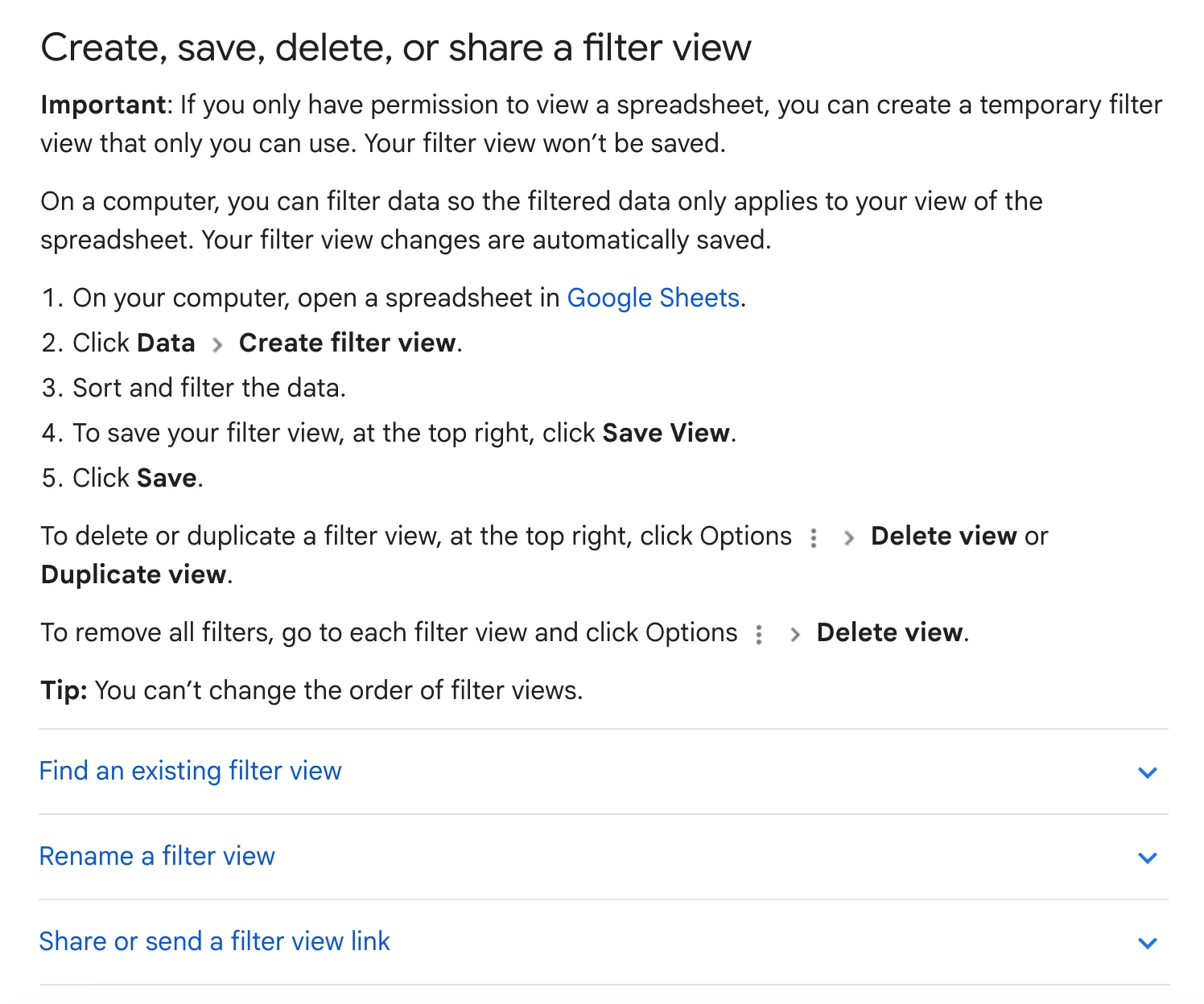
You may want to look into using Filter Views
https://support.google.com/docs/answer/3540681?hl=en&co=GENIE.Platform%3DDesktop


NOTES:

  • GSheets in Zaps can be fragile if humans are actively touching the worksheet data.
  • Changes they make on purpose or accidentally can break the Zap


SamB
Community Manager
Forum|alt.badge.img+11
  • Community Manager
  • July 3, 2025

Hey ​@teamX, just checking in—were you able to get this sorted? 

Keep us posted on your progress, want to make sure you’re all set! 🙂