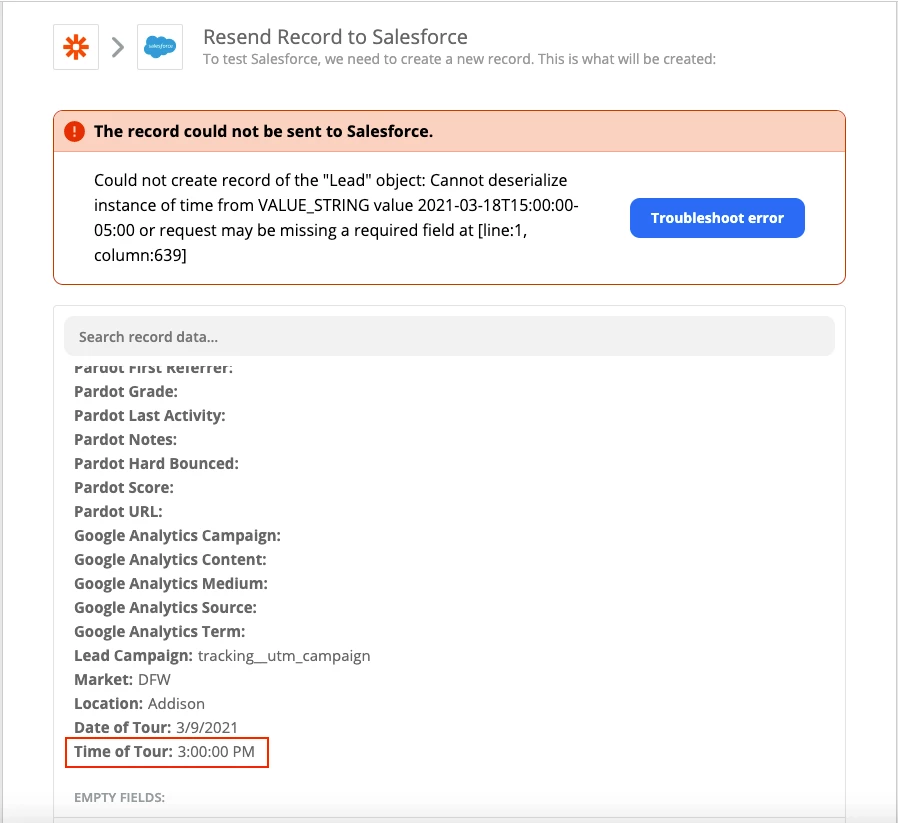
I have connected Calendly with Salesforce. I’m setting up the meeting time value to a lead field on Salesforce and getting the following error.
I tried all the following time formats that Salesforce accepts.
"2:40 PM", "14:40", "14:40:00", and "14:40:50.600"
I also tried the following time formats.
02:40 PM 2:40:00 PM 02:40:00 PM
But Zapier keeps showing me the error. What should I do to resolve this?
Best answer by Danvers
Hi @thinker500
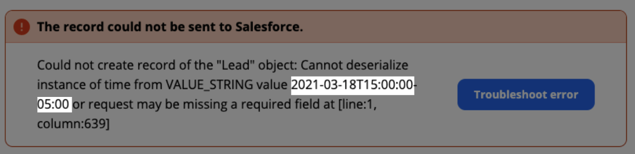
It could be that the time being sent from Calendly is not using the format that you can see in the Zap editor. You can see the time format that’s being sent in the error message:
In this case, you’ll need to get in touch with the Support Team so that they can take a closer look at your Zap and the information that’s being sent/received. The best way to do that is using the Get Help form.
This post has been closed for comments. Please create a new post if you need help or have a question about this topic.
It could be that the time being sent from Calendly is not using the format that you can see in the Zap editor. You can see the time format that’s being sent in the error message:
In this case, you’ll need to get in touch with the Support Team so that they can take a closer look at your Zap and the information that’s being sent/received. The best way to do that is using the Get Help form.