Question

Pass on phone number from affinity

  • September 15, 2022
  • 7 replies
  • 48 views

Hi, I want to create a contact in outlook each time we create a contact in affinity. How is it possible to pass on the field phone number to a Zap? 


Cheers

This post has been closed for comments. Please create a new post if you need help or have a question about this topic.

7 replies

Troy Tessalone
Zapier Orchestrator & Solution Partner
Forum|alt.badge.img+14
  • Zapier Orchestrator & Solution Partner
  • September 15, 2022

Hi @louis453 

Good question.

Try these Zap steps…

  1. Trigger: Affinity - New Person
  2. Action: Outlook - Create Contact


  • Author
  • Beginner
  • September 16, 2022

Hi Troy, 

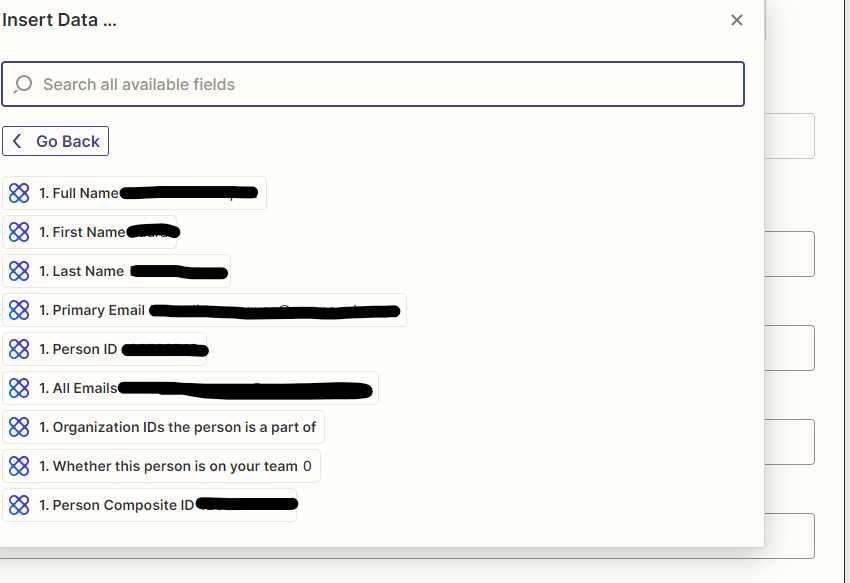
thanks, I set up a Zap like this. However, not all information from the person that is stored in Affinity,  is passed on and can be inserted. Do you know what could be the reason?


  • Author
  • Beginner
  • September 16, 2022

@Troy Tessalone 


Troy Tessalone
Zapier Orchestrator & Solution Partner
Forum|alt.badge.img+14
  • Zapier Orchestrator & Solution Partner
  • September 16, 2022

@louis453 

Some Zaps only return data points that have values.

Try changing the trigger test data to use an example that has data populated for those fields.

https://zapier.com/help/create/basics/change-the-test-data-in-your-zap-trigger


Liz_Roberts
Forum|alt.badge.img+8
  • Zapier Staff
  • September 19, 2022

Hi @louis453 - welcome to Community! Were you able to get this test data to pull through? 

If you’re still having trouble pulling certain data for your trigger (phone number, etc), you can try adding new data for the event in your trigger app.

This would mean taking a peek at your Affinity list/data to ensure the desired data is available for your test contact, which will allow the Zap to use it within the Outlook Action. 😊

Let us know if that does the trick!


  • Author
  • Beginner
  • September 19, 2022

Hi @Liz_Roberts 


yes I added data to the sample contact, but as I have shown above: The fields are not populated in the sample contact. They are not even visible or “null”. 


Do you know what could be the reason for that? 

Best, Louis 


jesse
Forum|alt.badge.img+9
  • Architect
  • September 26, 2022

Hey @louis453! This often happens when using sample data - some values default to “null”. If you skip the tests, turn the Zap on, and then create a new person in Affinity, does it appear in Outlook with all fields populated? Let us know - we want to make sure you’re up and running here!