

Best answer

Not possible to disable the notification email sent to recipients with Google Drive “Share File / Share Folder” action

  • January 18, 2026
  • 5 replies
  • 14 views

Hi Zapier team,

When using the Google Drive “Share File / Share Folder” action, 
it’s currently not possible to disable the notification email sent to recipients.

The Google Drive API already supports this via the 
sendNotificationEmail=false parameter in permissions.create,
but this option is not exposed in Zapier.

This causes issues in automated workflows where:
- folders are shared with groups or collaborators
- users receive unwanted emails with direct links
- access should be granted silently, with links shared separately

A simple toggle (e.g. “Send notification email: Yes / No”) 
would solve this and make the integration much more usable for business workflows.

Thanks for considering it.
Best answer by SamB

Hi ​@Luca1234, I just checked on this and it seems our Support team added you to a feature request which has just been implemented! 🎉

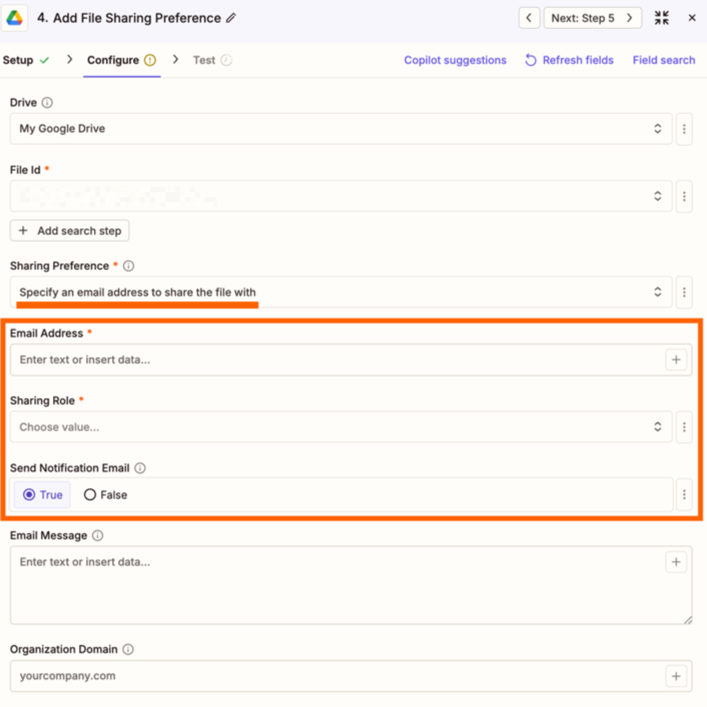
To use that new feature you’ll need to upgrade your Zap to use the latest version of the Google Drive app. Once that’s done, in the Sharing Preference field, select the Specific an email address to share the filter with option. That will then load additional fields where you can disable (or customize) the email notifications: 

9b44c4585ef7ee077448a04e147abb0f.png
 

Excited for you to give this new feature a try! And if you run into any issues with it please do let us know, either in the Community or by contacting our Support team directly. 

In the meantime, happy Zapping! 😁⚡

5 replies

Troy Tessalone
Zapier Orchestrator & Solution Partner
Forum|alt.badge.img+14
  • Zapier Orchestrator & Solution Partner
  • January 18, 2026

Hi ​@Luca1234 

Try these options:

  • Custom Action
    • Create a Custom Action with the help of AI
  • GDrive - API Request
    • Ask AI to help you create the API request to use (e.g. ChatGPT)

  • Author
  • New
  • January 18, 2026

Thank you for the idea. I see how a Custom API action could work, but I’m not a developer and I’d prefer not to rely on custom or unsupported implementations that I might not be able to maintain properly.

If there’s no simple solution available, could this be escalated or reviewed by the Zapier team as a feature request for the Google Drive integration? Disabling sharing notification emails would be very useful in real workflows like mine.

Thanks for your support.


Troy Tessalone
Zapier Orchestrator & Solution Partner
Forum|alt.badge.img+14
  • Zapier Orchestrator & Solution Partner
  • January 19, 2026

@Luca1234 

Feedback and feature requests can be submitted via a ticket to Zapier Support for consideration: https://zapier.com/app/get-help


  • Author
  • New
  • January 19, 2026

thank you Troy!


SamB
Community Manager
Forum|alt.badge.img+11
  • Community Manager
  • Answer
  • January 21, 2026

Hi ​@Luca1234, I just checked on this and it seems our Support team added you to a feature request which has just been implemented! 🎉

To use that new feature you’ll need to upgrade your Zap to use the latest version of the Google Drive app. Once that’s done, in the Sharing Preference field, select the Specific an email address to share the filter with option. That will then load additional fields where you can disable (or customize) the email notifications: 

9b44c4585ef7ee077448a04e147abb0f.png
 

Excited for you to give this new feature a try! And if you run into any issues with it please do let us know, either in the Community or by contacting our Support team directly. 

In the meantime, happy Zapping! 😁⚡





