Best answer

Need to send Gmails one at a time with New Spreadsheet Row Trigger

  • February 19, 2026
  • 8 replies
  • 41 views

My zap is to send a Gmail when a New Spreadsheet Row is added in Gsheets.  The issue is that if 50 rows are added, it sends 50 emails at once.  I need to make them send one at a time with a delay of 30 minutes in between each.  

Best answer by DavidLGS

You can use a “delay after queue” step and set the delay to 30 min.

https://help.zapier.com/hc/en-us/articles/8496288754829-Add-delays-to-Zaps#h_01H919TAHMM9MFFP2TSK03W1TB

8 replies

DavidLGS
Forum|alt.badge.img+6
  • Zapier Solution Partner
  • Answer
  • February 19, 2026

You can use a “delay after queue” step and set the delay to 30 min.

https://help.zapier.com/hc/en-us/articles/8496288754829-Add-delays-to-Zaps#h_01H919TAHMM9MFFP2TSK03W1TB


  • Author
  • Beginner
  • February 19, 2026

Awesome thank you!  I have  two steps set up so the emails are only sent between 8am and 6pm central usa time.  The steps are Formatter by Zapier and Filter by Zapier.  Would I put these after the Delay After Queue?  Or after?


Troy Tessalone
Zapier Orchestrator & Solution Partner
Forum|alt.badge.img+14
  • Zapier Orchestrator & Solution Partner
  • February 19, 2026

Hi ​@Sconi 

You do not want long Delays in Zap Runs.


With your requirements, it requires a different approach.


Essentially you will want this type of configuration…

STEPS

  1. Trigger: Schedule
    1. Hourly
      1. Run at :00
        1. Duplicate the Zap and set to run at :30
    2. Help: https://zapier.com/apps/schedule/integrations#help
  2. Action: Filter
    1. Check that it is within the desired days/hours
      1. See GUIDE below
  3. Action: GSheets - Lookup Row
    1. Use a column to check an email status
      1. e.g. Status = PENDING
  4. Action: Filter
    1. Check that a row was found to process
  5. Action: Gmail - Send Email
  6. Action: GSheets - Update Row
    1. Use a column to mark an email was sent
      1. e.g. Status = DONE


Help link for how to have Zaps run during specified hours: 


DavidLGS
Forum|alt.badge.img+6
  • Zapier Solution Partner
  • February 19, 2026

If you can share a screenshot of the Zap, that may help, but on the surface, it seems as though it won’t matter.

If you want to keep the “flow” a little more intuitive, I would put the delay after. That way “it feels like” you’re still blocking the emails if they get triggered after hours before they ever delay. But in reality, even if they delay before the filter, the filter will still block them if it’s after hours. Does that make sense?


  • Author
  • Beginner
  • February 19, 2026

Yes.  That makes sense.  I added it and will test.  Thank you so so much for your help!


  • Author
  • Beginner
  • February 19, 2026

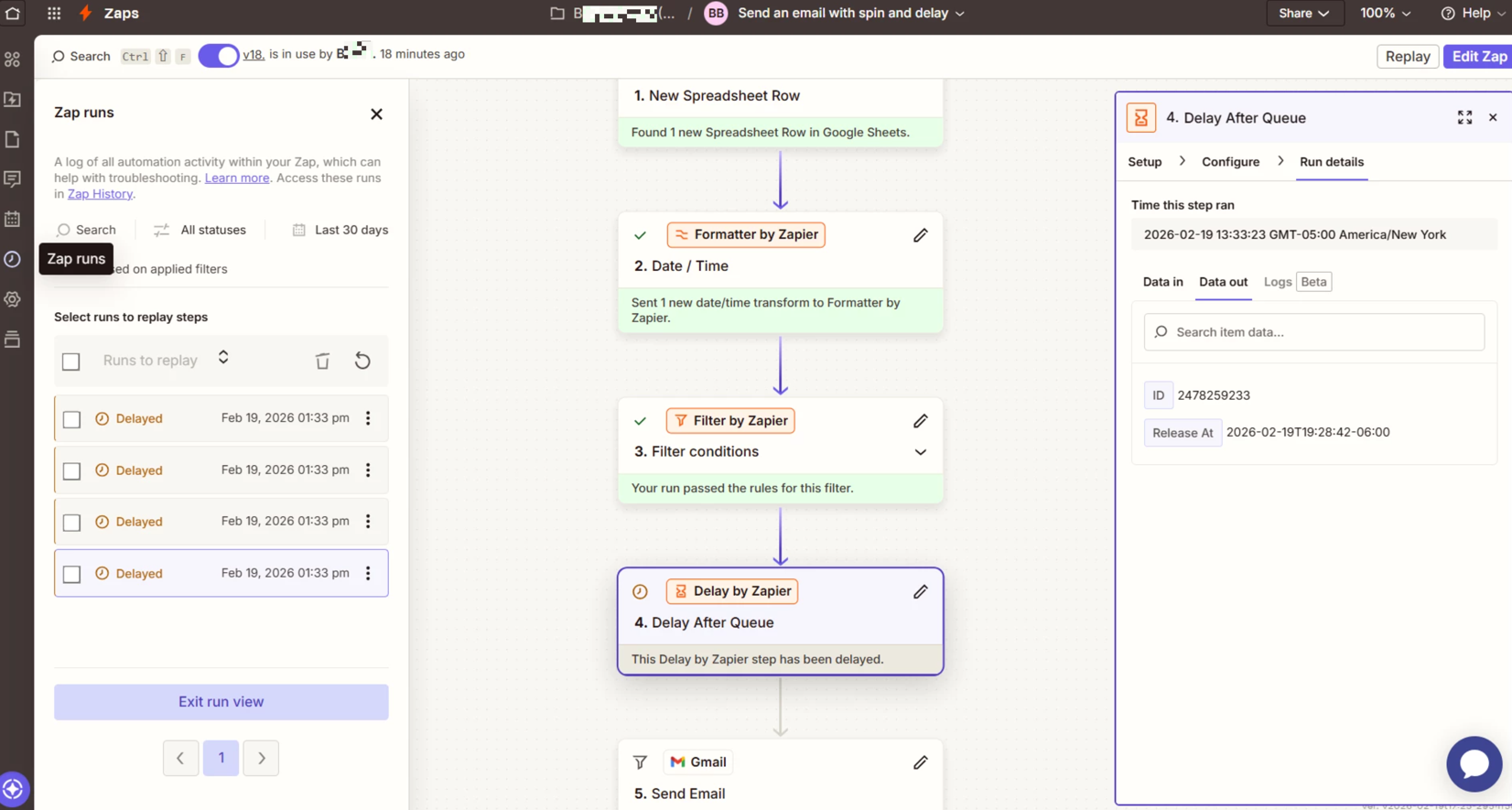
Having an issue with the Delay After Queue:

Time this zap ran:  2026-02-19 13:33:23 GMT-05:00 America/New York

Release at: 2026-02-19T19:28:42-06:00


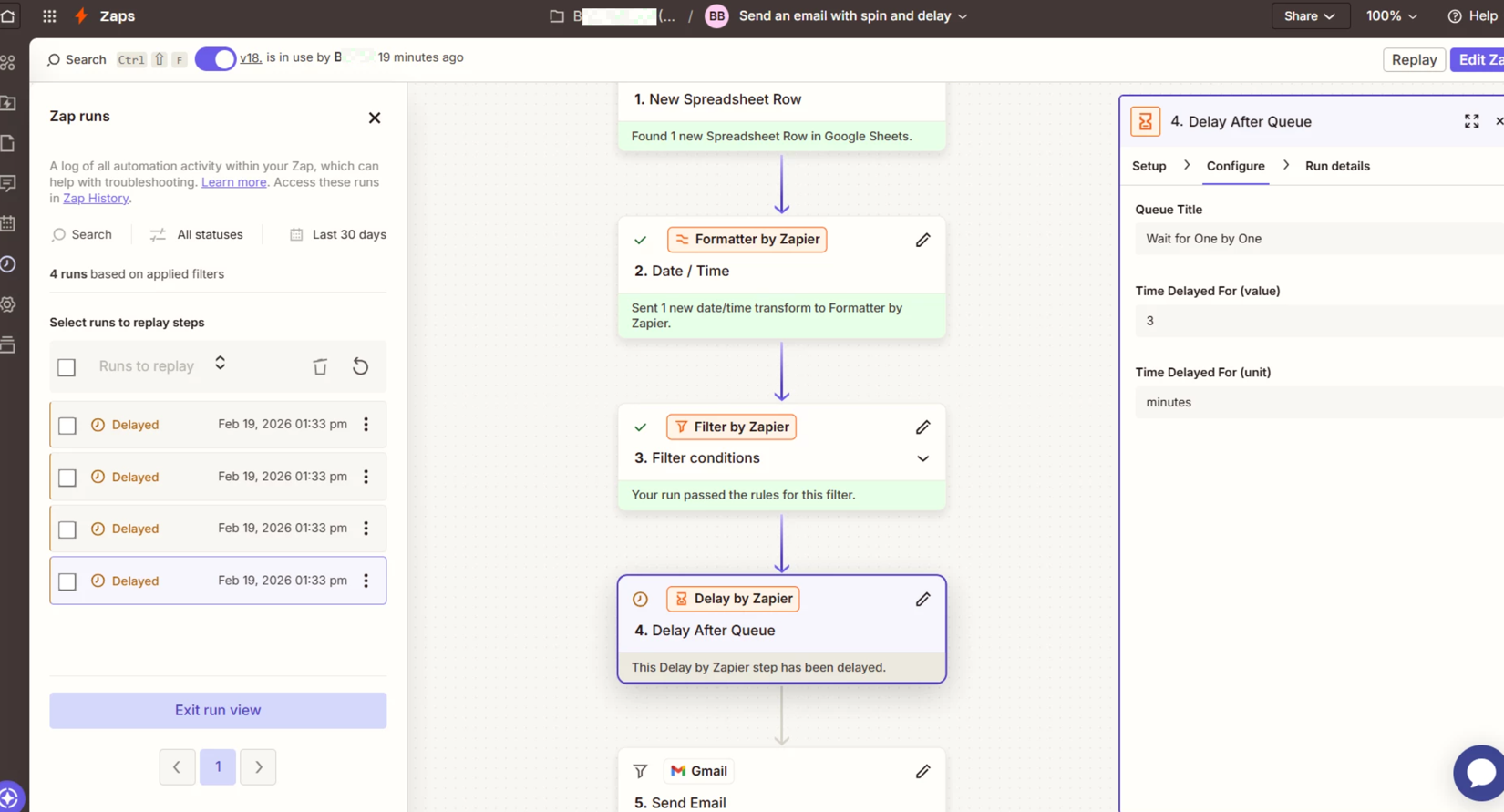
The Time delayed for is set to 3 minutes though.  I can’t figure out why it’s delaying the run for such an oddball amount of time.  


Troy Tessalone
Zapier Orchestrator & Solution Partner
Forum|alt.badge.img+14
  • Zapier Orchestrator & Solution Partner
  • February 19, 2026

@Sconi 

Try this other approach: 

Hi ​@Sconi 

You do not want long Delays in Zap Runs.


With your requirements, it requires a different approach.


Essentially you will want this type of configuration…

STEPS

  1. Trigger: Schedule
    1. Hourly
      1. Run at :00
        1. Duplicate the Zap and set to run at :30
    2. Help: https://zapier.com/apps/schedule/integrations#help
  2. Action: Filter
    1. Check that it is within the desired days/hours
      1. See GUIDE below
  3. Action: GSheets - Lookup Row
    1. Use a column to check an email status
      1. e.g. Status = PENDING
  4. Action: Filter
    1. Check that a row was found to process
  5. Action: Gmail - Send Email
  6. Action: GSheets - Update Row
    1. Use a column to mark an email was sent
      1. e.g. Status = DONE


Help link for how to have Zaps run during specified hours: 


DavidLGS
Forum|alt.badge.img+6
  • Zapier Solution Partner
  • February 20, 2026

Having an issue with the Delay After Queue:

Time this zap ran:  2026-02-19 13:33:23 GMT-05:00 America/New York

Release at: 2026-02-19T19:28:42-06:00


The Time delayed for is set to 3 minutes though.  I can’t figure out why it’s delaying the run for such an oddball amount of time.  


It likely has to do with 3 possible timing issues.

  1. The account timezone
  2. The timezone of the data coming in
  3. The timezone you are currently sitting in

If any or all of those are different, you need to resolve them by always explicitly using formatter steps to make sure they are always converted to a single format and timezone.