Best answer

My address isn't parsing correctly?

  • June 9, 2022
  • 3 replies
  • 191 views

I can’t seem to figure this out regardless of how many templates or variations I create.

I simply using one line data and breaking it up to create an address

123 Main St., Happyville, TX 5555

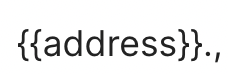
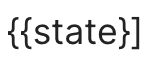
{{address}}., {{city}}, {{state}] {{zip}}

I keep getting crazy results and it starts with the address part. It always feeds into the city and sometimes further.

1- Is there a way to fix it?

2-I am considering putting the data in google sheets first them manipulating the data with some formulas!! it’s exhausting


Thank you for any help you can provide.
Best answer by Troy Tessalone

Hi @DV_Automation 

Good question.

Make sure you have a properly configured template.


Notice the closing bracket.


Notice the extra period before the comma.


Other Options

You may want to try using a more robust email parser such as Mailparser: https://zapier.com/apps/mailparser/integrations


A Zap code step can be used to parse data:


This post has been closed for comments. Please create a new post if you need help or have a question about this topic.

3 replies

Troy Tessalone
Zapier Orchestrator & Solution Partner
Forum|alt.badge.img+14
  • Zapier Orchestrator & Solution Partner
  • Answer
  • June 9, 2022

Hi @DV_Automation 

Good question.

Make sure you have a properly configured template.


Notice the closing bracket.


Notice the extra period before the comma.


Other Options

You may want to try using a more robust email parser such as Mailparser: https://zapier.com/apps/mailparser/integrations


A Zap code step can be used to parse data:


Sorry for the typo. It is correctly formatted in the app. I just typed it fast in the forum. 

I will check your link. Thank you


christina.d
Forum|alt.badge.img+9
  • Zapier Staff
  • June 14, 2022

Hey there, @DV_Automation! I wanted to drop by and see if you were able to get this sorted using the article Troy mentioned? Keep us posted! 🤗