
Best answer

Move file to a folder based on matching words on Google Drive

  • March 8, 2023
  • 7 replies
  • 190 views

sergiosilva

I’m using google meet to record my meeting with clients, and when it’s finished it’s uploaded auto0matically to a folder in google drive.

These meetings have the name of the client there (ex “Client name & me, date”), and the folders i have for my clients say “client name calls”. I want to make a zap that, once a file is uploaded, zapier searches for a folder that matches at least one word that is on the recording file and transfers it to the persons folder.


I can’t seem to make this type of conditional 

Best answer by Troy Tessalone

Hi @sergiosilva 

Good question.

Please post detailed screenshots with how your Zap steps are configured so we have more context to work with.

You can try using the Formatter > Text > Split (split at “ &” and keep the first segment) to isolate the client name to then search for a GDrive Folder by.

Also note, there’s a chance that 2 clients have the same name.

This post has been closed for comments. Please create a new post if you need help or have a question about this topic.

7 replies

Troy Tessalone
Zapier Orchestrator & Solution Partner
Forum|alt.badge.img+14
  • Zapier Orchestrator & Solution Partner
  • 34031 replies
  • Answer
  • March 8, 2023

Hi @sergiosilva 

Good question.

Please post detailed screenshots with how your Zap steps are configured so we have more context to work with.

You can try using the Formatter > Text > Split (split at “ &” and keep the first segment) to isolate the client name to then search for a GDrive Folder by.

Also note, there’s a chance that 2 clients have the same name.


sergiosilva
  • Author
  • Beginner
  • 3 replies
  • March 8, 2023

Do these screenshots help?


sergiosilva
  • Author
  • Beginner
  • 3 replies
  • March 8, 2023

I’m using the formater to isolate the client name, but how do I make the search for partial input in this step?


sergiosilva
  • Author
  • Beginner
  • 3 replies
  • March 8, 2023

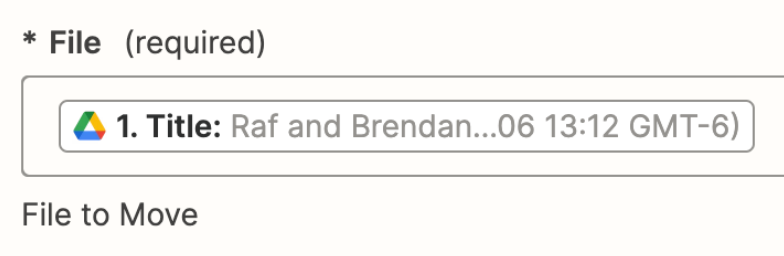
I think it can find it, but now im getting this error. All steps have a success icon, except for this last one


Troy Tessalone
Zapier Orchestrator & Solution Partner
Forum|alt.badge.img+14
  • Zapier Orchestrator & Solution Partner
  • 34031 replies
  • March 8, 2023

@sergiosilva 

The File field expects the File ID instead of the File Title.


Hironobu Yoshida

's very intriguing... For example, how about triggering an update to Google Calendar?

Presumably, Meet will provide a link to the meeting on Google Calendar. It can be determined based on that information and the subject of the calendar.


chanelle
Forum|alt.badge.img+8
  • Zapier Staff
  • 628 replies
  • March 15, 2023

@sergiosilva Hey there, checking in! 

Were you able to successfully launch your Zap using Title ID in lieu of File Title? Hoping you ran into no further issues 🤞