
Best answer

Microsoft outlook zap

  • April 26, 2022
  • 5 replies
  • 55 views

My post trigger action is to send an email through outlook but I’m having trouble figuring out how to format the email so that it’s more presentable. 

Currently it just strings all the text info and data together into one long line.


So instead of something like this: 


Sales Enquiry 

Name: John Smith

Phone: 123456


I’m getting: 


Sales Enquiry Name: John Smith Phone: 123456


Thanks

Daniel
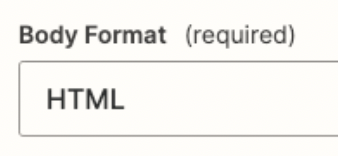
Best answer by Troy Tessalone

@danigold 

Change this to plain text:


This post has been closed for comments. Please create a new post if you need help or have a question about this topic.

5 replies

Troy Tessalone
Zapier Orchestrator & Solution Partner
Forum|alt.badge.img+14
  • Zapier Orchestrator & Solution Partner
  • April 26, 2022

Hi @danigold 

Good question.

Make sure to add line breaks in the Zap config.

Are you using HTML or plain text format for the email?

Can you post screenshots with how your Outlook Zap step is configured?


  • Author
  • New
  • April 26, 2022

Hi Troy 

Thanks for responding! 

Trying HTML but by no means an expert in any of this! 

See screenshot of the Zap step


Troy Tessalone
Zapier Orchestrator & Solution Partner
Forum|alt.badge.img+14
  • Zapier Orchestrator & Solution Partner
  • Answer
  • April 26, 2022

@danigold 

Change this to plain text:


  • Author
  • New
  • April 26, 2022

I tried that but got the same result! 


  • Author
  • New
  • April 26, 2022

Scratch that, that worked actually :)





