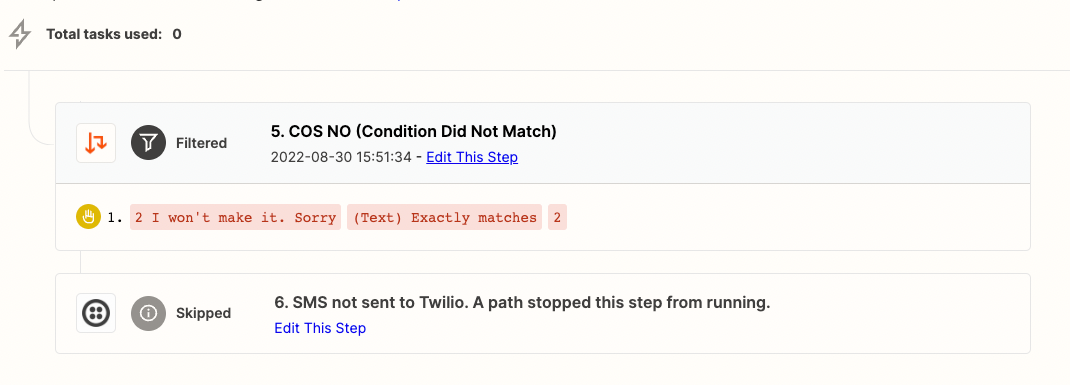
I am creating a path rule based on an incoming text of 1 or 2.
I’ve tried a few options but I need to be able to determine the path based on a 1 or 2 response of an incoming text.
However it either doesnt work. Or it will match 255, 525, 552 .. i just need it to match an exact 2 or 1.
Best answer by MohSwellam
Hi @rleon10 ,
So you need to do one of 4 things:
Use Formatter By Zapier > Event = Text > Transform = Extract Number, this will extract whatever number is there and you can use it in the path.
Either match the entire phrase and make it “Exactly Matches” - not sure if that applies to you or not
Use Text Starts With “2 “ with a space after it
Depending on where the data is coming from and whether it is like a form with Single Select options, use a lookup table (Formatter by Zapier > Utilities > Lookup Table) to convert the sentence into numbers
Hope any of those solutions help :)
This post has been closed for comments. Please create a new post if you need help or have a question about this topic.
Hey @rleon10 sorry to hear you’re running into some trouble here! Are you able to share more information/screenshots around how your paths are configured? There should be a path condition where you can say “text > EXACTLY matches”. I’d be curious to know if you’re using that as well as the field you’re using within those conditions. Let us know!
If you use Exactly Matches then it shouldn’t be considering something like “2 i can’t make it” to be an exact match for “2”.
Do you have any live runs of the Zap that you could share a screenshot of (from your Zap History) to show that this happened? It’s definitely not intended behaviour.
Please remember to remove any personally identifiable information from screenshots before sharing :)
Use Formatter By Zapier > Event = Text > Transform = Extract Number, this will extract whatever number is there and you can use it in the path.
Either match the entire phrase and make it “Exactly Matches” - not sure if that applies to you or not
Use Text Starts With “2 “ with a space after it
Depending on where the data is coming from and whether it is like a form with Single Select options, use a lookup table (Formatter by Zapier > Utilities > Lookup Table) to convert the sentence into numbers
We're celebrating the Zapier builders making AI transformation happen. Winners get a published story on zapier.com, a trophy, $5,000 cash, and a feature at ZapConnect. Nominate yourself or a peer by July 24th, 2026.