Question

Kanban Board: Create set of rows on another google sheet, under a specific column.

  • April 22, 2024
  • 3 replies
  • 38 views

Hello!


I am trying to create a Kanban Board in google sheets to automatically populate “New Requests” when a new row is created in my Data Sheet.


I have separates sheets for my Data Sheet and my Kanban Board.


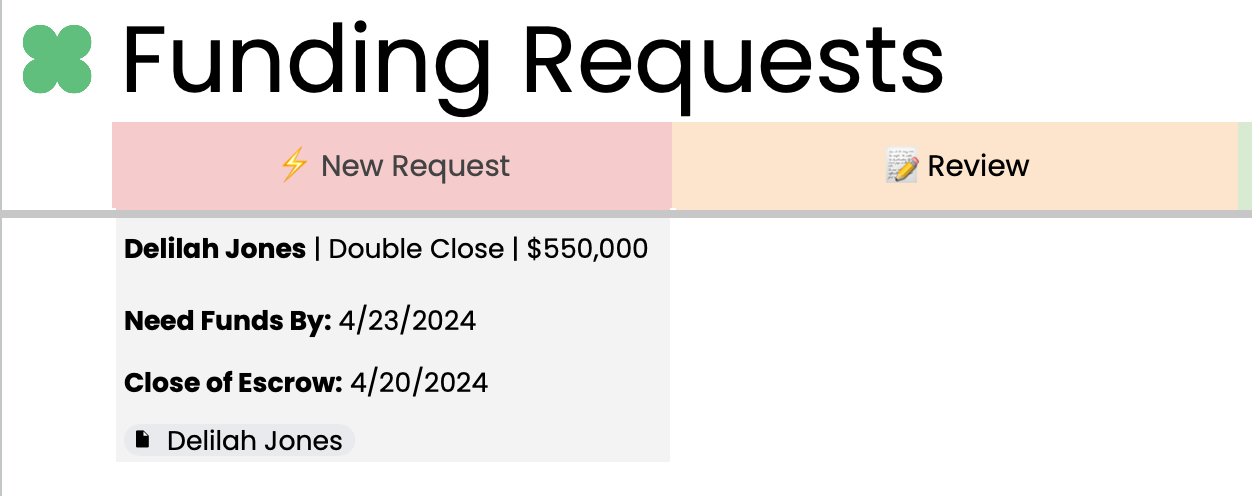
Create a “Card”: I want to pull ONLY select data from specific columns in Data Sheet, then automatically push that to the Kanban Board Sheet. This card should have 4 rows, or at lease appear to have 4 rows. 


  • I’d like to make background grey and border white.
  • I’d like to have a link to the specific Google Drive Folder for the client.
  • I’d like to format Name, Need Funds By, Close of Escrow in bold.


Picture of what I’m trying to do below.

Any ideas of how I can create a zap for this?


Thanks so much!


This post has been closed for comments. Please create a new post if you need help or have a question about this topic.

3 replies

Troy Tessalone
Zapier Orchestrator & Solution Partner
Forum|alt.badge.img+14
  • Zapier Orchestrator & Solution Partner
  • April 22, 2024

Hi @rtlew 

Here’s an alternative to consider trying…

Use Airtable instead of GSheets.

Airtable has these View types:

https://support.airtable.com/docs/getting-started-with-airtable-kanban-views

https://support.airtable.com/docs/airtable-grid-view


  • Author
  • New
  • April 22, 2024

Thanks! I was really trying to keep it simple and stay within one place for this.


Troy Tessalone
Zapier Orchestrator & Solution Partner
Forum|alt.badge.img+14
  • Zapier Orchestrator & Solution Partner
  • April 22, 2024

@rtlew 

I’d really recommend checking out Airtable for managing your data.

Airtable Views (Grid and Kanban) can likely replace your GSheet.


To do what you are trying to do, you would likely have to use an advanced approach with the GSheets API: https://developers.google.com/sheets/api/reference/rest