Question

I was unable to complete the setup of my Zap. “Groups” is grayed out, and my Zap is disabled.

  • May 12, 2022
  • 5 replies
  • 94 views

I just joined Zapier and can’t get past connecting the apps that I’m using. 

I connected Convertkit and Square (for Square online) adding the secret API for Convertkit.

I get to the step that says Groups and everything is greyed out. 
I can only go back. When I go to look at my Zap it’s disabled because the Group isn’t set up.


During the setup, I added the Convertkit form that I want to use on my Square website and Zapier says it cannot find it (probably because I couldn’t complete setup).

Just adding as much info as possible.


Thank you for your help.

This post has been closed for comments. Please create a new post if you need help or have a question about this topic.

5 replies

Troy Tessalone
Zapier Orchestrator & Solution Partner
Forum|alt.badge.img+14
  • Zapier Orchestrator & Solution Partner
  • May 12, 2022

Hi @Lea with Pawsibilities 

Good question.

Please post screenshots with where you are having issues configuring your Zap so we can have proper context, thanks.


My prtScr isn’t working, so here’s the copied page 

Zaps


Private folders

Add folder

Home


Create Zap


Troy Tessalone
Zapier Orchestrator & Solution Partner
Forum|alt.badge.img+14
  • Zapier Orchestrator & Solution Partner
  • May 13, 2022

@Lea with Pawsibilities 

We’re going to need screenshots or a record video in order to have proper context about your Zaps.


Danvers
Forum|alt.badge.img+12
  • Zapier Staff
  • May 13, 2022

Hi @Lea with Pawsibilities!

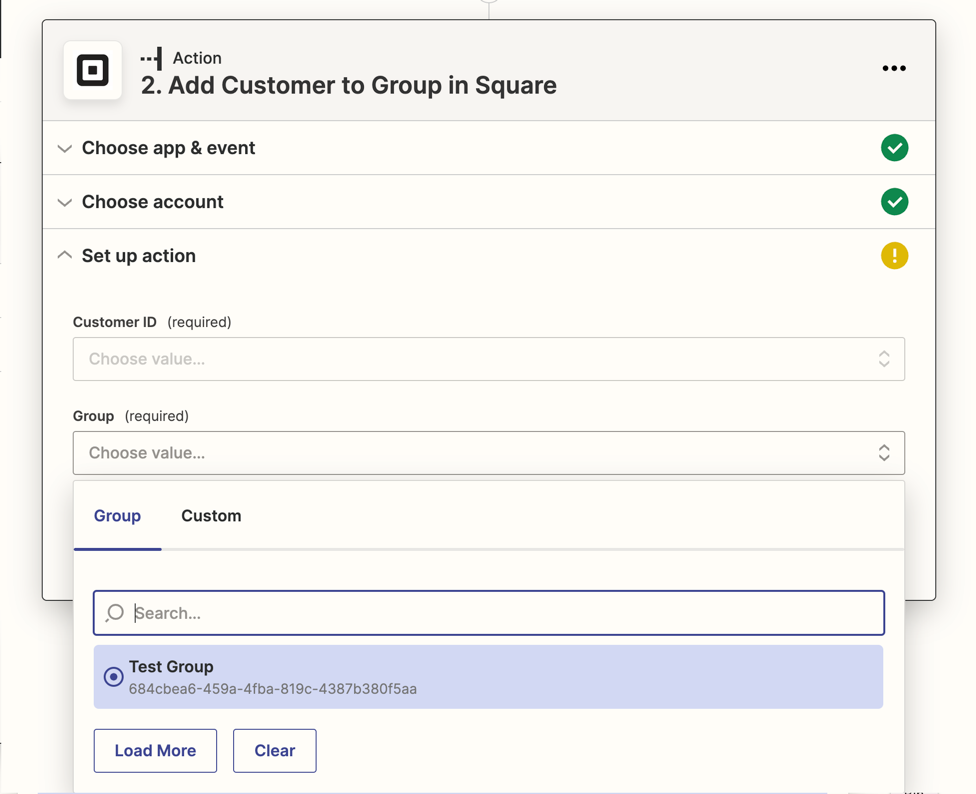
I’m sorry that you’re having trouble setting up your Zap. Would you be able to take a screenshot of the bit of your Zap where you’re seeing Groups grayed out? I’m guessing it’s in the Square step, so that should look something like this:


Also, if you could tell us exactly which trigger and action you’re using, that will help us all to get on the same page. 


jesse
Forum|alt.badge.img+9
  • Architect
  • May 19, 2022

@Lea with Pawsibilities Just checking in here to make sure you saw Danvers’ reply above. Once we have a bit more info, we can get you pointed in the right direction. Let us know!