Question

I want to extract an embedded image from a Gmail email

  • November 20, 2024
  • 4 replies
  • 288 views

Hello,


I want to extract an image that’s embedded in a Gmail. When I look up the attachment tag in “New Email Matching Search” it comes up empty, but I found the HTML <img> tag with the associated image. Is there any way to extract the image and then send it as an SMS?


This post has been closed for comments. Please create a new post if you need help or have a question about this topic.

4 replies

Troy Tessalone
Zapier Orchestrator & Solution Partner
Forum|alt.badge.img+14
  • Zapier Orchestrator & Solution Partner
  • November 20, 2024

Hi ​@RobbyG 

Options for email parsing:


  • Author
  • Beginner
  • November 20, 2024

Thank you! I’ll give these a try.


Badger
Forum|alt.badge.img+5
  • New
  • November 22, 2024

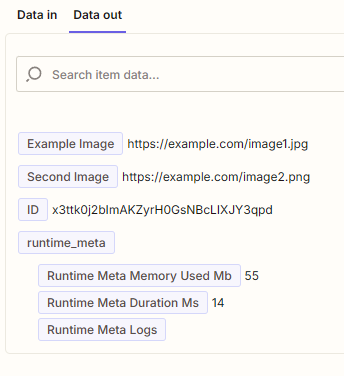
If you sent the email html to a code block you’ll be able to grab the img src/href which you can the send on. I’m uncertain if you can download the actual image though.

I would use something like this:


import re

# Example input data
input_data = {
"html": """
<p>Here is an image:</p>
<img alt="Example Image" src="https://example.com/image1.jpg">
<p>Another image:</p>
<img src="https://example.com/image2.png" alt="Second Image">
"""
}

# Regex pattern to handle flexible attribute order and spacing
pattern = r'<img[^>]*alt=["\']([^"\']*)["\'][^>]*src=["\']([^"\']+)["\']|<img[^>]*src=["\']([^"\']+)["\'][^>]*alt=["\']([^"\']*)["\']'

# Find all matches in the HTML input
matches = re.findall(pattern, input_data["html"])

# Process matches to handle flexible groups
key_value_pairs = {}
for match in matches:
# Each match is a tuple of up to 4 elements due to the alternate regex groups
alt = match[0] or match[3] # First group's alt or second group's alt
src = match[1] or match[2] # First group's src or second group's src
key_value_pairs[alt.strip()] = src.strip()

# Output the key-value pairs
output = key_value_pairs


Hope it’s useful​​​


SamB
Community Manager
Forum|alt.badge.img+11
  • Community Manager
  • November 27, 2024

Hi there, ​@RobbyG

How did you get on with Troy and ​Badger’s suggestions here? 

If you're having any trouble extracting the image we’d be happy to assist further. Want to make sure you’re all set so would love to hear how things are going! 🙂