Best answer

I can't add an Upcoming Meeting in Zoom

  • September 1, 2020
  • 5 replies
  • 99 views

petecodes

I’m trying to do the Create Meeting Registrant in Zoom zap triggered by a Gumroad pre-order. 

The Gumroad bit seems to work fine. 

I’ve signed into Zoom on Zapier and made a meeting for this evening.

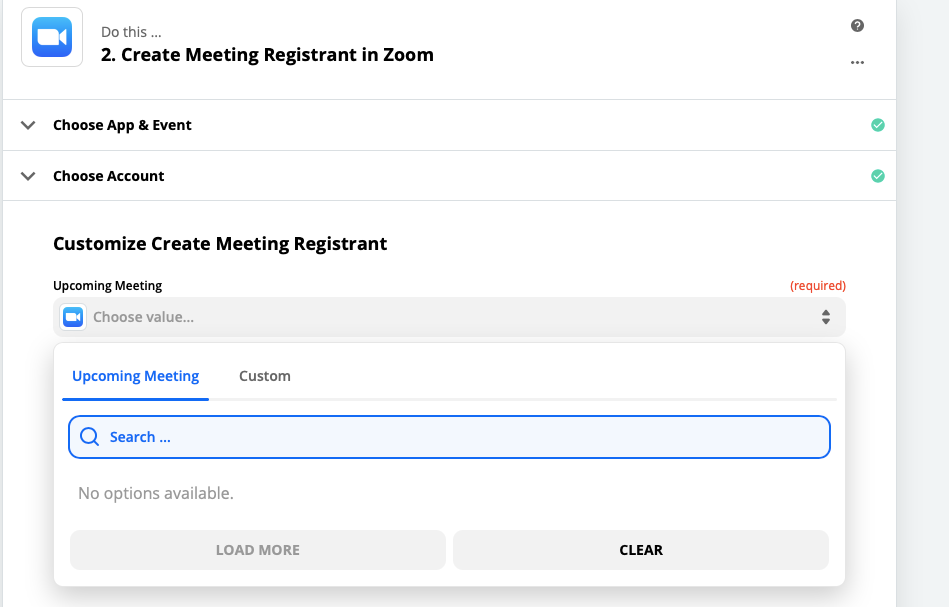
But when I go back into Zapier and go to add the Upcoming Meeting field it says

“No options available.”

Best answer by Troy Tessalone

Are you trying to send all those who preorder from Gumroad to the same Zoom or 1:1?


 Try creating a Webinar and use this Action in the Zap.


Otherwise like you may want to structure your Zap steps like this to achieve the desired result.

  1. Trigger: Gumroad - Sale
  2. Action: Zoom - Create Meeting
  3. Action: Zoom - Create Meeting Registrant


This post has been closed for comments. Please create a new post if you need help or have a question about this topic.

5 replies

Troy Tessalone
Zapier Orchestrator & Solution Partner
Forum|alt.badge.img+14
  • Zapier Orchestrator & Solution Partner
  • September 1, 2020

Please provide a screenshot of how you have the Zap step configured, thanks.

Troubleshooting Questions

  1. Did you save the Zoom meeting?
  2. Did you create a Webinar instead of a meeting?
  3. Check the date and time of the meeting is in the future.

petecodes
  • Author
  • Beginner
  • September 4, 2020

Please provide a screenshot of how you have the Zap step configured, thanks.

Troubleshooting Questions

  1. Did you save the Zoom meeting?
  2. Did you create a Webinar instead of a meeting?
  3. Check the date and time of the meeting is in the future.

Hi Troy!

  1. Yep
  2. It’s a meeting - is that ok not to have the webinar?
  3. Yep - it’s in the future. 


Troy Tessalone
Zapier Orchestrator & Solution Partner
Forum|alt.badge.img+14
  • Zapier Orchestrator & Solution Partner
  • Answer
  • September 4, 2020

Are you trying to send all those who preorder from Gumroad to the same Zoom or 1:1?


 Try creating a Webinar and use this Action in the Zap.


Otherwise like you may want to structure your Zap steps like this to achieve the desired result.

  1. Trigger: Gumroad - Sale
  2. Action: Zoom - Create Meeting
  3. Action: Zoom - Create Meeting Registrant


petecodes
  • Author
  • Beginner
  • September 4, 2020

Ok, thanks!


I believe the webinar add-on costs extra so I will try your second method of adding a meeting and then the registrant :)


petecodes
  • Author
  • Beginner
  • September 4, 2020

Ok, sorted it now!