
Answer

How to Use a Pardot Form to Populate a Teams Webinar

  • October 24, 2024
  • 2 replies
  • 93 views

Hi all

We currently publish a Pardot form on our company website to allow us to have a single place to go for customers to sign up for webinars. We currently utilise GoToMeeting for webinars but would like to move to Teams.  I can get Zapier to talk to both Pardot and Teams but what I can’t seem to do is find a way of getting a Pardot form to pass through the participants details through to the Teams Webinar.

Is this something that’s even possible with Zapier or (hopefully) and I missing something silly? 

Any help would be greatly appreciated. 

Regards

Neil 
Best answer by Troy Tessalone

Hi @Neil.Cruickshanks 

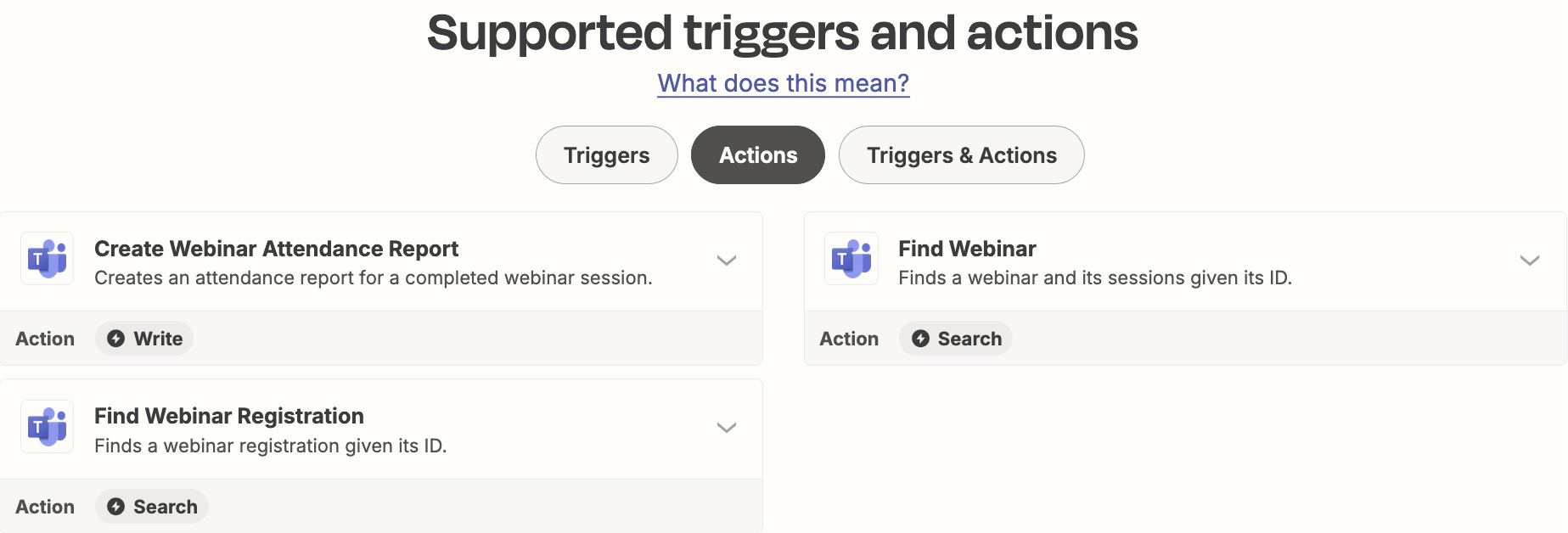
The Microsoft Teams Events Zap app integration has no action available to create a webinar registration:

https://zapier.com/apps/microsoft-teams-events/integrations#triggers-and-actions


If you need more help, post screenshots showing how your Zap steps are outlined.

This post has been closed for comments. Please create a new post if you need help or have a question about this topic.

2 replies

Troy Tessalone
Zapier Orchestrator & Solution Partner
Forum|alt.badge.img+14
  • Zapier Orchestrator & Solution Partner
  • Answer
  • October 24, 2024

Hi @Neil.Cruickshanks 

The Microsoft Teams Events Zap app integration has no action available to create a webinar registration:

https://zapier.com/apps/microsoft-teams-events/integrations#triggers-and-actions


If you need more help, post screenshots showing how your Zap steps are outlined.


Thanks Troy, appreciate the help. 

Regards

Neil




