
Best answer

How to transfer data from desired pipeline in AMOCRM

  • August 4, 2022
  • 5 replies
  • 55 views

Pleas can you help me with my issue. 
I can not understand how to set filter for transfer data from AMOCRM to GA. 
I can not find how to let Zapier know thaw we need transfer data only when deal will be in desired pipeline.

 

Best answer by Danvers

Hi!

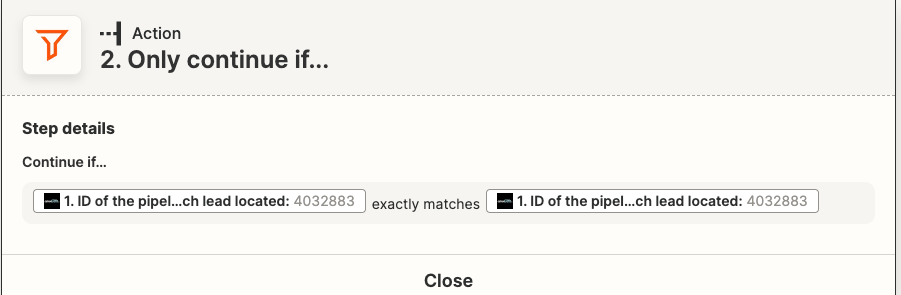
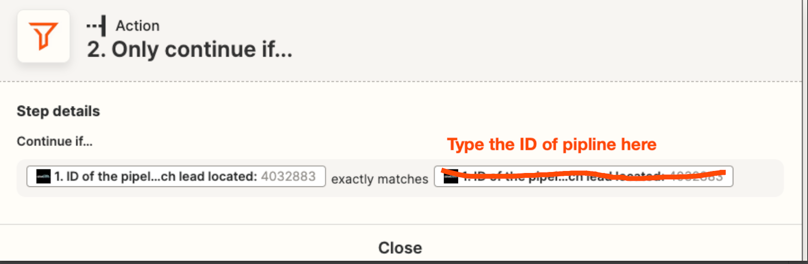
Just dropping in to clarify Troy’s reply here. This filter will work, but you need to type in the ID of the pipeline that you want it be as the ‘matches’ value (the field on the right) instead of using the value that comes from the test field:
 

I hope that clears things up!

This post has been closed for comments. Please create a new post if you need help or have a question about this topic.

5 replies

Troy Tessalone
Zapier Orchestrator & Solution Partner
Forum|alt.badge.img+14
  • Zapier Orchestrator & Solution Partner
  • August 4, 2022

Hi @TonyMass 

Good question.

Your right side value should be static, otherwise the filter will always evaluate to true.


  • August 4, 2022

Yes sure, but how to set that system understand I need data only when deals will be on desired pipeline?


Troy Tessalone
Zapier Orchestrator & Solution Partner
Forum|alt.badge.img+14
  • Zapier Orchestrator & Solution Partner
  • August 4, 2022

@TonyMass 

You need to get the ID of the desired pipeline then set a static/hardcoded value on the right side of the Filter condition.


Forum|alt.badge.img+4

Hi @TonyMass ,

Just passing by to check if you were able to follow @Troy Tessalone ‘s suggestion and add the ID of the pipeline to the filter as a static condition?

Let us know, and happy zapping 🙂


Danvers
Forum|alt.badge.img+12
  • Zapier Staff
  • Answer
  • August 30, 2022

Hi!

Just dropping in to clarify Troy’s reply here. This filter will work, but you need to type in the ID of the pipeline that you want it be as the ‘matches’ value (the field on the right) instead of using the value that comes from the test field:


I hope that clears things up!





