Best answer

How to send a personalized LinkedIn message from a Google Sheet for each new contact added?

  • March 18, 2024
  • 3 replies
  • 46 views

How can I set up a personalized LinkedIn message triggered from a Google Sheet each time a new person is added to the Google sheet?

Thank you.

Best answer by ken.a

Hi there @Kim1862,

I’m jumping in to see if I can help!

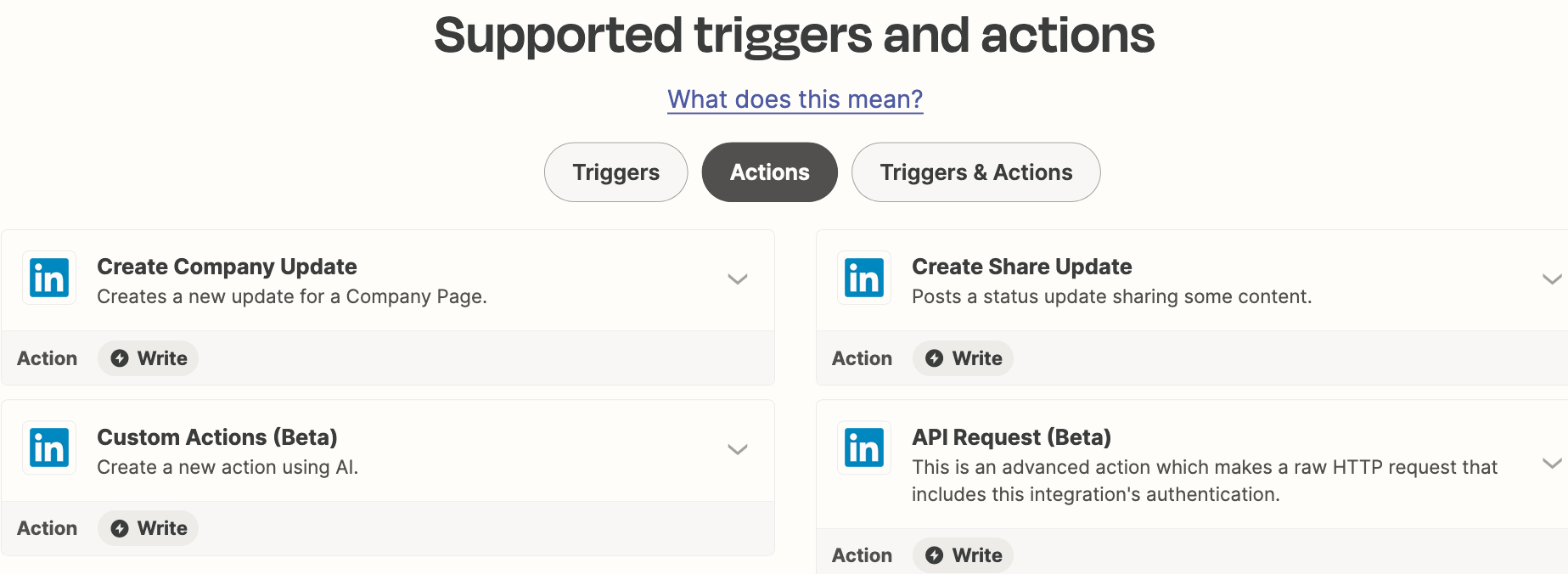
I did some digging into this, and it seems like you would need to use the "Send Message" action in LinkedIn. Unfortunately, the "Send Message" action is currently not supported.

However, we have received a feature request for this exact functionality, and I have added you to the open feature request. That does a few things:

  • Bring this to the attention of the integration developers
  • Help track interest in this feature being implemented
  • Allows us to notify you via email if this feature becomes available in the future

While I don't have an ETA on when this feature might be implemented, we will notify you via email if it is!

Hopefully, this helps!

This post has been closed for comments. Please create a new post if you need help or have a question about this topic.

3 replies

Troy Tessalone
Zapier Orchestrator & Solution Partner
Forum|alt.badge.img+14
  • Zapier Orchestrator & Solution Partner
  • March 18, 2024

Hi @Kim1862 

The LinkedIn Zap app has these actions available: https://zapier.com/apps/linkedin/integrations#triggers-and-actions


You would have to explore using the LinkedIn API via one of these actions:

  • Custom Actions
  • API Request


  • Author
  • Beginner
  • March 18, 2024

Thank you for your input. I really appreciate it!


ken.a
Forum|alt.badge.img+6
  • Zapier Staff
  • Answer
  • March 19, 2024

Hi there @Kim1862,

I’m jumping in to see if I can help!

I did some digging into this, and it seems like you would need to use the "Send Message" action in LinkedIn. Unfortunately, the "Send Message" action is currently not supported.

However, we have received a feature request for this exact functionality, and I have added you to the open feature request. That does a few things:

  • Bring this to the attention of the integration developers
  • Help track interest in this feature being implemented
  • Allows us to notify you via email if this feature becomes available in the future

While I don't have an ETA on when this feature might be implemented, we will notify you via email if it is!

Hopefully, this helps!