Question

How to run a Zap immediately in Zapier for testing purposes

  • February 25, 2026
  • 4 replies
  • 19 views

I recently switched to Zapier from Make.com and am finding one feature sorely missing:

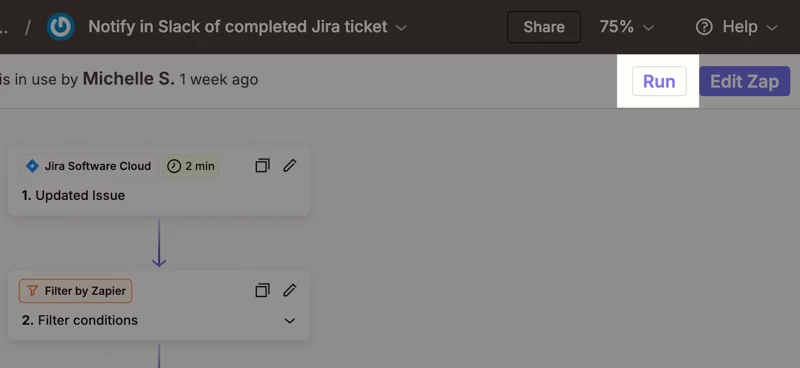
I would like to be able to run production zaps NOW.

Make.com lets you execute production scenarios in real time, even ones that wait for an incoming webhook or event, and then ffollow their execution in real time.

Is there a way to execute a zap that triggers on schedule to just RUN NOW so I can test the full execution in production?


Thank you.

4 replies

drtanvisachar
Forum|alt.badge.img+5
  • Zapier Solution Partner
  • February 25, 2026

Hey ​@jehsom welcome to Zapier!

There isn’t a true “run this live Zap right now” button for scheduled triggers in the same way you’re describing. Scheduled Zaps run based on their set interval, and you can’t manually force that trigger to fire on demand.

A few practical workarounds:

  • Temporary schedule change: Edit the Schedule trigger to “Every 1 minute,” turn the Zap on, let it fire once, then switch it back to the original schedule.

  • Test from Zap History: If you have a recent run, you can replay the Zap from Zap History to re-run the same data through your live steps.

  • Add a manual trigger path: Some people add a secondary trigger (like a webhook or a manual app trigger) in a duplicate Zap just for controlled production testing.

If you need to follow execution step by step, Zap History is your best bet. It shows each step, the data in and out, and any errors, even for live runs.

It’s not quite the same experience, but with a short-term schedule change or replay from History, you can get very close.

Dr. Tanvi Sachar
Monday Certified Partner, Monday Wizard


Troy Tessalone
Zapier Orchestrator & Solution Partner
Forum|alt.badge.img+14
  • Zapier Orchestrator & Solution Partner
  • February 25, 2026

Hi ​@jehsom 

There are 2 trigger types:


Help link for how to use a previous Zap Run as a Zap trigger record example: https://help.zapier.com/hc/en-us/articles/35632951078029-Use-previous-Zap-runs-as-trigger-test-records


  • Author
  • New
  • February 26, 2026

Thanks ​@drtanvisachar and ​@Troy Tessalone these are good answers. However I am definitely still missing the ability to do a test run and see the output of each stage right while I’m there in the editor, real time. It requires a lot of steps and/or waiting to achieve the same effect. I think this could be a nice feature to add to Zapier, speaking as someone who used this feature all the time in make.com and found it incredibly useful. 

By the way, where there is an instant trigger, the test execution will block/wait until the trigger is activated. Then the results of the execution will show real-time right in the editing view. 


Troy Tessalone
Zapier Orchestrator & Solution Partner
Forum|alt.badge.img+14
  • Zapier Orchestrator & Solution Partner
  • February 26, 2026

@jehsom 

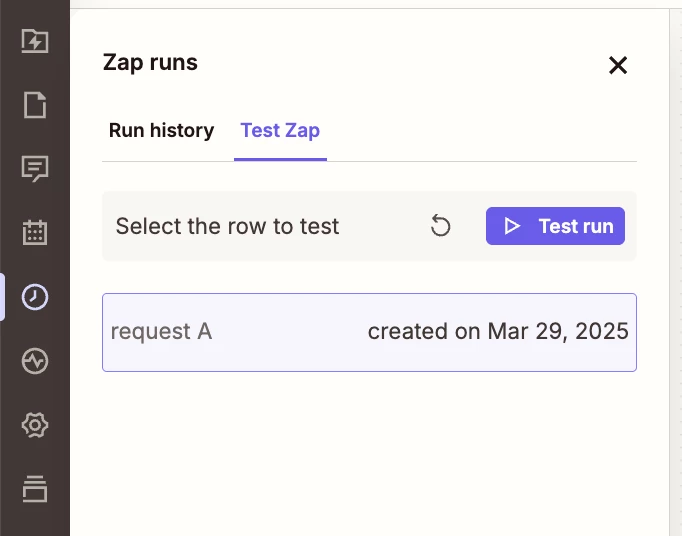
In the Zap Editor, in the left rail, in the History section, there is a tab “TEST ZAP” with a button “TEST RUN”.

(see screenshot)