Question

How to populate a Google Sheet with AI-generated book ideas from Zapier

  • March 15, 2026
  • 5 replies
  • 20 views

Hi guys, new to this forum and noob on Zapier.. just starting using it.

I am frustrated by a simple zap and I would really appreciate your help.

Step 1, an AI by Zapier (Open AI) generates 10 ideas of books, with 3 fields (title, sales volume, date). 

Step 2, I just would like a Google sheet to be populated with these 10 ideas (10 rows with 3 columns). As easy as that. Despite 100 attempts, I can’t do it. The sheet is empty and Copilot fails to fix.

Maybe I fail to understand how to prompt and whether step1 needs to generate an array or not (true/false?)

Any guidance please?

Pardon me if I choos the wrong forum seciont to post

5 replies

Troy Tessalone
Zapier Orchestrator & Solution Partner
Forum|alt.badge.img+14
  • Zapier Orchestrator & Solution Partner
  • March 15, 2026

Hi ​@Tommy78 

AI by Zapier can’t be used as the Zap trigger step, so clarify how your Zap steps are outlined and configured by sharing screenshots to give context.


  • Author
  • Beginner
  • March 15, 2026

Hi thanks for your reply.

Actually, the first step is an “on schedule” trigger which every morning at 7AM demands an action to an AI by Zapier (step 2).

This step 2 prompt requires the AI to generate 10 ideas of books, including titles, sales potental (units per year) and date. Pretty simple and it’s working fine. I’ve tested and seen the outputs.

The problem is now. How can I populate a Google sheet with those 10 ideas (title, sales, date). I want these ideas to be 10 rows in a sheet. No rocket science, but I don’t find a way.


Troy Tessalone
Zapier Orchestrator & Solution Partner
Forum|alt.badge.img+14
  • Zapier Orchestrator & Solution Partner
  • March 16, 2026

@Tommy78 

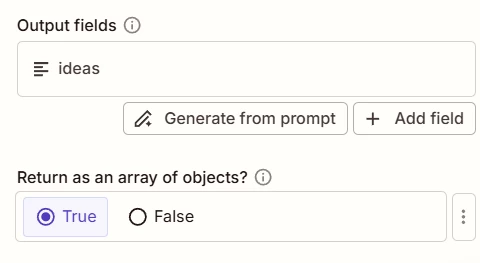
Make sure the data returned from AI by Zapier is an array of objects.

Configured under Advanced Options > Return as array of objects

(see screenshot below)


Add this Zap action: GSheets - Create Multiple Spreadsheet Rows


  • Author
  • Beginner
  • March 19, 2026

Hi,

I did it...this is my prompt

Generate exactly 10 distinct book ideas on strange animals as a JSON array. Each array element must be a JSON object with only these three keys (case sensitive):

- "title" — a book title (string).
- "sales_potential" — an integer from 1 to 100 representing estimated sales potential.
- "generation_date" — a date string in ISO format YYYY-MM-DD.

Requirements:
1. Output only the JSON array and nothing else (no explanations, no extra text).
2. Do not include any additional keys or metadata.
3. Ensure all "sales_potential" values are integers (no quotes).
4. Use realistic, varied Italian titles (different genres and tones).
5. Use valid ISO dates for "generation_date" (e.g., 2026-03-19).
6. Produce 10 objects exactly.

Example of the required structure (do not output this example in the result):
[
  { "title": "Titolo esempio", "sales_potential": 62, "generation_date": "2026-03-19" },
  ...
]

Return the final result as a JSON array.


However, step 3 does not work.. I can’t select the title, or the sales potential, or the generation date from “result ideas” which seems to be a block of text no matter I asked JSON and an array of objects.

I am surprized that such a simple thing keeps me busy and the AI can’t fix it. I just want 10 ideas generated (with 3 fields each) and a google sheet populated accordingly… it should not be so hard!

thanks for help


Troy Tessalone
Zapier Orchestrator & Solution Partner
Forum|alt.badge.img+14
  • Zapier Orchestrator & Solution Partner
  • March 20, 2026

@Tommy78 

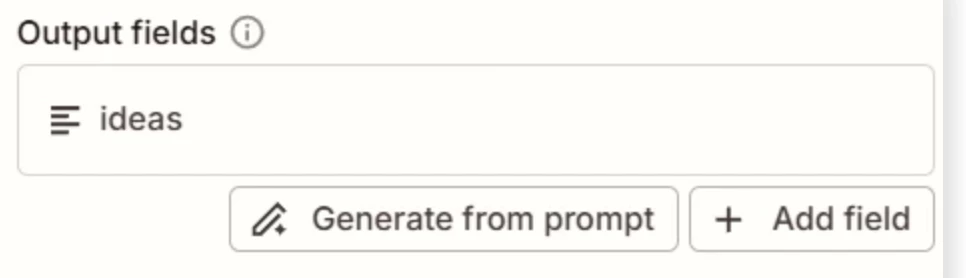
For the Output Fields define EACH field you want to map to the GSheet. (title, sales volume, date)

Right now you only have 1 field “ideas”, so all the data is getting output as 1 field.