Best answer

How to extract a unique ID from a URL pattern using the Zapier Formatter?

  • August 17, 2023
  • 3 replies
  • 1399 views

Forum|alt.badge.img+1

I have a sense that I can do this with the Formatter, but I’m not quite sure how to do it? 

Overall, i’m looking to extract a unique Id from within a url pattern, for example 

http://www.example-domain.com/{string-of-numbers-and-letters}/edit

  • My trigger will include a chunk of HTML content. 
  • I’ll filter the Zap steps to only continue when it contains the beginning URL structure i’m looking for, but the URL itself will be wrapped within a bunch of other text and html code

Example: 

<p> hey, danny.</p>
<p> try this link: http://www.example-domain.com/{string-of-numbers-and-letters}/edit </p>
<p> hope this helps!</p>

How do I go about extracting that unique Id string from within the URL pattern so that I can use it in subsequent steps? 

(If it helps, my use case is that subsequent steps are using this unique Id in API calls that need that Id)

Best answer by Troy Tessalone

Hi @ddpancratz 

Good question.

Options:

  1. Ask AI
    1. Zap action: ChatGPT - Extract Structured Data
  2. Code
    1. Custom JavaScript
  3. Formatter > Text > Split
    1. Multiple Zap actions
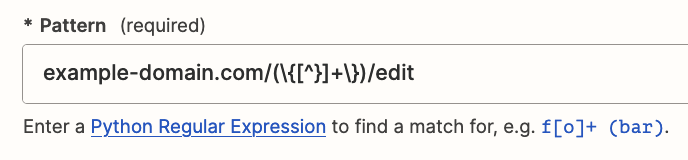
  4. Formatter > Text > Extract Pattern
    1. Try this:
      1. example-domain.com/(\{[^}]+\})/edit


This post has been closed for comments. Please create a new post if you need help or have a question about this topic.

3 replies

Troy Tessalone
Zapier Orchestrator & Solution Partner
Forum|alt.badge.img+14
  • Zapier Orchestrator & Solution Partner
  • Answer
  • August 17, 2023

Hi @ddpancratz 

Good question.

Options:

  1. Ask AI
    1. Zap action: ChatGPT - Extract Structured Data
  2. Code
    1. Custom JavaScript
  3. Formatter > Text > Split
    1. Multiple Zap actions
  4. Formatter > Text > Extract Pattern
    1. Try this:
      1. example-domain.com/(\{[^}]+\})/edit


shalgrim
Forum|alt.badge.img+8
  • Zapier Staff
  • August 18, 2023

A Code by Zapier Python step would do it.

Assuming you map that URL to an Input Data field called `url`:

```

output = [{'part_i_want': input_data['url'].split('/')[-2]}]

```


Forum|alt.badge.img+1
  • Author
  • Tinkerer
  • August 18, 2023

Thanks, all. We’ve solved this with the code step.