Answer

How to discard first line item?

  • February 13, 2020
  • 4 replies
  • 1062 views

Hey!

I'm connecting Slack to ClickSend (sms) and want to send and sms from a Slack message.

So the Slack message has the following structure:

"+46735112233

This is the message.

It can be on one line or multiple lines, it's all up to the person writing the message"


Now I want to split the phone number from the actual message and use them in separate parts of my zap.


The Zap

1) The zap uses string.number_extract to get the phone number. This is then used to populate the receiver field in the ClickSend action step. This step is working as intended, yihaa!

2) I then want to use the rest of the message as the body of the sms. This is where the problems begin 🙂 I have tried the following approaches:

  • Split into line items using [:newline:] and then add a filter on line items NOT starting with < (since Slack formats the number as "<tel:+46735112233>"). This fails because then the whole flow stops since there is no looping through all line items in the filter step.
  • Concat the line items to text. This just brings back the same problem as using the whole slack message in the first place, meaning I'm sending the number in the sms body as well....
  • A Formatter Extract Pattern step which should match everything after \>.* This one actually works in the sense that it does find the ">" BUT since there is a newline after, it just returns blank. When trying to add \>/s.* or even doing a re.search(\<.*,{{message_from_slack}},re.DOTALL) in order to include the line breaks but that fails.
  • Just referencing the individual line items in the sms body. But since I don't know how many items there will be, this doesn't work.


So now I'm stuck...

To summarise, what I'm trying to achieve is to get the phone number (always the first row of the slack message) as a 1 field and everything that goes after the phone number as another field.


Thanks in advance!

/Björn

Best answer by BowTieBots

Hey @Minoan,

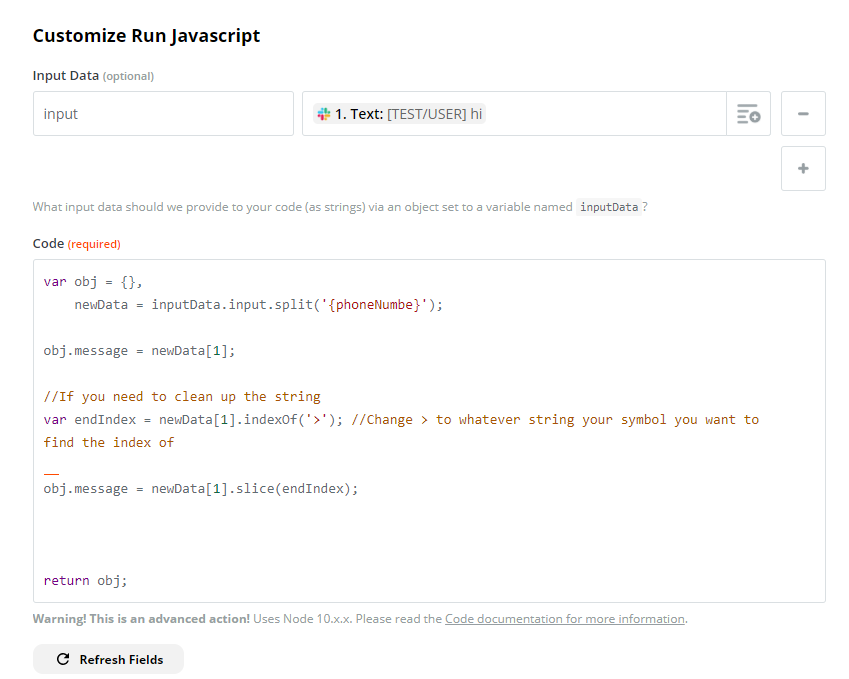
Are you comfortable with code steps? If so you could try this:

  • Since you can extract the phone number perform:

var newData = {yourstring}.split({phoneNumber});

  • This should result in newData[1] being everything after the phone number. If you need to clean up the front of the message to remove a '>' you could then do newData[0].slice() to remove characters. This step also works well with indexOf which returns the index of the first matching character it finds.

Basic setup for the code step is:

image.png


This post has been closed for comments. Please create a new post if you need help or have a question about this topic.

4 replies

BowTieBots
Forum|alt.badge.img+4
  • Zapier Solution Partner
  • Answer
  • February 14, 2020

Hey @Minoan,

Are you comfortable with code steps? If so you could try this:

  • Since you can extract the phone number perform:

var newData = {yourstring}.split({phoneNumber});

  • This should result in newData[1] being everything after the phone number. If you need to clean up the front of the message to remove a '>' you could then do newData[0].slice() to remove characters. This step also works well with indexOf which returns the index of the first matching character it finds.

Basic setup for the code step is:

image.png


  • Author
  • Beginner
  • February 14, 2020

Ah, very smart! That will def be my fallback solution if the tip from support that I'm just trying to implement fails :)

That is to use message variables:

https://zapier.com/help/create/customize/split-up-trigger-data-with-named-variables-in-zaps

Think it should be good if I just reformat the way messages are entered in Slack a bit.

If not, I'm all over your suggestion!

Thanks a million!

/Björn


PaulKortman
Forum|alt.badge.img+10
  • Zapier Solution Partner
  • February 15, 2020

Ooo I like the NamedVariables in the data. Did you get a chance to give it a go @Minoan ? How'd it turn out?


  • Author
  • Beginner
  • February 17, 2020

Hey!

I'm happy to report that named variables did the trick :)

Very convenient feature that one!

Thanks!

/Björn