Question

How to create timestamp type field with firebase in Zapier?

  • January 22, 2023
  • 6 replies
  • 372 views

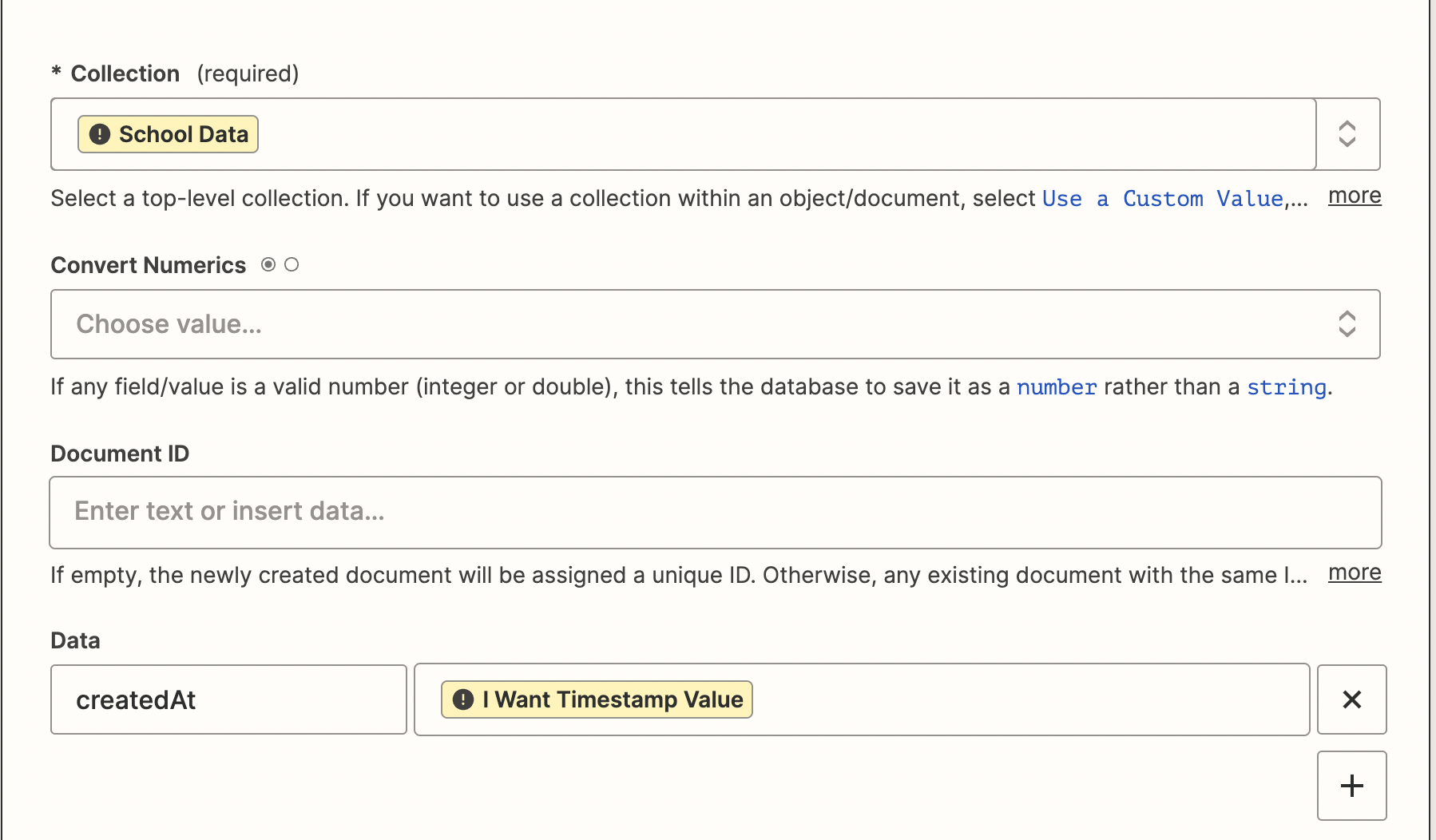
It was expected to be input as Timestamp type based on json type, but only string type was input.

 

This post has been closed for comments. Please create a new post if you need help or have a question about this topic.

6 replies

Troy Tessalone
Zapier Orchestrator & Solution Partner
Forum|alt.badge.img+14
  • Zapier Orchestrator & Solution Partner
  • 34031 replies
  • January 22, 2023

Hi @Victor Ko 

Good question.

Can you provide more detail about what you are trying to do, the issue you are encountering, and screenshots with all of your Zap steps?


  • Author
  • Beginner
  • 2 replies
  • January 23, 2023

@Troy Tessalone


Thanks for answering my problem. The problem is actually very simple. When saving a new document to firestore, I want to store the current time in a Timestamp type field. However, I couldn't find a related example, and I tried setting the key in json format to "__time__", but it was recognized as a String type.


Danvers
Forum|alt.badge.img+12
  • Zapier Staff
  • 3731 replies
  • January 23, 2023

Hi @Victor Ko!

Got it, thanks for the extra information :) 

You can enter the value {{zap_meta_human_now}} to add a timestamp of the current date/time into your Zap. The format of the {{zap_meta_human_now}} output is MM/DD/YY hh:mmAM/PM and it will use the timezone of your Zapier account (or the individual Zap if that’s set to something different) to calculate the time. If you’d like the time in a different format or timezone, this help doc explains some of your options:

Insert the time of Zap runs into a field


​I hope that's clear, please let us know if you have any questions!


  • Author
  • Beginner
  • 2 replies
  • January 23, 2023

Hi @Victor Ko!

Got it, thanks for the extra information :) 

You can enter the value {{zap_meta_human_now}} to add a timestamp of the current date/time into your Zap. The format of the {{zap_meta_human_now}} output is MM/DD/YY hh:mmAM/PM and it will use the timezone of your Zapier account (or the individual Zap if that’s set to something different) to calculate the time. If you’d like the time in a different format or timezone, this help doc explains some of your options:

Insert the time of Zap runs into a field


​I hope that's clear, please let us know if you have any questions!

Hi! @Danvers

Thanks for the reply. I have already tried the method I found out through countless web surfing. I think the ability to specify the field type should be added when setting the firestore value.

Danvers
Forum|alt.badge.img+12
  • Zapier Staff
  • 3731 replies
  • January 24, 2023

Hi @Victor Ko 

Thanks for your reply, I see what you mean now - it’s not that you need to make a timestamp it’s that you need to tell Firebase that the value you’re giving is a timestamp (as opposed to an integer/string). That isn’t currently possible but we do have a feature request open for this. I've added your email address as another vote for this addition. I don't have an ETA of when or if this will happen, but we will definitely email you if it does become a reality. 

Thanks!


SamB
Community Manager
Forum|alt.badge.img+11
  • Community Manager
  • 9676 replies
  • December 17, 2024

Hey folks, 

Just reaching out with a small update to share that the team have decided not to pursue this feature request at this time. If anything changes on the status of this feature request in future we’ll be sure to let you know right away!

For now, the only way to get around this would likely be to use an API Request (Firebase / Firestore) action. It’s a bit more advanced since you’d need to reference Firebase / Firestore’s API documentation to set up the request correctly to create the document and set the datatypes, but we have a more general guide that you might find helpful: Set up an API request action.

Please do reach out in Community if you have any questions in the meantime. 🙂