Answer

How to create a linked record in a different table via Zapier

  • April 9, 2021
  • 6 replies
  • 1166 views

Burner918

I’m working in Airtable and I need help with configuring a Zap.

So let’s say I have two tables, (1) People and (2) Companies. I’ve created a form view in the People table, which has the following fields {First Name}, {Last Name}, and {Company}. What I’d like to have happen is that when a user fills out this form, the {Company} value is not only created in the People table, but also in the Companies table as linked record so that this person and the company in the Companies table are a linked record.

I’m new to Zapier and not sure how to configure the Zap to get them to be linked as opposed to just creating an isolated record in the Companies table.

Any help would be much appreciated.

Thanks a ton.

Best answer by XRay Tech

@Burner918 great! Airtable is perfect for this stuff. 
 

Dealing with “Linked Records” can be tricky in Airtable, especially when you pull those fields into Zapier. 
 

When you get you test data, I’m sure you’re seeing a Record 🆔, rather than the “Company Name” you’re expecting. 


The solution here is to create an additional field in Airtable called Record 🆔. It’s going to be a formula field with the formula =recordid() 


Then, add an additional few steps in Zapier to “Find” the record in the other table, and lookup by the Record 🆔 formula field. 
 

If you’re using Airtable & Zapier regularly, you’ll end up using this pattern of storing/organizing/linking data quite often. 
 

hope that helps, Happy Zapin’ 🙌⚡️

This post has been closed for comments. Please create a new post if you need help or have a question about this topic.

6 replies

XRay Tech
Forum|alt.badge.img+4
  • Zapier Solution Partner
  • April 9, 2021

@Burner918 What software are the ‘tables’ in? Airtable or GSheets?


Burner918
  • Author
  • April 9, 2021

My apologies. Airtable. I should have mentioned that in the question.


XRay Tech
Forum|alt.badge.img+4
  • Zapier Solution Partner
  • Answer
  • April 10, 2021

@Burner918 great! Airtable is perfect for this stuff. 
 

Dealing with “Linked Records” can be tricky in Airtable, especially when you pull those fields into Zapier. 
 

When you get you test data, I’m sure you’re seeing a Record 🆔, rather than the “Company Name” you’re expecting. 


The solution here is to create an additional field in Airtable called Record 🆔. It’s going to be a formula field with the formula =recordid() 


Then, add an additional few steps in Zapier to “Find” the record in the other table, and lookup by the Record 🆔 formula field. 
 

If you’re using Airtable & Zapier regularly, you’ll end up using this pattern of storing/organizing/linking data quite often. 
 

hope that helps, Happy Zapin’ 🙌⚡️


SamB
Community Manager
Forum|alt.badge.img+11
  • Community Manager
  • June 8, 2021

Hey @Burner918,

I just wanted to check in to see if you’d managed to get this working using a formula field, or whether you could still use some help here? Please let us know! 


  • Beginner
  • June 25, 2021

I’d like to jump in on this thread, having a bit of a similar question. Here’s what I’m trying to do….


Paperform Submission  → Create New Record in Airtable (“Pets” Table) → Create New Record in Airtable (“Clients” Table)  → Link the Records


I’m not finding the best way to relate the two new records that have been created. Do I need to a “find” step for one of the records that were just created, and get the Record ID (I have that in a formula field in the Airtable records)? What’s the best way to find a record that was created in the same zap?

@XRay Tech @SamB 


nicksimard
Forum|alt.badge.img+11
  • Zapier Staff
  • June 30, 2021

Hi @Hal!

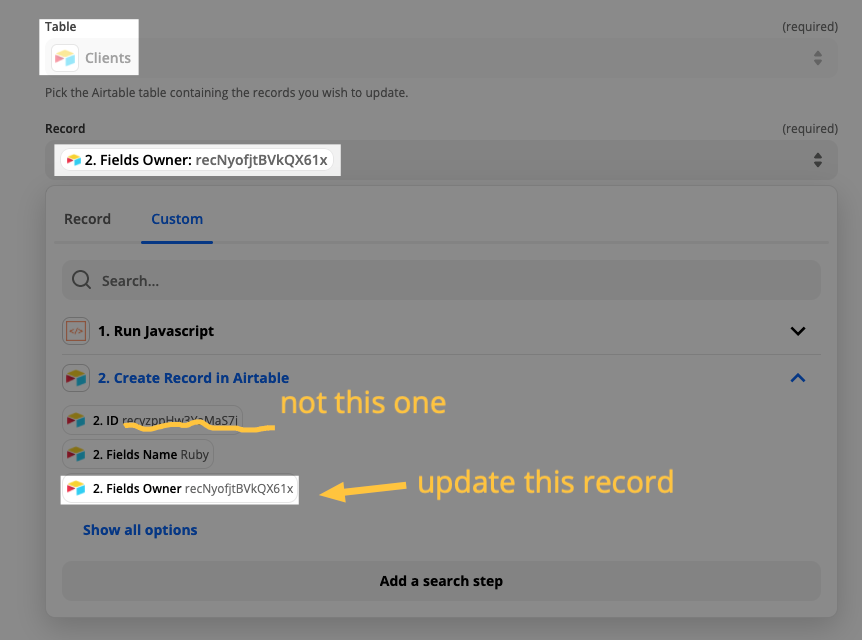
Here’s one way to do it. You would create a record in one of those tables (it would depend on how you’ve got things set up) then update the linked record. I added a record to my Pets table first and then did this in an Update Record step:

You can see the Fields Owner and then the record ID of the linked record that got created when I added the pet. Then map whatever fields you need to update.

I’m not sure if it’s necessary but if you run into errors where the Update step tries to run too soon after your Create step, you can add a Delay by Zapier step in between those.

Hope that helps!