

Best answer

How to add counting input on Google Sheets

  • February 24, 2022
  • 2 replies
  • 233 views

Hello, is there a possible way to add an input on the google sheets action step for creating a new spreadsheet row, where everytime a new row is added, one of the columns counts up, this is going to be used for a clipboard so I need to make sure that each person is counted, so we know how many people their are. I have attached a screenshot if that helps with understand,


any help would be appreciated.
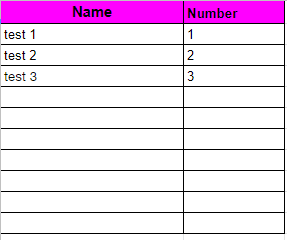
I need each row of people who is added to have a number counting up if possible


Best answer by Troy Tessalone

Hi @kipbrentwood 

Try adding this formula to the desired field (cell) in the GSheet Zap configuration: =ROW()-1


This will dynamically populate the row #, then minus by 1 to offset for the header row.

This post has been closed for comments. Please create a new post if you need help or have a question about this topic.

2 replies

Troy Tessalone
Zapier Orchestrator & Solution Partner
Forum|alt.badge.img+14
  • Zapier Orchestrator & Solution Partner
  • Answer
  • February 24, 2022

Hi @kipbrentwood 

Try adding this formula to the desired field (cell) in the GSheet Zap configuration: =ROW()-1


This will dynamically populate the row #, then minus by 1 to offset for the header row.


  • Author
  • Beginner
  • February 25, 2022

Thank you this has helped massively!




