Best answer

How does "Queue Title" in Zapier's "Delay After Queue" differ from Loop Iteration?

  • Apr 23, 2024 8:42 AM UTC
  • 3 replies
  • 240 views

Forum|alt.badge.img

hello.

Delay after queueing

I don't understand the following explanation.


In the Queue title field, enter a title for the queue.
It will be delayed the specified amount of time after the last delay in the queue. You can enter up to 32 characters. The default is a unique queue for this step.

When you say 'Queue title field', do you mean to set 'Loop Iteration'?
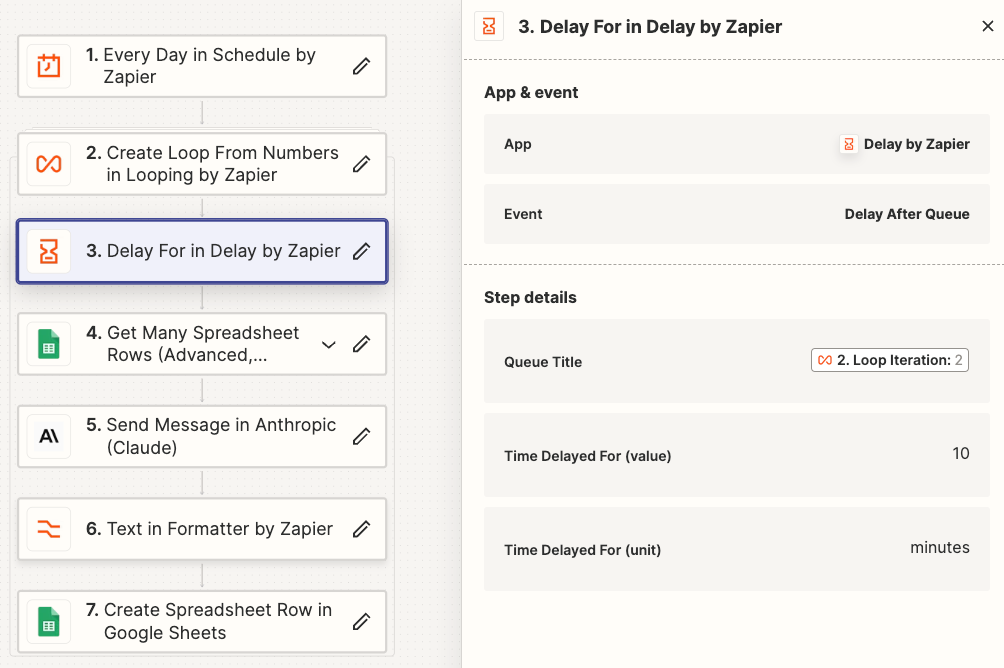


Best answer by livedigm

You've found your answer.
We just need to enter it as a string.
It feels good to have the problem solved.


The Queue Title should be a static/hardcoded value (not a mapped dynamic variable).

You want all rows added to the same Queue.

View original
This post has been closed for comments. Please create a new post if you need help or have a question about this topic.

3 replies

Forum|alt.badge.img
  • Author
  • Beginner
  • Apr 23, 2024 11:44 AM UTC

I set it up as shown, but the Loop runs all at once.
I want it to run sequentially at 10 minute intervals.

If anyone knows how to do this, please let me know in the comments, it would be very helpful.


Forum|alt.badge.img
  • Author
  • Beginner
  • Answer
  • Apr 23, 2024 1:11 PM UTC

You've found your answer.
We just need to enter it as a string.
It feels good to have the problem solved.


The Queue Title should be a static/hardcoded value (not a mapped dynamic variable).

You want all rows added to the same Queue.


ken.a
Forum|alt.badge.img+6
  • Zapier Staff
  • Apr 24, 2024 6:11 AM UTC

That’s awesome @livedigm! We’re glad to hear that the issue is now resolved.

Thanks for sharing the solution, it will help other members in our community who might face the same problem.

Happy Zapping! ⚡️