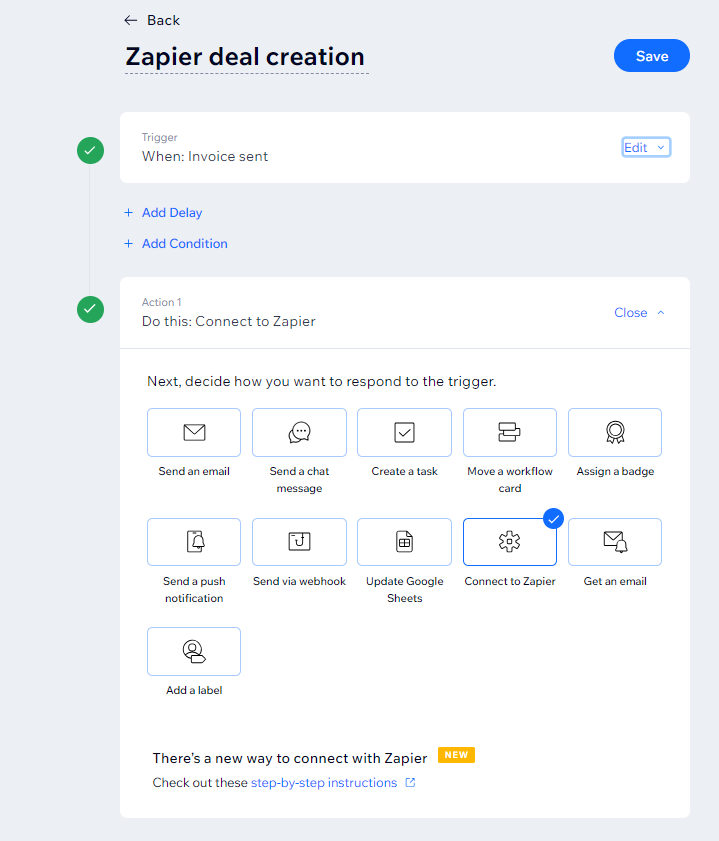
HI! In my Wix account, it says hat I can ‘send to Zapier’ every time I create an invoice:
But, in Zapier, there’s no trigger for invoices from Wix.
Can someone explian how I would then send details?
I would then like to update my contacts in Hubspot with invoice details, and create a deal.
Thank you!!
Best answer by Troy Tessalone
@phantaisia
If you are trying to update HubSpot Contacts and Deals in the same Zap, then that will be a multi-step Zap which requires a Zapier paid plan, so if you have a Zapier paid plan, then you would have access to the Webhooks Zap app: https://zapier.com/apps/webhook/integrations#triggers-and-actions
If you are trying to update HubSpot Contacts and Deals in the same Zap, then that will be a multi-step Zap which requires a Zapier paid plan, so if you have a Zapier paid plan, then you would have access to the Webhooks Zap app: https://zapier.com/apps/webhook/integrations#triggers-and-actions
Early access
Next Gen Zaps
Build and deploy automations from AI tools you already use. With Agentic Management, if anything breaks, the agent diagnoses the issue and proposes a fix.