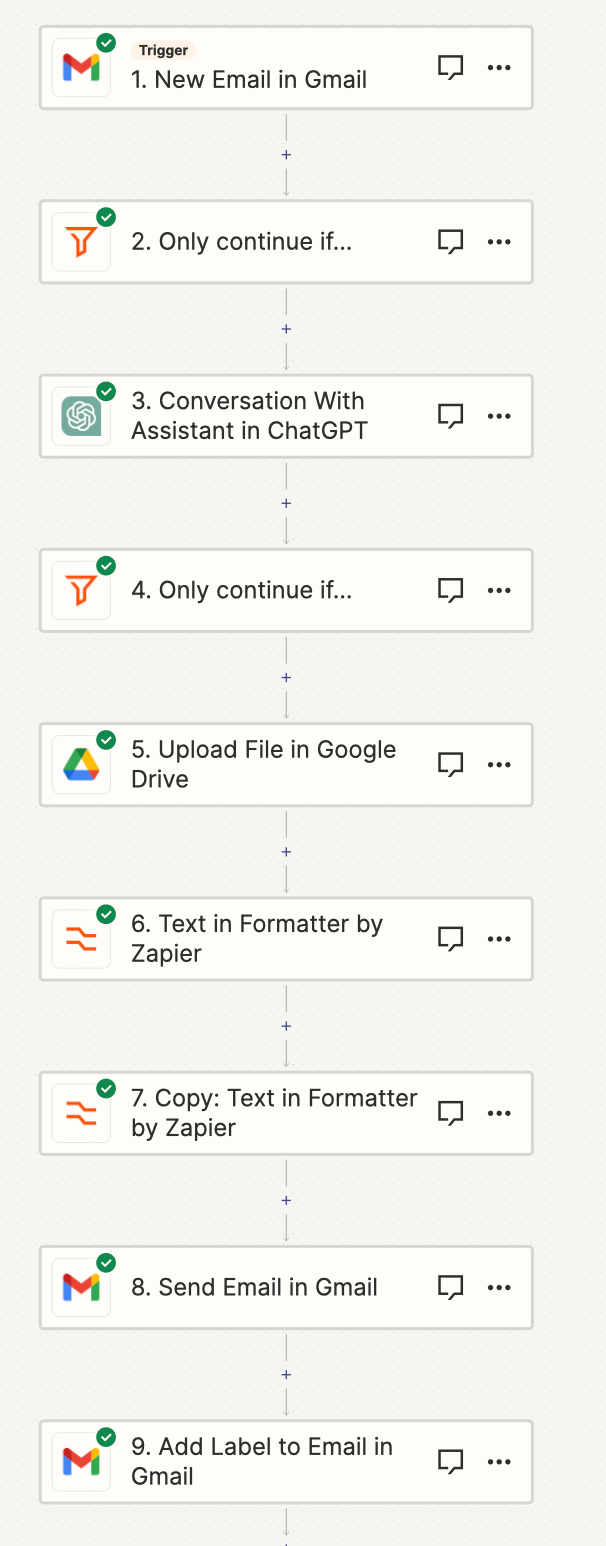
I have made a pdf checking software. I uploaded the zap overview below. So currently, the email reply is making a new thread. I want to send an acknowledgement email to the same mail. Which steps do I do to take that? I had a lot of trouble trying this out myself.
Thanks!
Best answer by SamB
Hello @raghavbajoria123! 👋
There isn’t a “reply all” option but there is a Reply to Email action available for Gmail that might work well for this. The New Email trigger should output a field called Thread Id that you can use to select the ID for the message thread you want the email reply to be added to. For example:
Can you give that Reply to Email action a try and let us know if that works any better?
There isn’t a “reply all” option but there is a Reply to Email action available for Gmail that might work well for this. The New Email trigger should output a field called Thread Id that you can use to select the ID for the message thread you want the email reply to be added to. For example:
Can you give that Reply to Email action a try and let us know if that works any better?
That’s awesome news @raghavbajoria123! Really pleased that Reply To Email action did the trick.
Do reach out again if you need any further help at all. In the meantime, happy Zapping! ⚡
Early access
Next Gen Zaps
Build and deploy automations from AI tools you already use. With Agentic Management, if anything breaks, the agent diagnoses the issue and proposes a fix.