
Question

How do I map Microsoft Excel columns to Monday.com columns in Zapier for auto-population?

  • November 6, 2023
  • 1 reply
  • 75 views

Hello everyone! 

I am new to Zapier, and having some trouble matching up my excel columns to the Monday.com columns I would like my information to auto populate into. 

My zap is  ‘when an excel doc is added to this folder, then create an item in Monday.com on this board in this group.’ 

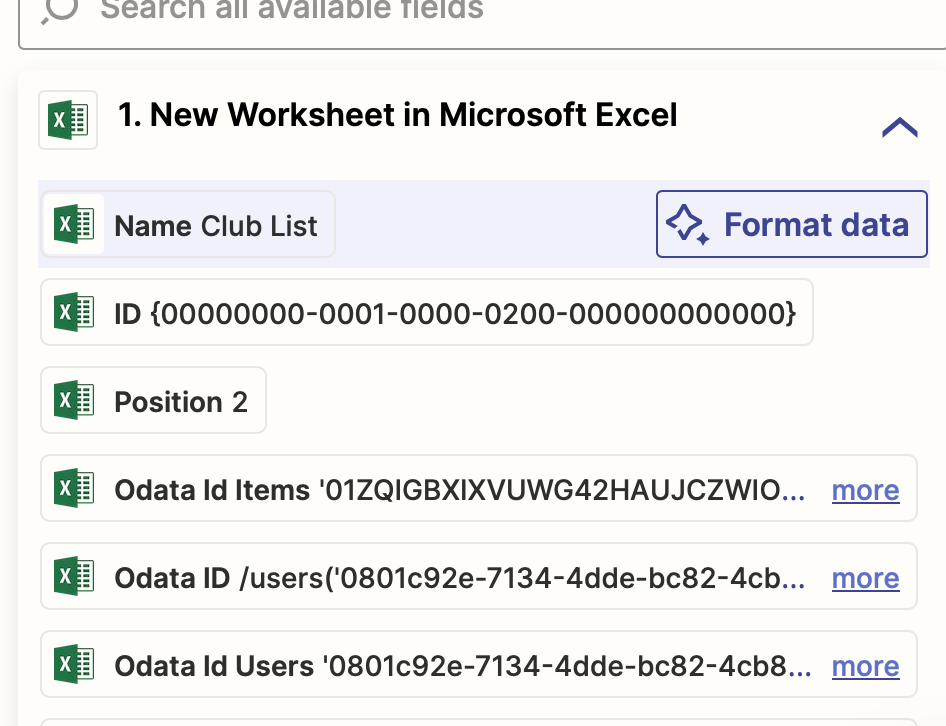
What I’m running into is when mapping excel columns to Monday.com columns, I get a weird code. Is this something I need to address within the excel sheet? Or is there an explanation to the current naming conventions so that I can figure out which title belongs to which column in excel?


Photo below for reference:
 

This post has been closed for comments. Please create a new post if you need help or have a question about this topic.

1 reply

ken.a
Forum|alt.badge.img+6
  • Zapier Staff
  • November 7, 2023

Hi there @Lauren Strobel,

Welcome to the Community! 🎉

I think the “New Worksheet in Microsoft Excel” trigger is not able to return the columns of the spreadsheet. You might need to add a “Find Row” action step to fetch the columns.

Hopefully, this helps.


