

Question

How do I limit the task usage for this RSS feed news scanner?

  • August 6, 2025
  • 3 replies
  • 17 views

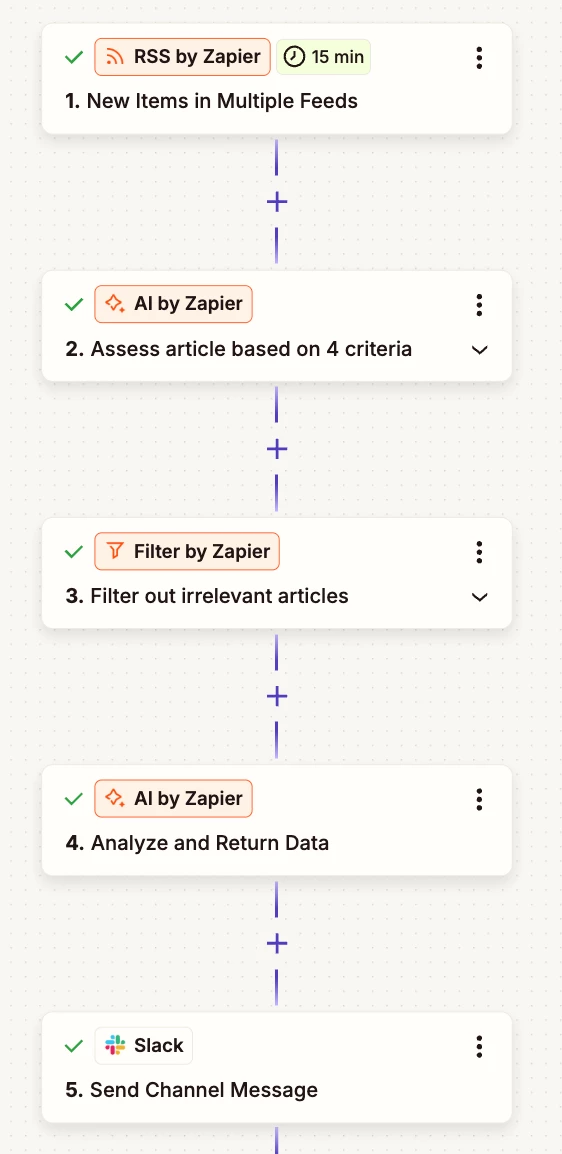
I managed to do my desired workflow for my news Slack bot.

I am monitoring 10 RSS feeds and whenever there are new articles, the Zap goes through the whole flow. I realized though that it’s using up a lot of my task allocation.


Question now is how could I limit my task usage for this workflow? If I add a scheduler trigger (like 2x a day, if that’s possible), will that limit my task usage? Or will that technically still lead to same number or tasks used because it counts one item in the feeds as one task, regardless if it’s ran 2x a day or as it comes.



This post has been closed for comments. Please create a new post if you need help or have a question about this topic.

3 replies

SamB
Community Manager
Forum|alt.badge.img+11
  • Community Manager
  • August 20, 2025

Hi ​@accounts2025 👋

It’s been a while since you reached out here, were you able to figure out a way to cut down on the task usage? 

If not, it looks like your Zap is currently set up to use 3 tasks every time it runs successfully, and would use 1 task even if it is filtered out due to the AI action being ahead of the filter. 🤔 You could use Zapier Tables help save tasks by storing a record of each new feed and use that to trigger another Zap, only if the criteria is met.

For example:

Zap 1: triggers on new feed items and adds them to the table (0 tasks)

  • The table has an AI field that determines whether it meets the criteria - e.g. outputs either a Yes or No value depending on whether the criteria was met. You can learn more about how to use AI fields in Zapier Tables here: Generate content with AI Fields in Zapier Tables
  • In the table you could create a view to display all the records that have a “Yes” in that AI field, which would indicate that it met the criteria. Check out our Create views in Zapier Tables guide to learn more.

Zap 2: triggers on new records in the view and sends the Slack message (2 tasks if successful)

With this sort of approach the first Zap wouldn’t incur any task usage since triggers and Zapier Tables actions don't count towards your task usage. And the second Zap would only use 2 tasks if it’s successfully run.

Do you think that could work for your needs here?


  • Author
  • Beginner
  • August 20, 2025

Hi ​@SamB ! Thanks for sharing these! For now, I’ve kept the Zap as it is but I think this suggestion’s great and addresses my pain point. I’m not yet sure though if the AI field will work for complex criteria? I’ll revisit this suggestion when I go back to tweaking my Zap.


SamB
Community Manager
Forum|alt.badge.img+11
  • Community Manager
  • September 2, 2025

You are most welcome, ​@accounts2025! 🤗 

And sorry for the delay in my reply here. If you run into any issues with the AI fields not handling the criteria correctly when you revisit this, just let me know and I’ll be happy to help out. 

Keep us posted on how you get on!


