


Best answer

How do I import Xero dates into Microsoft Excel in British format without time value?

  • July 12, 2023
  • 2 replies
  • 102 views

joshb3399

Hi there,

I have set up a Zap which updates a spreadsheet with details whenever payment is received for specific invoices, including the date on which the invoice is paid. When importing the date from Xero, it comes up in the below format.
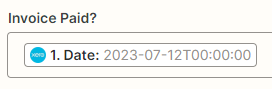
For tidiness, I would like to import this data into the spreadsheet in a way that a) does not include the time value, and b) converts the date to the British way of reading i.e. 12/07/2023 for 12th July of this year.

Is this a rule I need to set within Excel, or I can I set up the Zap to do this before importing the data? Should I just do it manually everytime we receive a payment?

Looking forward to a response. Thanks!

Josh

Best answer by Liz_Roberts

Hi @joshb3399 👋🏽 Welcome to Community!

It sounds like a Formatter step would do the trick here. Here’s a handy video that explains how to use it 😊

This post has been closed for comments. Please create a new post if you need help or have a question about this topic.

2 replies

Liz_Roberts
Forum|alt.badge.img+8
  • Zapier Staff
  • Answer
  • July 12, 2023

Hi @joshb3399 👋🏽 Welcome to Community!

It sounds like a Formatter step would do the trick here. Here’s a handy video that explains how to use it 😊


joshb3399
  • Author
  • Beginner
  • July 13, 2023

Perfect, thank you Liz!

Josh

