
Question

How do I connect and filter the Less Annoying CRM Group with a Mailerlite group?

  • May 29, 2024
  • 2 replies
  • 19 views

Hi TURBO Frustrated, HEEEEEELP!!

When I add a contact within LessAnnoying CRM (LACRM) to a group witin LACRM, I want them to end up in a Mailing Group within Mailerlite.

I understand that I need to use Filter to do this. I can create that filter to include the Group field and name the specific group I want it to pull from. Simple enough.

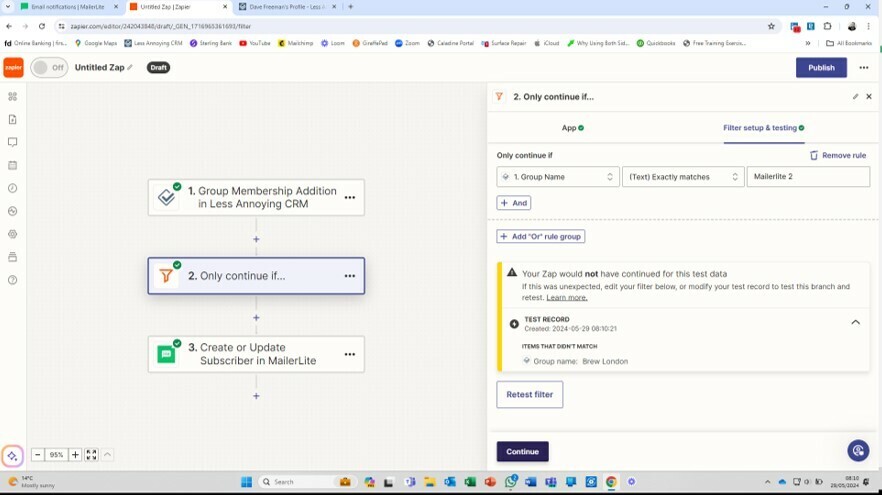
The problem is that when I set the LACRM trigger to be “Group membership addition in LACRM” that step doesn’t allow me to designate the Group. the TEST connection is then defaulting to a random contact in my CRM not in the right group. I then get the attached error message!!??

How do get round this. Has anyone got a simple stepped approach to creating this Zap so it works pls?



This post has been closed for comments. Please create a new post if you need help or have a question about this topic.

2 replies

Troy Tessalone
Zapier Orchestrator & Solution Partner
Forum|alt.badge.img+14
  • Zapier Orchestrator & Solution Partner
  • May 29, 2024

Hi @Dave Freeman 

Try turning your Zap ON and testing live.

Then check your Zap Runs history activity to see the DATA IN/OUT for each step to help you trace the data flow between steps and troubleshoot.

https://zapier.com/app/history/


Some Zap app triggers only return representative trigger data to use to configure the Zap steps.

Also, the Filter step result is a warning (not an error) indicating the trigger example data would not have passed the filter step conditions.


JammerS
Forum|alt.badge.img+6
  • Zapier Staff
  • June 25, 2024

Hi @Dave Freeman ,


We just wanted to see how everything is going with your Zap. Did Troy's recommendation get the job done? If you need any assistance, feel free to reach out. We're happy to address any concerns and assist you.


We're looking forward to your response.




