

Best answer

How do I configure an Airtable field to track the previous value of another field?

  • June 2, 2022
  • 7 replies
  • 276 views

Hi guys,


I’m new to Airtable as well as Zapier, and I need to track an old value of a record to another field.

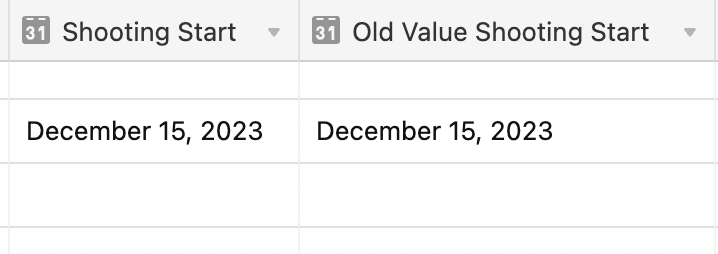
For example, I have a Shooting Date with 15/12/2023, but this date could be change anytime like it will 26/12/2023. I need to find a way that ‘15/12/2023’ will still be tracked to another field “Old Value Shooting Start” when I update the Shooting Start. I hope this make sense. 


My Best,

Mae

Best answer by christina.d

Hey friends, swinging by to summarize some of the tips here!
Ultimately this was resolved by using scripting/integrating on2air to Zapier and Airtable.

That said, Troy did have some suggestions that may be worth giving a shot for anyone following along:

@edmae

When you first enter the Shooting Start, then have an Airtable Automation that sets the Old Shooting Start, by using this trigger logic:

When record matches these conditions:

Shooting Start is not empty

AND

Old Shooting Start is empty


Once both field values are set the Airtable Automation won’t run again.

I hope this helps! 🤗


This post has been closed for comments. Please create a new post if you need help or have a question about this topic.

7 replies

Troy Tessalone
Zapier Orchestrator & Solution Partner
Forum|alt.badge.img+14
  • Zapier Orchestrator & Solution Partner
  • June 2, 2022

Hi @edmae 

Good question.

Why not set both Field values when you originally input the data?

Otherwise, try using Airtable Automations to set this value: https://support.airtable.com/hc/en-us/articles/360050974153-Automations-overview


  • Author
  • Beginner
  • June 2, 2022

Hi @Troy Tessalone ,


Thanks for the quick response.

Yes we have tried to do it by automations in Airtable, but it’s just copying the changed date.

I need the old date to be retained so other collaborators can see the changes. I know they can just look it up through the record history, but they want it to see for comparison purposes, like presentations and stuffs.

Is there any way through Zapier to do it?


Thanks!


Troy Tessalone
Zapier Orchestrator & Solution Partner
Forum|alt.badge.img+14
  • Zapier Orchestrator & Solution Partner
  • June 2, 2022

@edmae

When you first enter the Shooting Start, then have an Airtable Automation that sets the Old Shooting Start, by using this trigger logic:

When record matches these conditions:

Shooting Start is not empty

AND

Old Shooting Start is empty


Once both field values are set the Airtable Automation won’t run again.


christina.d
Forum|alt.badge.img+9
  • Zapier Staff
  • June 6, 2022

Hi @edmae! I wanted to drop by and see if Troy’s suggestions helped get this sorted for ya? Keep us posted! 🤗


  • Author
  • Beginner
  • June 7, 2022

hi @christina.d 

thanks for checking in, unfortunately no.

My manager actually found a way to dig deeper into it, he integrated on2air to zapier and to airtable.

I think it’s not possible just by doing automations as he did it by scripting.


Anyways, thanks for the responses!


christina.d
Forum|alt.badge.img+9
  • Zapier Staff
  • June 10, 2022

Thanks for keeping us in the loop on what worked for ya’ll, @edmae! If he’s open to sharing any details, we’d love to hear it. 😊


christina.d
Forum|alt.badge.img+9
  • Zapier Staff
  • Answer
  • June 17, 2022

Hey friends, swinging by to summarize some of the tips here!
Ultimately this was resolved by using scripting/integrating on2air to Zapier and Airtable.

That said, Troy did have some suggestions that may be worth giving a shot for anyone following along:

@edmae

When you first enter the Shooting Start, then have an Airtable Automation that sets the Old Shooting Start, by using this trigger logic:

When record matches these conditions:

Shooting Start is not empty

AND

Old Shooting Start is empty


Once both field values are set the Airtable Automation won’t run again.

I hope this helps! 🤗




