

Question

How do I check for an email in a Zapier Table without using an extra action?

  • April 14, 2024
  • 1 reply
  • 55 views

Hi,

At the moment I have my zap set up like this…
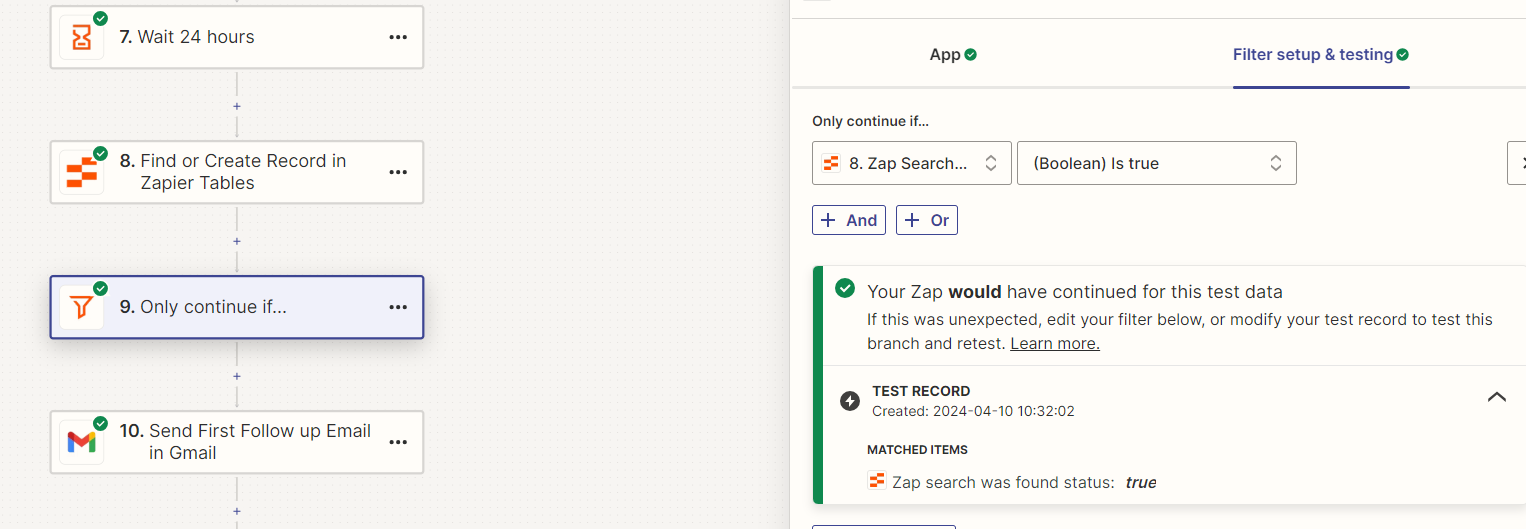
Where it uses 8. to return a boolean if the email exists in the table.

Then 9. continues if the boolean is true (re: image), but is there a way I can do the check within 9. without needing 8?

Something like this
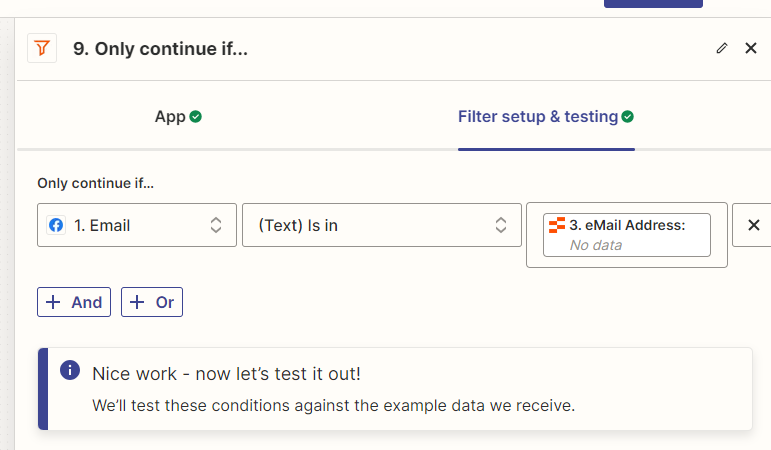
Where eMail Address, is a column in a table that’s updated previously in the zap. Anything I’ve tried so far doesn’t work.


This post has been closed for comments. Please create a new post if you need help or have a question about this topic.

1 reply

ken.a
Forum|alt.badge.img+6
  • Zapier Staff
  • April 15, 2024

Hi there @Blackhawks,

Welcome to the Community! 🎉

I believe the first screenshot here is the best approach to your workflow since the third field of the Filter setup doesn’t recognize the “bold” part (in your case the column) of the data and only recognizes the typed/static data. Additionally, if you map the data on the third field the Filter step will not work properly.

You can learn more about Filter By Zapier here: https://help.zapier.com/hc/en-us/articles/8496276332557-Add-conditions-to-Zaps-with-filters#h_01HBG78VG30E8SQD8HK52QDJCA

Hopefully, this helps!
