Answer

How do I automatically have a Google Sheets formula used from the previous row?

  • January 3, 2023
  • 4 replies
  • 232 views

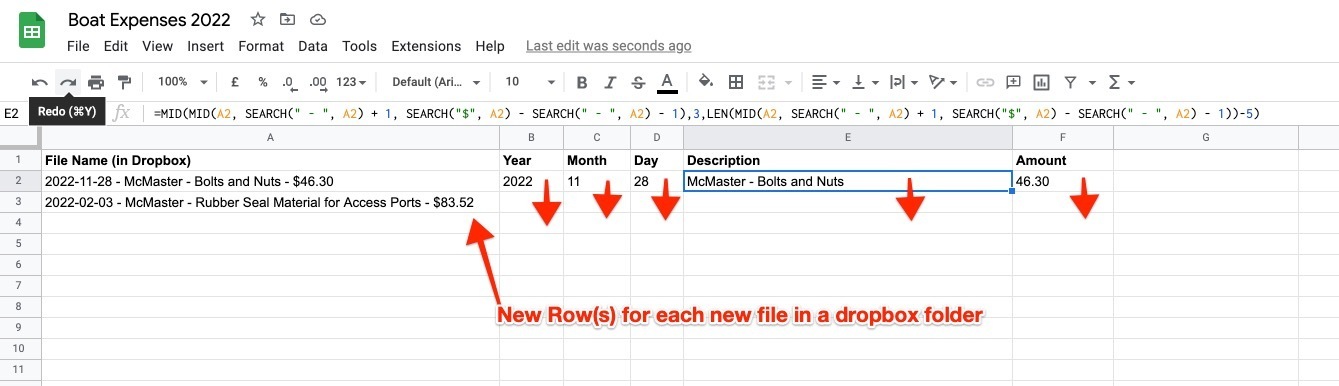
I’ve setup a Zap to check a Dropbox folder for new files.

Then the file name of the file is inserted into a Google Sheet. 

Now I need to figure out how to automatically have columns from the preview rows used for the new row.

 

Best answer by Troy Tessalone

@KevinCrit 

If you are trying to use GSheets, then check out these related Topics:

 

This post has been closed for comments. Please create a new post if you need help or have a question about this topic.

4 replies

Troy Tessalone
Zapier Orchestrator & Solution Partner
Forum|alt.badge.img+14
  • Zapier Orchestrator & Solution Partner
  • January 3, 2023

Hi @KevinCrit 

Good question.

I may suggest you use Airtable instead of GSheets.

Airtable has Formula fields, and those will be automatically applied to every record/row.

https://support.airtable.com/docs/formula-field-overview


Troy Tessalone
Zapier Orchestrator & Solution Partner
Forum|alt.badge.img+14
  • Zapier Orchestrator & Solution Partner
  • Answer
  • January 3, 2023

@KevinCrit 

If you are trying to use GSheets, then check out these related Topics:


  • Author
  • New
  • January 4, 2023

Hi @KevinCrit 

Good question.

I may suggest you use Airtable instead of GSheets.

Airtable has Formula fields, and those will be automatically applied to every record/row.

https://support.airtable.com/docs/formula-field-overview

Google Sheets is used by our accountants, so it’s not really an option. Thanks for the suggestion. 


Forum|alt.badge.img+7
  • Zapier Staff
  • January 4, 2023

Thanks for the help as always Troy, those are great resources.  Let us know if you run into any issues when setting this up @KevinCrit



