Best answer

How do I automate the following with Monday.com, Typeform and Calendly?

  • January 4, 2024
  • 10 replies
  • 209 views

Hi all,

I have a lead capturing form on Typeform where after completion, leads are redirected to Calendly to schedule a call. I am trying to setup an automation so that:

  • Once a typeform is completed and  the lead has scheduled an appointment through Calendly with sales rep, the lead is added to Monday.com with the Calendly appointment date with matching information as the typeform submission. 

    Current structure:
    Trigger: Typeform Submission Received
    Action: Get Item by Column Value in monday.com + appointment date from Calendly
    Action: Create item in monday.com 

When I try, Calendly isn’t an available option in the app list for Step 2. It says “Calendly: No action available”.
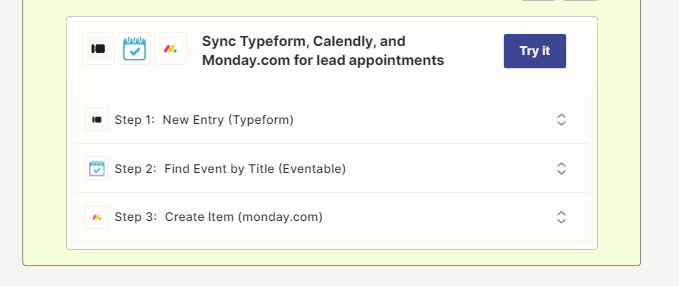
 

I don’t want to have 2 automations where I have to manually match my typeform entries and my calendly appoitments.


Hope y’all can help!

Thanks,

Sarah

 

Best answer by Troy Tessalone

Hi @SarahC 

Good question.

The Calendly Zap app has 0 actions available, only triggers.

That means you’ll need 2 separate Zaps.


Zap 1

  1. Trigger: Typeform - New Entry
  2. Action: Monday - Create Item


Zap 2

  1. Trigger: Calendly - Invitee Created
  2. Action: Monday - Get Item by Column Value
    1. Search by Email
  3. Action: Monday - Change Multiple Columns Value
This post has been closed for comments. Please create a new post if you need help or have a question about this topic.

10 replies

Troy Tessalone
Zapier Orchestrator & Solution Partner
Forum|alt.badge.img+14
  • Zapier Orchestrator & Solution Partner
  • Answer
  • January 4, 2024

Hi @SarahC 

Good question.

The Calendly Zap app has 0 actions available, only triggers.

That means you’ll need 2 separate Zaps.


Zap 1

  1. Trigger: Typeform - New Entry
  2. Action: Monday - Create Item


Zap 2

  1. Trigger: Calendly - Invitee Created
  2. Action: Monday - Get Item by Column Value
    1. Search by Email
  3. Action: Monday - Change Multiple Columns Value

  • Author
  • New
  • January 4, 2024

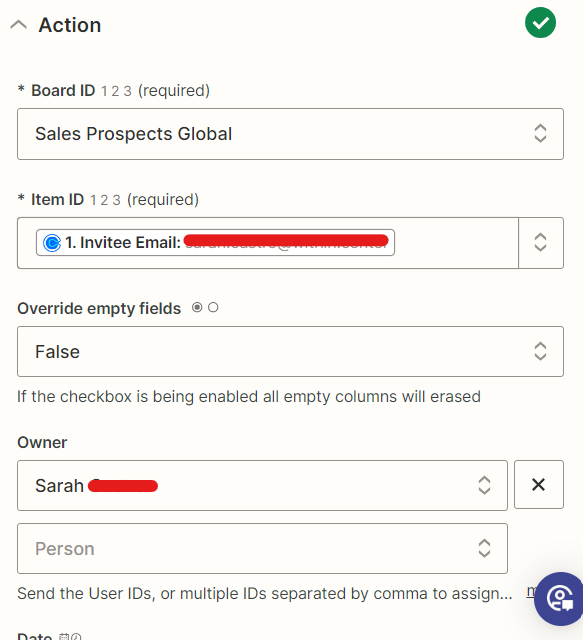
Hi @Troy Tessalone , thank you for the insight! I’m struggling with Zap 2, step 3!

That’s what I have below and I get an error message “Invalid value for undefined on undefined. Item not found”. It’s probably related to the item ID?


Troy Tessalone
Zapier Orchestrator & Solution Partner
Forum|alt.badge.img+14
  • Zapier Orchestrator & Solution Partner
  • January 4, 2024

@SarahC 

The Item ID fields expects the Monday Board Item ID which is a number as indicated by the 123 icon.

You would map that from the previous Zap step where you found the Monday Item.


Forum|alt.badge.img

Hi @SarahC we are a monday.com implementation business and help clients like yourself set up their monday.com accounts. If you need any support feel free to book a call here


  • Beginner
  • February 1, 2024

Hi @Troy Tessalone,


My calendly is set up as a “round robin”. I wonder if there’s a way to create an automation, so the right sales rep is assigned as the owner in Monday.com depending on who the lead booked with on Calendly.

I tried the same process as you mentioned earlier “Monday - Change Multiple Columns Value”, but on Monday.com, the Sales rep is identified by their first name and last name, and in Calendly, there are identified by their email address. Also in the “Column to Receive”, I don’t have the “owner” field from Monday


Thanks!


Troy Tessalone
Zapier Orchestrator & Solution Partner
Forum|alt.badge.img+14
  • Zapier Orchestrator & Solution Partner
  • February 1, 2024

@SarahCC 

Try adding a Lookup Table to translate the values from what Calendly provides to what Monday expects.


Forum|alt.badge.img

Hi @SarahCC 

Attached is how we set it up for our crm with round robin calendly. I would recommend having the person column and if you don’t have that then add a status. Let me know if you need any additional support. 


Troy Tessalone
Zapier Orchestrator & Solution Partner
Forum|alt.badge.img+14
  • Zapier Orchestrator & Solution Partner
  • February 2, 2024

Hi @WorkflowMagic 

The Paths approach does work as a solution.

However, in this case it creates avoidable redundancies that a lookup table prevents.

For example, say you have 5 Paths with the same steps expect for 1 field value.

Now consider you want to add/remove/adjust a step, that change has to be done across all the impacted Paths, which creates more maintenance and possible error being introduced.

Using an external lookup table (e.g. Airtable, GSheets), allows the Zap to not only be dynamic, but also to scale (up/down) from a single source of truth by managing the data outside the Zap.

Have you tried the lookup table approach in your Zaps?


  • Beginner
  • February 2, 2024

Both solutions seem difficult for me to achieve lol. I might have to hire someone to teach me


Troy Tessalone
Zapier Orchestrator & Solution Partner
Forum|alt.badge.img+14
  • Zapier Orchestrator & Solution Partner
  • February 2, 2024

@SarahCC 

If you need help, consider hiring a Certified Zapier Expert.