Answer

How do I automate Plug&Pay PDF invoices to Google Drive and email my accountant?

  • May 8, 2024
  • 5 replies
  • 64 views

lotalifestyle.be

When a PDF invoice is created in Plug&Pay I want to create a shared folder in Google Drive specific to this client, then auto-upload the PDF invoice to that specific folder and send an e-mail with the PDF invoice attached to my accountant

Best answer by Troy Tessalone

@lotalifestyle.be 

The Plug&Pay Zap trigger step would need to provide a file object or a file url to use in Step 3 to upload to GDrive.


Or have another Zap action step where you can search for an invoice to get the invoice PDF file.


Help article about sending files in Zaps.

https://help.zapier.com/hc/en-us/articles/8496288813453

This post has been closed for comments. Please create a new post if you need help or have a question about this topic.


5 replies

Troy Tessalone
Zapier Orchestrator & Solution Partner
Forum|alt.badge.img+14
  • Zapier Orchestrator & Solution Partner
  • May 8, 2024

Hi @lotalifestyle.be 

To help us have more context, post screenshots with how your Zap steps are outlined and configured in EDIT mode along with details about what you are having trouble with configuring in the Zap steps.


Help article about sending files in Zaps: https://help.zapier.com/hc/en-us/articles/8496288813453


Steps

  1. Trigger: Plug&Pay - Invoice Created
  2. Action: GDrive - Find/Create Folder
  3. Action: GDrive - Upload File
  4. Action: Gmail - Send Email

lotalifestyle.be

Hi Troy,

Thank you for reaching out.
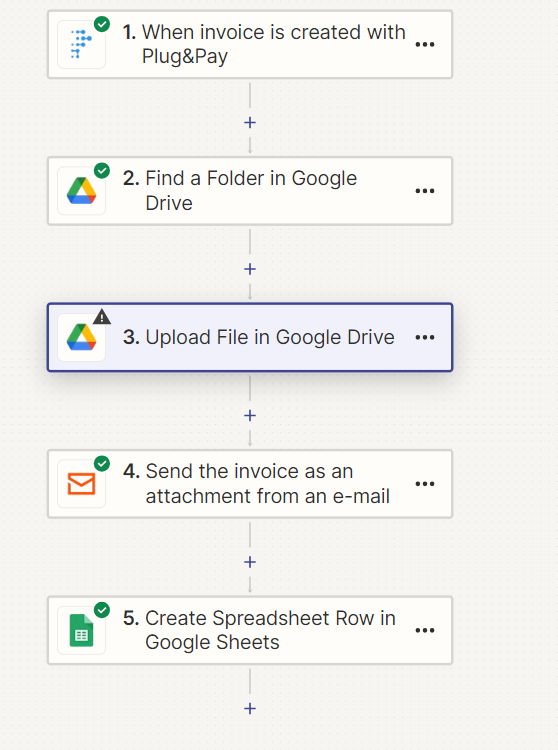
Here you can find a screenshot from my  zap in edit mode.
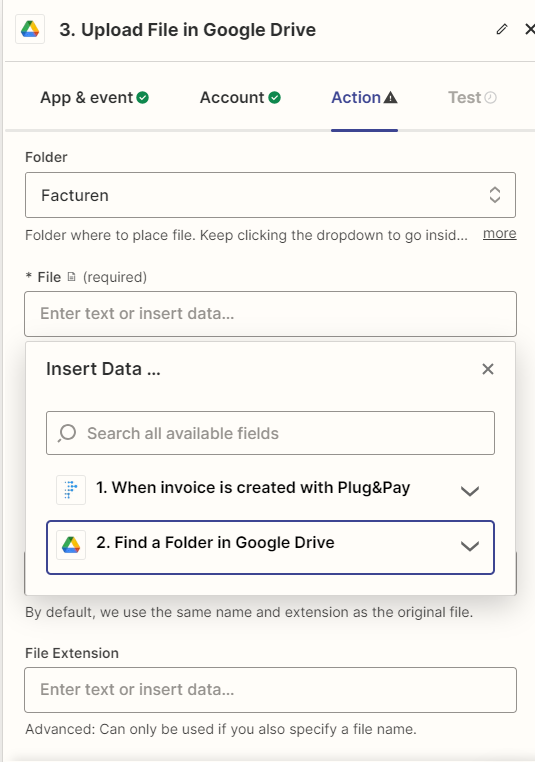
I contacted the support from Plug&Pay but they say it is not possible to send the pdf invoice to a second e-mail address, but it is possible to export the pdf via the order platform and upload them manually. I wonder if you have any idea how to get around this, so it is automated. Every step is working, except that I cannot find the file to upload  step 3.Upload File in Google Drive.

PS. My accountant has a platform where I need to upload my  files  manually or send the system an e-mail.

Thank you,
Lore


Troy Tessalone
Zapier Orchestrator & Solution Partner
Forum|alt.badge.img+14
  • Zapier Orchestrator & Solution Partner
  • Answer
  • May 15, 2024

@lotalifestyle.be 

The Plug&Pay Zap trigger step would need to provide a file object or a file url to use in Step 3 to upload to GDrive.


Or have another Zap action step where you can search for an invoice to get the invoice PDF file.


Help article about sending files in Zaps.

https://help.zapier.com/hc/en-us/articles/8496288813453


lotalifestyle.be

Thanks Troy, I managed to forward the pdf attachement in the e-mail I received to my accountant :-)


SamB
Community Manager
Forum|alt.badge.img+11
  • Community Manager
  • May 16, 2024

Thanks for letting us know @lotalifestyle.be! 🤗

Sounds like you’ve got things sorted for now but if anything changes on that please do let us know. In the meantime, happy Zapping! ⚡