Best answer

How do I add steps after a loop has completed - but the loop has a filter in it

  • December 15, 2025
  • 4 replies
  • 19 views

Forum|alt.badge.img

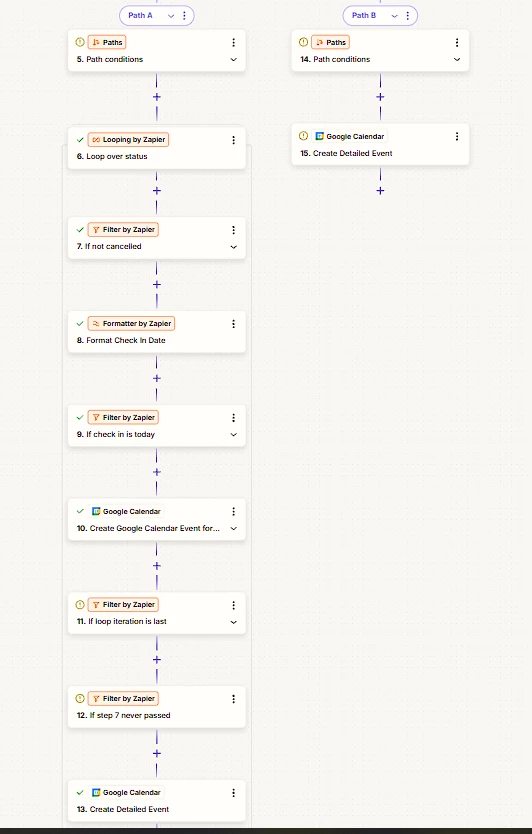
I have an API call which returns a list of bookings. If there are 0 bookings, we use Path B. Otherwise if there is data - I have Path A which uses data received from an API call and loops over that data. I only want to see bookings where the user has not cancelled (and thus needs to be completed) so I have added a filter to check the booking status. For these bookings I add a detailed calendar event.


However, if all bookings that were returned by my api call are the incorrect status type I need to create another detailed calendar event. I therefore need to break out of the loop or somehow continue if my filter never passes in any iteration of the loop.


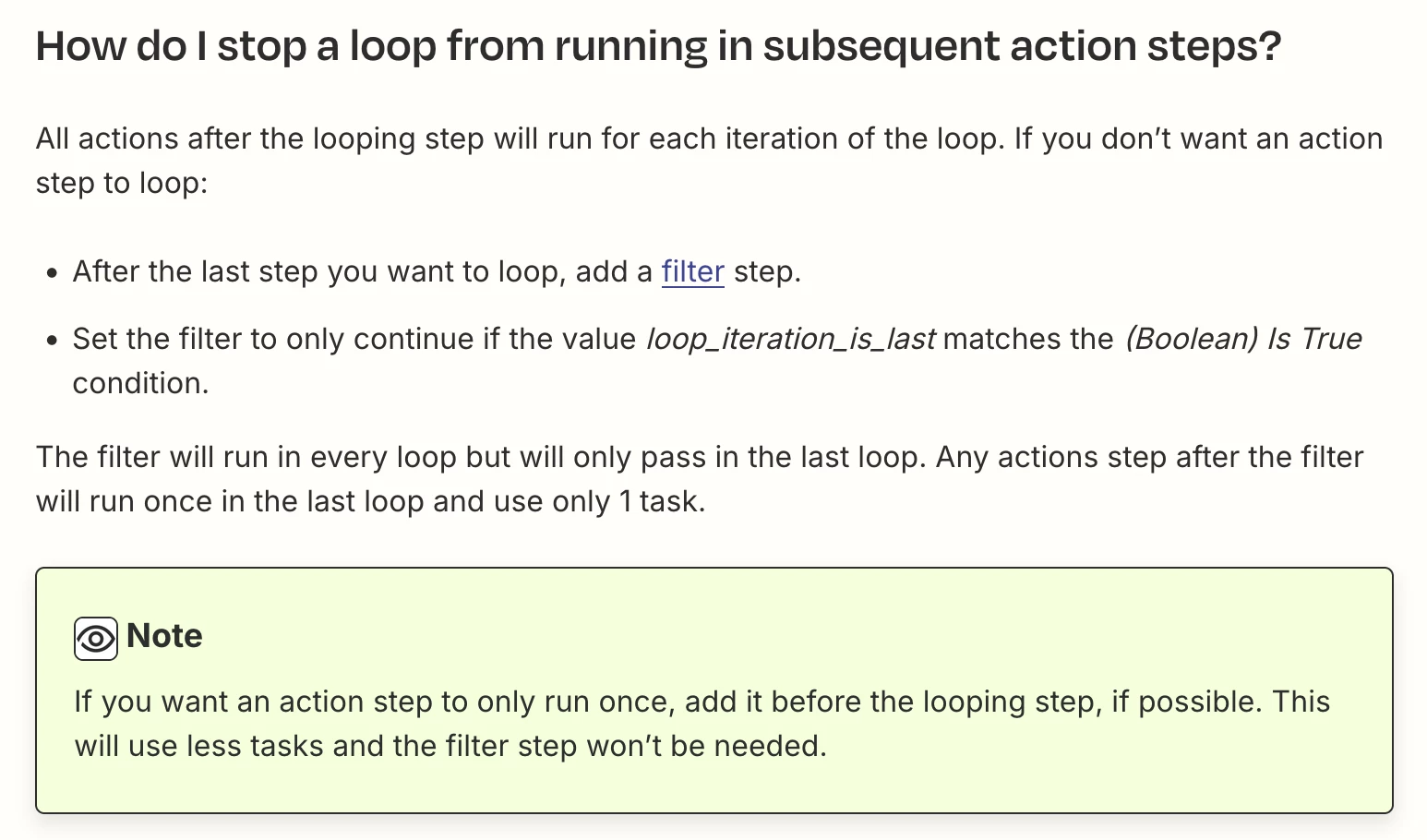
If I add a filter at the end of the loop as advised in other threads, it will of course never be run. How can I break out of this loop?


Best answer by sean.faughey

I’ve managed to complete my task. Here is how I did it:

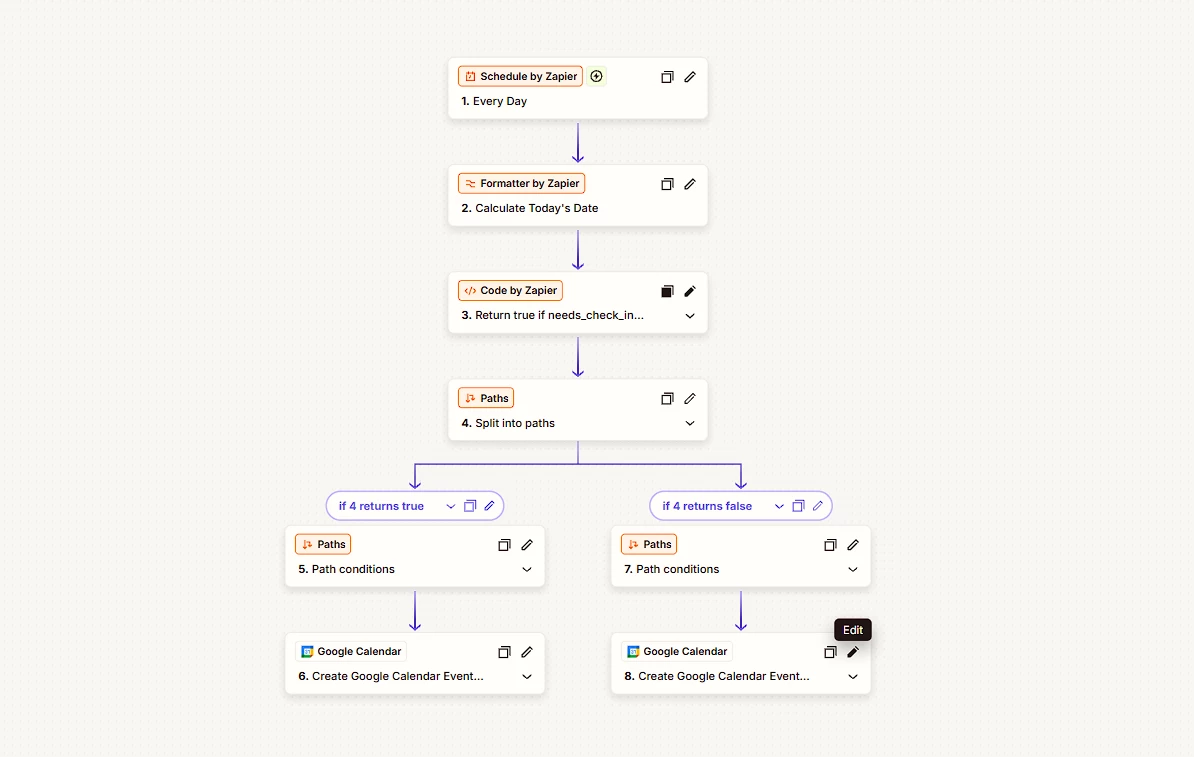
I moved the api call and the looping logic into a javascript code step. This code took my bookings json data into an array and used the .some command toreturn true or false based on my conditions. This avoided the inability to break out of a loop in Zapier. I then simplified my zap by moving the other filters into this js code. I was then able to have 2 simple paths to create my calendar events.

// Construct the API URL using the input date
const url = `{MY-URL}`;

// Fetch bookings from the API
const response = await fetch(url, {
method: 'GET',
headers: {
'Authorization': '{API-KEY}',
'Content-Type': 'application/json'
}
});

// Parse JSON response
const data = await response.json();

// Ensure bookings is always an array
const bookings = Array.isArray(data.bookings) ? data.bookings : [];

// Function to convert DD/MM/YYYY → YYYY-MM-DD
function toIsoDate(ddmmyyyy) {
if (!ddmmyyyy || ddmmyyyy.length !== 10) return null; // Expect format DD/MM/YYYY
const [day, month, year] = ddmmyyyy.split('/');
if (!day || !month || !year) return null;
return `${year}-${month}-${day}`;
}

// Convert input date
const inputDateIso = toIsoDate(inputData.date);

// Check if any booking meets the criteria
const hasNeedsCheckIn =
inputDateIso &&
bookings.some(b =>
b?.status === 'needs_check_in' &&
b?.check_in === inputDateIso
) || false;

// Return result
return { hasNeedsCheckIn };
Simplified Zap

Overall, I think looping currently has too many limitations for what my use case required.

4 replies

Troy Tessalone
Zapier Orchestrator & Solution Partner
Forum|alt.badge.img+14
  • Zapier Orchestrator & Solution Partner
  • December 15, 2025

Hi ​@sean.faughey 

Add Path C with Filter condition: Loop Iteration Last = true

Add a Filter condition to check if any of the filter conditions match or do not match. (e.g. if any bookings are not cancelled)

Paths process in order from left to right.


Help links for using Looping in Zaps: https://zapier.com/apps/looping/integrations#help


AndrewJDavison
Forum|alt.badge.img+11
  • Zapier Solution Partner
  • December 15, 2025

@sean.faughey You’ve found the one weakness of loops! What you describe can’t be done in any natural way.

One hacky workaround would be to use storage steps. Before entering the loop, you’d want to set a storage step unique to that run (use ID from trigger or something) with a value like 0.

Then find a way, so that if that step 7 ever does run in the loop, the storage value is updated to 1.

Then move that final GCal step to it’s own path. Add a 1 minute delay step, then a step to retrieve the stored value (when this runs live, with the delay, you know it’ll only retrieve after all loops have run).

Then you can add a filter based on whether the stored value is 0 (step 7 never ran), or 1 (step 7 ran at least once).

I’ll DM you.


Forum|alt.badge.img
  • Author
  • New
  • Answer
  • December 16, 2025

I’ve managed to complete my task. Here is how I did it:

I moved the api call and the looping logic into a javascript code step. This code took my bookings json data into an array and used the .some command toreturn true or false based on my conditions. This avoided the inability to break out of a loop in Zapier. I then simplified my zap by moving the other filters into this js code. I was then able to have 2 simple paths to create my calendar events.

// Construct the API URL using the input date
const url = `{MY-URL}`;

// Fetch bookings from the API
const response = await fetch(url, {
method: 'GET',
headers: {
'Authorization': '{API-KEY}',
'Content-Type': 'application/json'
}
});

// Parse JSON response
const data = await response.json();

// Ensure bookings is always an array
const bookings = Array.isArray(data.bookings) ? data.bookings : [];

// Function to convert DD/MM/YYYY → YYYY-MM-DD
function toIsoDate(ddmmyyyy) {
if (!ddmmyyyy || ddmmyyyy.length !== 10) return null; // Expect format DD/MM/YYYY
const [day, month, year] = ddmmyyyy.split('/');
if (!day || !month || !year) return null;
return `${year}-${month}-${day}`;
}

// Convert input date
const inputDateIso = toIsoDate(inputData.date);

// Check if any booking meets the criteria
const hasNeedsCheckIn =
inputDateIso &&
bookings.some(b =>
b?.status === 'needs_check_in' &&
b?.check_in === inputDateIso
) || false;

// Return result
return { hasNeedsCheckIn };
Simplified Zap

Overall, I think looping currently has too many limitations for what my use case required.


SamB
Community Manager
Forum|alt.badge.img+11
  • Community Manager
  • December 16, 2025

Great work ​@sean.faughey! Thanks so much for following up here to share details of the solution you came up with - this will be super helpful for others that might have a similar use case 🤗 And want to say a big thank you to ​@AndrewJDavison and ​@Troy Tessalone for jumping in to help out. 

Seems like you’re all set for now but please do reach back out in Community if you need help with anything else. In the meantime, happy Zapping! ⚡