Question

How do I add safeguards/edit restrictions?

  • Nov 26, 2026 9:47 PM UTC
  • 4 replies
  • 11 views

Hello!

I am a manager at a limousine company and I want to add safeguards for a potential mass/wipe deletion of reservations. Yes, unlikely, though I want to prepare for the worst. I am not using an MCP, I am creating a “in-built” zap?.. that would send a SMS to the client via Twilio once “x” condition has been met. 

App: https://zapier.com/apps/limo-anywhere/integrations

Screenshot attached of permissions, I do not see an option to edit any.

4 replies

WebhookEngineer
Forum|alt.badge.img+1

What your Zap is configured to do is separate from what its connected account is authorized to do. An SMS-only workflow doesn’t, by itself, tell us whether the connection has broader access. A notification wouldn’t prevent a deletion.

If you’re concerned about the automation, the next step is to check its configured actions and connection permissions. If you’re concerned about staff working directly in Limo Anywhere, we’d need to investigate the controls there instead. I can’t tell from the details supplied whether narrower permissions are available.

Are you trying to prevent the Zap from deleting reservations, or prevent staff from deleting them inside Limo Anywhere?


  • Author
  • New
  • Nov 27, 2026 1:42 AM UTC

I am trying to prevent “the zap” from deleting reservations by accident in some odd case. You know we hear the LLM horror stories “my LLM deleted my entire codebase.” Though I’m sure its comparing apples to oranges in the automation process, but I’d still think that is a potential possibility? 


WebhookEngineer
Forum|alt.badge.img+1

An AI choosing which operations to run is different from a Zap running operations you’ve explicitly configured. Broad access alone doesn’t instruct it to delete anything. A destructive operation would still need an execution path, such as a configured action or a request made through code.

For your SMS workflow, I’d check whether any step can write back to reservations, rather than looking at connection permissions alone. Include any code or custom-request steps you have. That’s a check of the workflow, not a guarantee about a setup I haven’t seen.

Is Limo Anywhere used only as the trigger, with Twilio sending the SMS, or does Limo Anywhere also appear in an action step?


SamB
Community Manager
Forum|alt.badge.img+11
  • Community Manager
  • Nov 27, 2026 11:11 AM UTC

Hi ​@belight! 👋

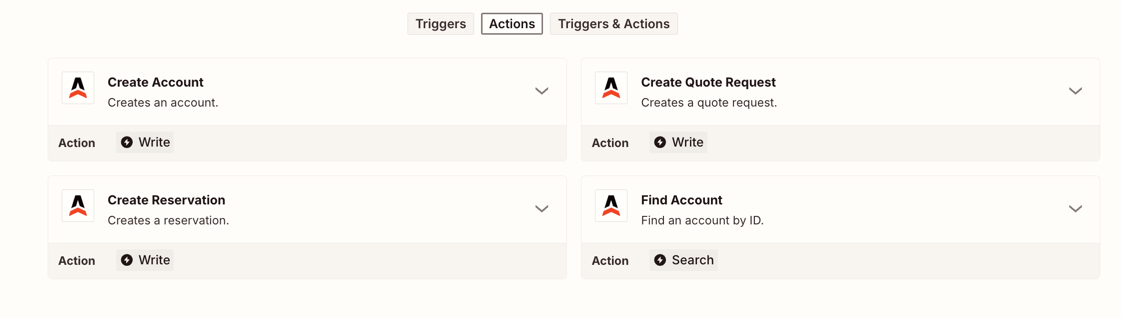
Just wanted to confirm that there’s no “Delete Reservation” action available for the LimoAnywhere app. The only actions available are to create an Account, Reservation and Quote Request, or to search for an existing account: 

6385fb02dbf7cdc191de16cf9cf7cda6.png
Like ​@WebhookEngineer said, the actions a Zap is set up to do are separate from what the connected account has permission to do. A Zap won't run any actions that you've not added into the Zap, so it wouldn't go through and delete all the reservations in your LimoAnywhere account.

Some apps also bundle permissions together, so a broad "edit" or "write" permission can include more than the actions the app integration offers. That's why the permissions screen can sometimes look broader than what the Zap would actually use.

If you run into any trouble setting up the Zap or have any more questions just let us know! 🙂