Question

How do I add a hyperlink to a cell in Google Sheet?

  • August 11, 2025
  • 2 replies
  • 33 views

Jaimee

How do I add a hyperlink to a cell in Google Sheet?

Trigger: In a Google Sheet, when Col D is set to "No" then run the Zap

Action: Create a Google Doc then add the link of the newly created doc to the trigger row.

I have attached a screenshot of my set up to this post.

I have also tried setting up the Action to add just the alternate link but in both cases, what Zapier adds to the trigger row is just the link in text format, it's not hyperlinked. I will then have to manually convert it to a link which kind of defeats the purpose of creating an automation in the first place. Is there a way for Zapier to add the hyperlink automatically and not just a string of text?

Need help. Thanks!

This post has been closed for comments. Please create a new post if you need help or have a question about this topic.

2 replies

Troy Tessalone
Zapier Orchestrator & Solution Partner
Forum|alt.badge.img+14
  • Zapier Orchestrator & Solution Partner
  • August 11, 2025

Hi ​@Jaimee 

For us to have more info, post screenshots showing how the GSheet cell is populated after testing the Zap step.


SamB
Community Manager
Forum|alt.badge.img+11
  • Community Manager
  • August 22, 2025

Hey ​@Jaimee, just checking in - were you able to get this sorted? 

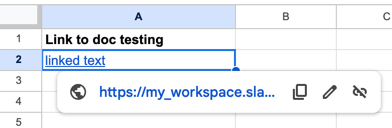
I tested that HYPERLINK formula in a Zap just now and it correctly linked the text:

3f9bc0b31e79698b1a06a5fe5ff22bf1.png
68d5b918304f628abfd70aa42599b2e7.png
 

So your formula should have worked. 🤔 If you change the mapped field in the second part of your formula to a different field, or just type in some text like I did, does it work correctly then?

Looking forward to hearing from you!