


Best answer

How can I tell Zapier to use the first worksheet in a Google Sheet without the name?

  • October 3, 2023
  • 3 replies
  • 136 views

Forum|alt.badge.img

Hi!

I’m automating a process that involves a Table in Excel(.xlsx)


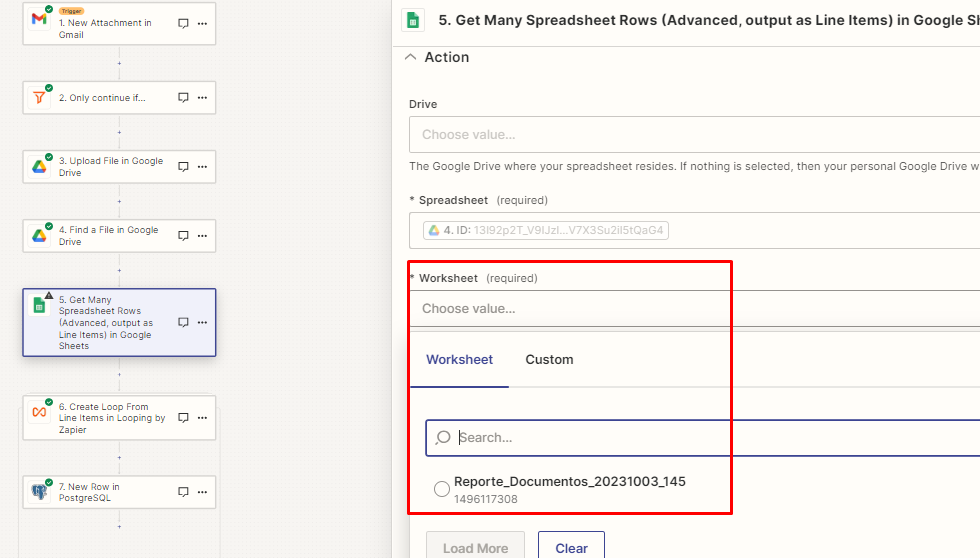
Once i’ve copeid that into Drive and converted to .gsheet i just can’t retrieve any row because the worksheet name is different every time


How i just can tell the zap to use the first worksheet without the name??


Please help.


Best answer by Troy Tessalone

@greenhub 

If the Worksheet title and Worksheet ID are different each time, then yes you will need to use the GSheets API.

This post has been closed for comments. Please create a new post if you need help or have a question about this topic.

3 replies

Troy Tessalone
Zapier Orchestrator & Solution Partner
Forum|alt.badge.img+14
  • Zapier Orchestrator & Solution Partner
  • October 3, 2023

Hi @greenhub 

Good question.

You may have to use the GSheets API: https://developers.google.com/sheets/api/reference/rest

If there are multiple worksheets, then you’ll have to add logic to isolate the first worksheet ID.


Forum|alt.badge.img
  • Author
  • Beginner
  • October 3, 2023

Hi @greenhub 

Good question.

You may have to use the GSheets API: https://developers.google.com/sheets/api/reference/rest

If there are multiple worksheets, then you’ll have to add logic to isolate the first worksheet ID.


Thanks for your response Troy!

Ok, but if tehre’s only one Worksheet in the SpreadSheet, I need to use the API or there’s another way?


Troy Tessalone
Zapier Orchestrator & Solution Partner
Forum|alt.badge.img+14
  • Zapier Orchestrator & Solution Partner
  • Answer
  • October 3, 2023

@greenhub 

If the Worksheet title and Worksheet ID are different each time, then yes you will need to use the GSheets API.



