Best answer

How can I tell which of my Zaps are shared?

  • November 19, 2020
  • 8 replies
  • 300 views

Forum|alt.badge.img

I need to understand everything I built that is shared outside if my account. Both listed and unlisted.

I’m interested in saving templates that I can re-use. I need to understand if these are being made available more broadly.

Best answer by Troy Tessalone

Articles: https://zapier.com/help/search?q=share&size=n_7_n

Zaps are not publicly available.

Shared Zaps are only shared with those indicated Zapier accounts.

If you Share a Zap (via a Share Zap link) with another account it’s only shared with that other Zapier account, essentially making a copy of your shared Zap.

Within your Team account, Zaps are only shared if designated in a Shared Folder.

 

This post has been closed for comments. Please create a new post if you need help or have a question about this topic.

8 replies

Troy Tessalone
Zapier Orchestrator & Solution Partner
Forum|alt.badge.img+14
  • Zapier Orchestrator & Solution Partner
  • November 19, 2020

Article: https://zapier.com/help/manage/collaborate/share-zaps-with-your-team

Zaps will be marked as being shared with others.


Forum|alt.badge.img
  • Author
  • Tinkerer
  • November 19, 2020

Ok - so Zaps are not shared out to the public. They are held as templates and shared within your account, if you are on an account with multiple users.

Correct? 


Troy Tessalone
Zapier Orchestrator & Solution Partner
Forum|alt.badge.img+14
  • Zapier Orchestrator & Solution Partner
  • November 19, 2020

Yes, Zaps are not public, but Zaps can be shared with other Zapier accounts: https://zapier.com/zap-sharing


Forum|alt.badge.img
  • Author
  • Tinkerer
  • November 19, 2020

Should I understand that my “Shared Zaps” are unlisted outside of my account. i.e. only in the case that I choose to disclose the URL would the template be visible to members of the public with Zapier accounts.

On a team account, are Shared Zaps listed? i.e. visible as templates for re-use? Or must, in all circumstances, a prospective user have the URL?


Troy Tessalone
Zapier Orchestrator & Solution Partner
Forum|alt.badge.img+14
  • Zapier Orchestrator & Solution Partner
  • Answer
  • November 20, 2020

Articles: https://zapier.com/help/search?q=share&size=n_7_n

Zaps are not publicly available.

Shared Zaps are only shared with those indicated Zapier accounts.

If you Share a Zap (via a Share Zap link) with another account it’s only shared with that other Zapier account, essentially making a copy of your shared Zap.

Within your Team account, Zaps are only shared if designated in a Shared Folder.


Forum|alt.badge.img
  • Author
  • Tinkerer
  • November 20, 2020

> Zaps are not publicly available

Do you mean even the shared templates? 

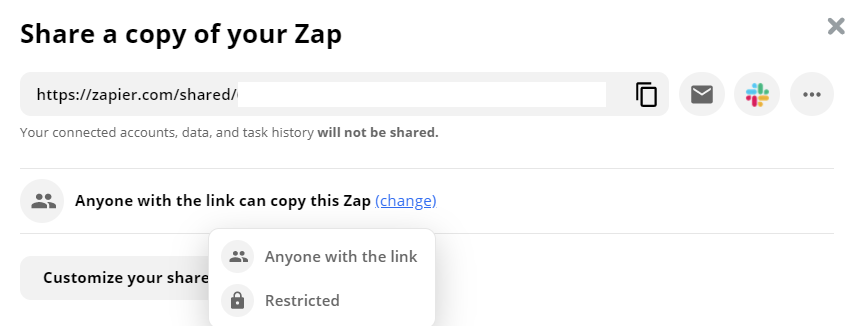
Because that’s not what “Anyone with the link” implies:


Thanks


Troy Tessalone
Zapier Orchestrator & Solution Partner
Forum|alt.badge.img+14
  • Zapier Orchestrator & Solution Partner
  • November 20, 2020

Someone would have to have the link to make a copy of the Zap.

Meaning the Zap Share Link isn’t discoverable.


Forum|alt.badge.img
  • Author
  • Tinkerer
  • November 20, 2020

Right, so “unlisted” 

I assume not all of my Zaps have a share link. I’d need to share. This leads to the question: when I’m logged in, how do I tell which of my zaps have been given a Zap Share Link? Is there an internal listing?


I dislike the same terminology “shared” to mean distinct things. There’s shared folders (sharing the editing of a live zap) and shared zaps (availability to use a given zap as a template via the Zap Share Link).  It’s confusing.