I am working with Google sheets, where I have an overview with all projects for 1 single customer, including the prices and the quantity. I created a Zap, and the information that is in the goolge spreadsheet is transferred to an invoice in Moneybird. The sheet however contains multiple projects, and I want to see them all on the same invoice. I only see 1 project only at the moment.
What do I need to do to include all projects (all rows with data) on the invoice?
Thanks so much! Lindsay
Best answer by Liz_Roberts
Hi @Lindsay ,
Thanks for reaching out! I see you were working with Paul on this and were able to come up with a workaround as there is not a “Find/Update Invoice” Action at the moment.
Posting the Action workaround below in case other members have a similar question in the future. Please let us know if you have any additional question- happy to help!
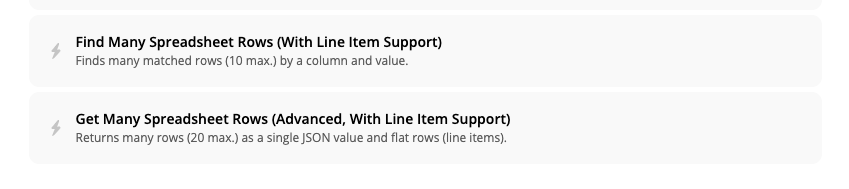
The Zap only has access to a single row each time the Zap is triggered so adding in a new Google Sheets action should get us access to multiple rows at once. The below Actions can return up to 10, or 20 rows as Line Items:
The information from those rows could then be mapped the way in the exact way a single row which triggered the Zap is mapped!
This post has been closed for comments. Please create a new post if you need help or have a question about this topic.
Thanks for reaching out! I see you were working with Paul on this and were able to come up with a workaround as there is not a “Find/Update Invoice” Action at the moment.
Posting the Action workaround below in case other members have a similar question in the future. Please let us know if you have any additional question- happy to help!
The Zap only has access to a single row each time the Zap is triggered so adding in a new Google Sheets action should get us access to multiple rows at once. The below Actions can return up to 10, or 20 rows as Line Items:
The information from those rows could then be mapped the way in the exact way a single row which triggered the Zap is mapped!
Join us on Friday, June 19, 11:30 a.m. ET for a hands-on community build-along where you'll learn the Zapier SDK, follow a live walkthrough, then build your own use case with a Zapier team member in your corner.