

Question

How can I determine the VAT amount for a Shopify refund?

  • February 17, 2026
  • 8 replies
  • 25 views

Joe_Evans
Forum|alt.badge.img

I’m trying to build a Zap which will be triggered by a new refund in Shopify, and which will create a refund receipt in Quickbooks.

I have the trigger set up, and in the next step I’m successfully accessing the original order from Shopify. However, I can’t see any way to determine how much purchase tax (VAT) was paid on the refunded item(s).

The data from the refund seems to always include three ‘refund discrepancy’ lines, two with negative and one with positive figures for the total refund amount and tax. Is it just a question of summing the tax figure from these three lines to get the total tax?

Our online shop sells a mix of items that are rated at 20% for VAT and items that are zero-rated. Because of Zapier’s limitations regarding test records I can’t currently access a refund which had any tax paid on it, so I can’t see how this presents; I’m also not clear whether Shopify always sends the three refund discrepancy lines.

I can’t just pull the total tax from the original order as it could have been a partial refund, ie refunding one of several items, and I can’t see how to determine which item or items were refunded.

Has anyone ever successfully created a Zap to send a Shopify refund on to a finance system? 

The refund data is attached.

 

8 replies

Troy Tessalone
Zapier Orchestrator & Solution Partner
Forum|alt.badge.img+14
  • Zapier Orchestrator & Solution Partner
  • February 17, 2026

Hi ​@Joe_Evans 

Help link for how to use a previous Zap Run as a Zap trigger example record to configure Zap action steps: https://help.zapier.com/hc/en-us/articles/35632951078029-Use-previous-Zap-runs-as-trigger-test-records


Troy Tessalone
Zapier Orchestrator & Solution Partner
Forum|alt.badge.img+14
  • Zapier Orchestrator & Solution Partner
  • February 17, 2026

@Joe_Evans 

If you are looking to hire help, there is a directory of Zapier Partners: https://zapier.com/partnerdirectory


Feedback from AI that may provide guidance...
 

Yes, this is possible, and you should not use the “refund discrepancy” lines to calculate VAT. Those are internal balancing adjustments and are not reliable for accounting.


Below is the correct approach.


1) Where Refunded VAT Actually Lives

In Shopify, VAT is attached to each refunded item, not to the summary lines.

You need:

refund_line_items[].tax_lines[].price

Each refunded line item contains one or more tax_lines showing:

  • Tax rate (20%, 0%, etc.)

  • Tax amount refunded

  • Tax name

This works correctly for mixed VAT and zero-rated orders.


2) Do Not Use “Refund Discrepancy” Lines

The three lines you see are:

  • Subtotal adjustment

  • Tax adjustment

  • Rounding/shipping adjustment

They exist to balance Shopify’s totals.

They:

  • Are not consistent

  • Are not guaranteed

  • Can change by scenario

Do not use them for VAT logic.


3) How to Know Which Items Were Refunded

Shopify tells you directly:

refund_line_items[].line_item_id
refund_line_items[].quantity

These match:

order.line_items[].id

So even for partial refunds, you always know exactly which products and quantities were refunded.

No guessing is required.


4) How to Calculate Total VAT Refunded

Formula:

Total VAT = sum(refund_line_items[].tax_lines[].price)

If each item has one tax line, it is simply:

tax_lines[0].price

If multiple tax lines exist, sum them.


5) Zapier Setup (Recommended)

In Zapier:

  1. Trigger: New Refund (Shopify)

  2. Loop: refund_line_items[]

  3. Inside Loop:

    • Read tax_lines[].price

    • Read subtotal

  4. Use Formatter or Code to sum VAT

  5. Send to QuickBooks

When creating the refund receipt, pass:

  • Net amount (subtotal)

  • Tax amount (VAT)

  • Correct tax code

Let QuickBooks calculate totals.


6) Dealing With Zapier’s Testing Limitation

Zapier often gives only one sample refund without VAT.

Workarounds:

Best option
Create a cheap VAT-rated test product (for example £0.01), buy it, refund it, and refresh samples.

Alternative
Use Webhooks by Zapier to capture the raw refund payload.


7) Direct Answers to Your Questions

Should I sum the three discrepancy lines?
No.

Does Shopify always send three lines?
No.

How do I know which items were refunded?
Use refund_line_items[].line_item_id.

Has this been done successfully?
Yes. Many production systems do this using refund_line_items + tax_lines.


Joe_Evans
Forum|alt.badge.img
  • Author
  • Beginner
  • February 17, 2026

Hi ​@Joe_Evans 

Help link for how to use a previous Zap Run as a Zap trigger example record to configure Zap action steps: https://help.zapier.com/hc/en-us/articles/35632951078029-Use-previous-Zap-runs-as-trigger-test-records

Thanks - this is a new Zap so there are no previous runs available.


Troy Tessalone
Zapier Orchestrator & Solution Partner
Forum|alt.badge.img+14
  • Zapier Orchestrator & Solution Partner
  • February 17, 2026

@Joe_Evans 

Try configuring the Zap with 3 steps.

  1. Trigger: Shopify
  2. Action: Filter
    1. Configure a condition that will evaluate to true
  3. Action: Any action that can be configured quickly to test
    1. e.g. Code step


Turn the Zap ON.

Test live.

Check your Zap Runs.

Use that filtered Zap Run as the Zap trigger example record as described in the article.

Remove the Filter step.

Remove the dummy action step.

Configure the action steps are you see fit.


TIP: Ask AI for help understanding the data points to use from Shopify for VAT.


Joe_Evans
Forum|alt.badge.img
  • Author
  • Beginner
  • February 17, 2026

Thanks Troy. The refund transactions don’t happen very often so ideally I don’t want to wait for a new one to occur before I can get on with building the Zap.

The answers I’ve had from AI on this are hopeless, they suggest using data items that are not in the refund data that Zapier pulls from Shopify, and don’t demonstrate any knowledge of how the integration works.


Troy Tessalone
Zapier Orchestrator & Solution Partner
Forum|alt.badge.img+14
  • Zapier Orchestrator & Solution Partner
  • February 17, 2026

@Joe_Evans 

If you are looking to hire help, there is a directory of Zapier Partners: https://zapier.com/partnerdirectory


Joe_Evans
Forum|alt.badge.img
  • Author
  • Beginner
  • February 18, 2026

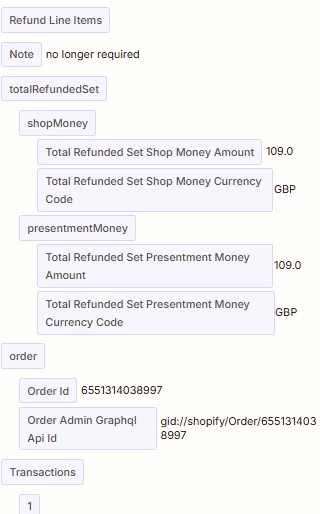
@Troy Tessalone thank you for your longer answer. This matches the answer given by AI. Unfortunately, the refund_line_items data that you show doesn’t appear in the data passed to Zapier by Shopify when I use the New Refund trigger. This is the refund_line_items section of the data from Shopify for a sample transaction:

As you can see, there is no tax information given, and no line item/product IDs are shown.


Troy Tessalone
Zapier Orchestrator & Solution Partner
Forum|alt.badge.img+14
  • Zapier Orchestrator & Solution Partner
  • February 18, 2026

@Joe_Evans 

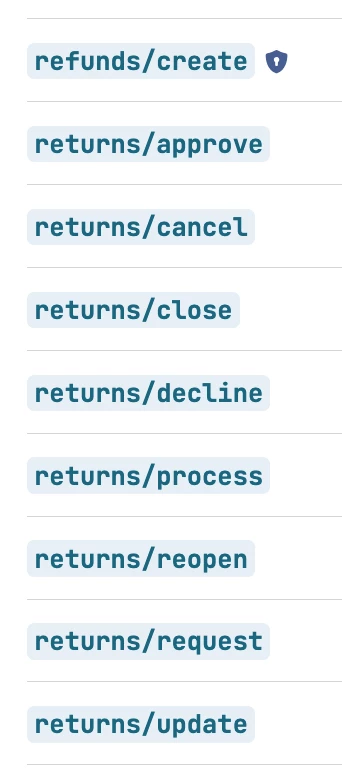
Reference the Shopify Dev Webhook events to see sample JSON payloads: 

https://shopify.dev/docs/api/webhooks/latest?accordionItem=webhooks-returns-approve&reference=toml