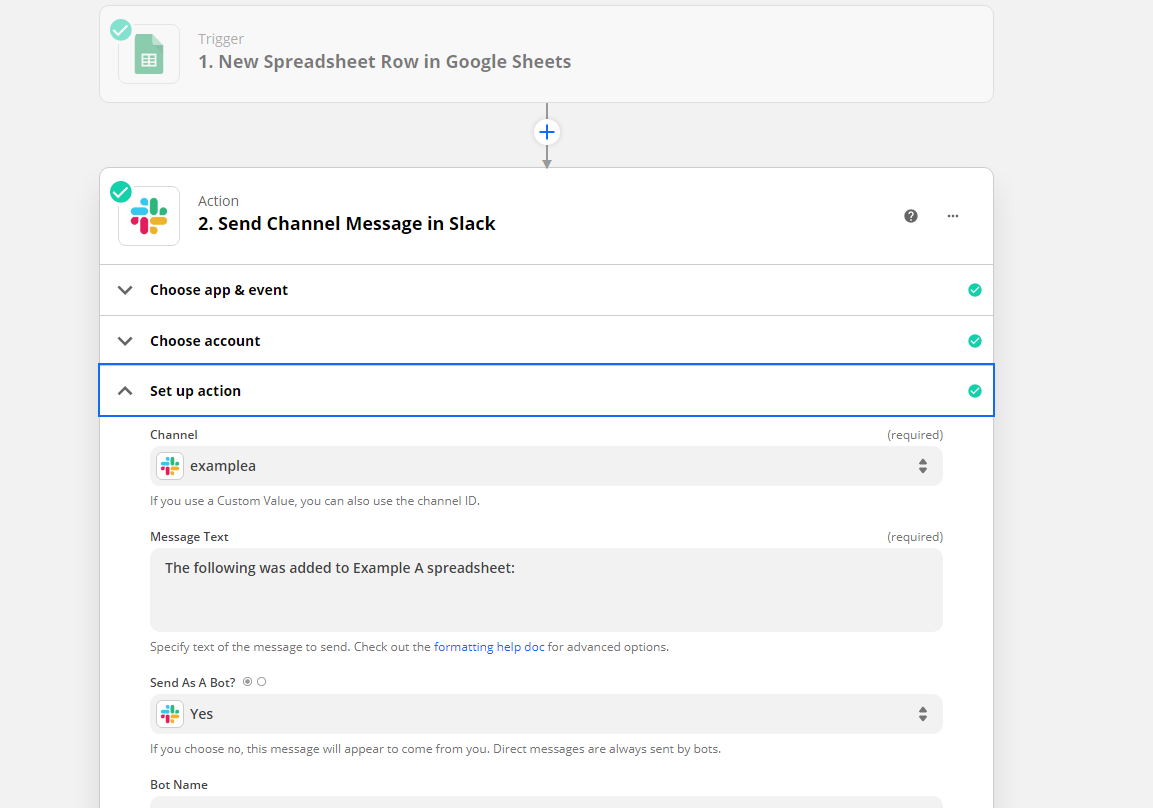
Hi, I’m new to Zapier, and I am looking to have the contents of a Google Sheet row put into a Slack channel anytime a new row is added, currently the bot just alerts when a new row is added but does not include the contents of what is added. Thanks for any links or info, much appreciated and looking forward to learning new things with Zapier!

Best answer
Google Sheets contents of row to Slack channel
Best answer by SamB
Just wanted to follow up here for anyone who’s running into the same issue to clarify that in order for the information from the spreadsheet to be added into the Slack message you’d need to click into the field. Then, from the dropdown menu that appears, select the relevant field(s) from the Google Sheets step that contain the desired information.
We have a guide on how to set up action steps like the Send Channel Message one that goes into more detail on this process here: Set up your action
This post has been closed for comments. Please create a new post if you need help or have a question about this topic.







Early access

Next Gen Zaps
Build and deploy automations from AI tools you already use. With Agentic Management, if anything breaks, the agent diagnoses the issue and proposes a fix.
Request access now
Enter your E-mail address. We'll send you an e-mail with instructions to reset your password.