Best answer

Google Docs / Invoice items from Quickbooks / Replace commas with line breaks.

  • July 26, 2020
  • 3 replies
  • 240 views

Hello,

I am creating a new Google Doc for each Quickbooks Online Invoice created. The doc is created and the fields merged. 

However, it merges all the invoice line items into one value separated by commas. 

Item1,Item 2, Item3

That creates a document that is very difficult to read. 

What I need to do, at a minimum, is to add a line break between the items. EG:

Instead of :Item1,Item2, Item3 

It would insert:

Item1

Item2

Item3


Any advice?

thanks
Best answer by ikbelkirasan

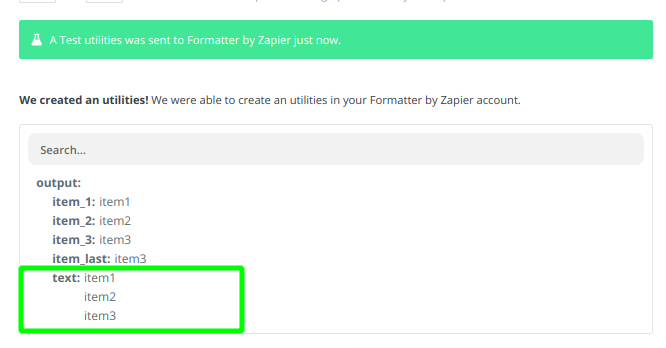
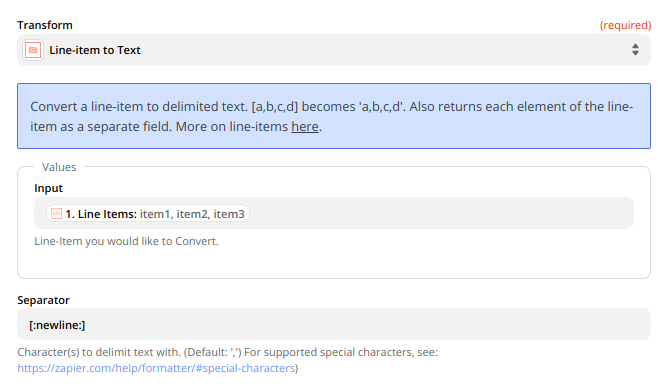
@ShaunS1456 - You could also use a Formatter step → UtilitiesLine-item to Text then set the Separator to [:newline:]


This post has been closed for comments. Please create a new post if you need help or have a question about this topic.

3 replies

johnwilliams
Forum|alt.badge.img

Hi 

Use Code by Zapier and apply {yourvalue}.replace(‘,’,’\n’)


You will receive output as line breaks.


ikbelkirasan
Forum|alt.badge.img+12
  • Zapier Solution Partner
  • Answer
  • July 26, 2020

@ShaunS1456 - You could also use a Formatter step → UtilitiesLine-item to Text then set the Separator to [:newline:]


  • Author
  • Beginner
  • July 26, 2020

That did it! Thank you!