I’m trying to setup Zapier to post my Ghost publications to Medium.
Everything is working perfectly, except that my Ghost “scripts” included in my blog posts are not formatted properly. Instead of being considered as “code snippet”, everything is written on the same line.
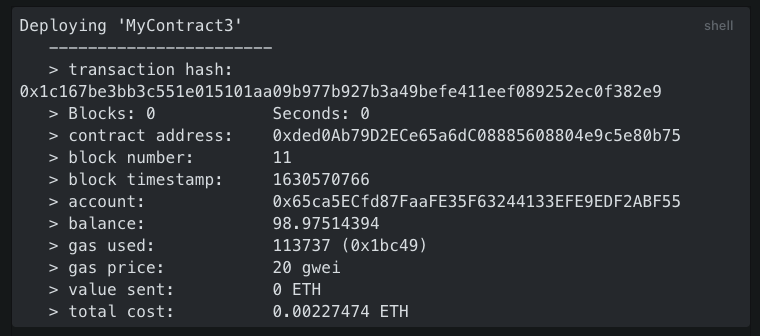
Here is an illustration:
Printscreen from Ghost = How it should be
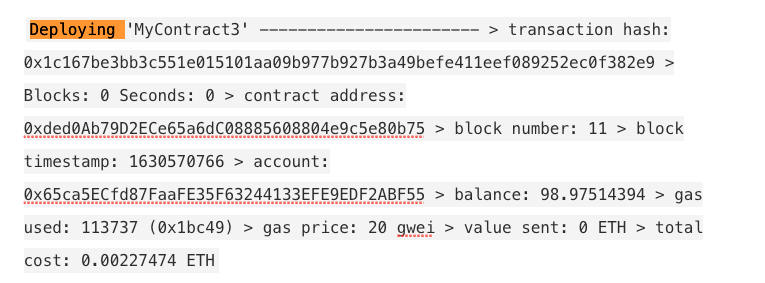
On Medium, it looks like this:
Posted on Medium
Many thanks for your help !
Best answer by SamB
Hey @henri228,
It looks as the code is being added as an inline code block instead of a separate code block. It appears that there’s the option to select either a HTML or Markdown format in the Create Story step. I did some searching and found a blog post on Medium’s website that talks about the accepted markup that can be used here: Accepted markup for Medium’s Publishing API
Going through to the Markdown Syntax guide which that accepted markup blog post links to, it seems to suggest that if the Markdown format is selected you can use indents (4 spaces or 1 tab) to format the code into a code block. Or you could potentially select the HTML format and use the <pre> and <code> tags to see if that works?
This post has been closed for comments. Please create a new post if you need help or have a question about this topic.
It looks as the code is being added as an inline code block instead of a separate code block. It appears that there’s the option to select either a HTML or Markdown format in the Create Story step. I did some searching and found a blog post on Medium’s website that talks about the accepted markup that can be used here: Accepted markup for Medium’s Publishing API
Going through to the Markdown Syntax guide which that accepted markup blog post links to, it seems to suggest that if the Markdown format is selected you can use indents (4 spaces or 1 tab) to format the code into a code block. Or you could potentially select the HTML format and use the <pre> and <code> tags to see if that works?