Question

Formatting data in a Google Sheet from text to number

  • April 25, 2025
  • 3 replies
  • 21 views

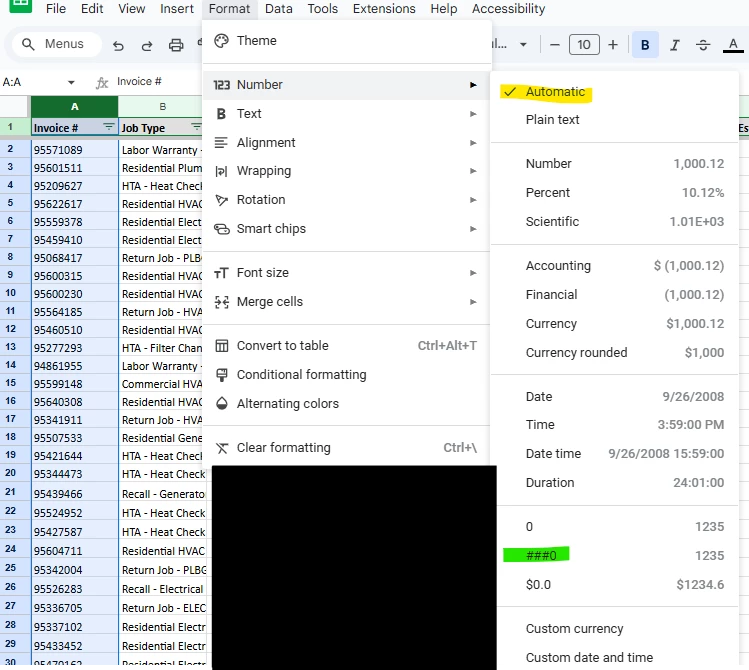
I have a workflow that pulls an Excel attachment from an email in Gmail and saves it into Google Drive as a Google Sheet.  One column of my data is invoice numbers, but it’s stored as text in the original file.  I have to have this as a number, so I’m having to go into the file and format that column to number.  

Is there a way for Zapier to automate this task?

This post has been closed for comments. Please create a new post if you need help or have a question about this topic.

3 replies

Troy Tessalone
Zapier Orchestrator & Solution Partner
Forum|alt.badge.img+14
  • Zapier Orchestrator & Solution Partner
  • April 25, 2025

Hi ​@jjslayton 

For us to have more info, post screenshots about what you are referring related to a specific example.


  • Author
  • Beginner
  • April 25, 2025

Hi ​@jjslayton 

For us to have more info, post screenshots about what you are referring related to a specific example.

It’s current formatted as automatic and I have to manually change it to the green highlight.


Troy Tessalone
Zapier Orchestrator & Solution Partner
Forum|alt.badge.img+14
  • Zapier Orchestrator & Solution Partner
  • April 25, 2025

@jjslayton 

If possible, that would likely involve using the GSheets API: https://developers.google.com/workspace/sheets/api/guides/concepts

Zap action: GSheets - API Request