

Best answer

Fixing multiple contract rows in Zapier Tables output

  • August 31, 2025
  • 6 replies
  • 55 views

Hi All,

I am having an issue with my workflow.

I have a scheduled Webhook running a GET request on a daily basis:
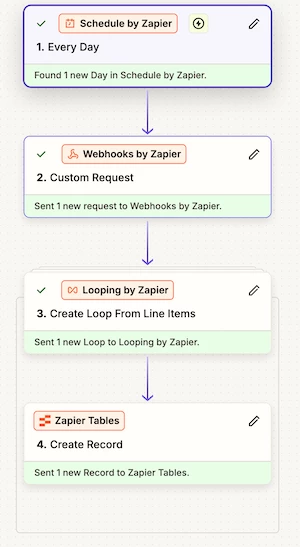
It is pulling back data in the following format, where ID, is my Customer ID, then there is an array of Contract Data for each customer, please see below:

[
{
"ID": 288,
"Contracts": [
{
"ID": 1634,
"Name": "Test1",
"StartDate": "2025-10-01",
"EndDate": "2026-09-30",
"ContractNo": "",
"Expired": false
}
]
},
{
"ID": 292,
"Contracts": [
{
"ID": 1403,
"Name": "Test2A",
"StartDate": "2025-06-01",
"EndDate": "2026-05-31",
"ContractNo": "292/001",
"Expired": false
},
{
"ID": 1238,
"Name": "Test2B",
"StartDate": "2025-08-01",
"EndDate": "2026-07-31",
"ContractNo": "292/002",
"Expired": false
},
{
"ID": 1577,
"Name": "Test2C",
"StartDate": "2025-10-01",
"EndDate": "2026-03-31",
"ContractNo": "292/003",
"Expired": false
}
]
}
]

The problem that I am having is as follows:

For each customer where there is only one Contract, I get a row added to my table as expected.

Where there are multiple Contracts, in the example above (Test2A, Test2B, Test2C), there are 3 rows created (which are, oddly to me, not consecutive). Each row has all of the correct details in the correct columns with the exception of my contract names; where all three are repeated for each row, as shown below:

 

The loop configuration is shown below:
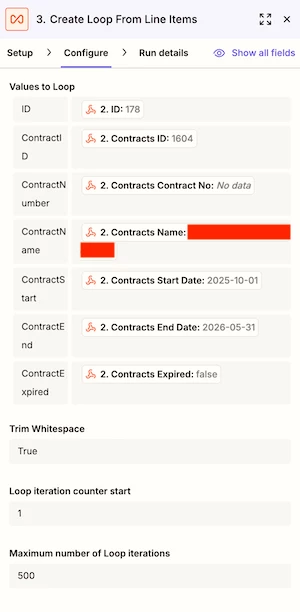
Could anybody point out where I am going wrong?

Best answer by Sparsh from Automation Jinn

Hey ​@CellCSamp,

It’s happening because you are not accessing the nested array of Contracts. You can solve it either by using two Zaps in Zapier as nested looping is not natively supported so the extra loop from the second Zap can access the nested contracts in JSON or either by using a Code by Zapier step to access the required details from the GET request step.

PS: If you need any professional help and a done for you service, I am a Zapier Official Silver Solution Partner and you can contact me through my solution page from my profile :)

This post has been closed for comments. Please create a new post if you need help or have a question about this topic.

6 replies

Sparsh from Automation Jinn
Forum|alt.badge.img+6

Hey ​@CellCSamp,

It’s happening because you are not accessing the nested array of Contracts. You can solve it either by using two Zaps in Zapier as nested looping is not natively supported so the extra loop from the second Zap can access the nested contracts in JSON or either by using a Code by Zapier step to access the required details from the GET request step.

PS: If you need any professional help and a done for you service, I am a Zapier Official Silver Solution Partner and you can contact me through my solution page from my profile :)


  • Author
  • Beginner
  • August 31, 2025

Hi ​@Sparsh from Automation Jinn,

Thanks, this makes sense now.

What still confuses me though is that the ContractID is being populated, seemingly correctly. Do you know why this would be?

Presumably with the dates, start and end, this is because the column type is date and it is only showing the first entry?

Thanks for your help, much appreciated 😁


Sparsh from Automation Jinn
Forum|alt.badge.img+6

Hey ​@CellCSamp ​,

I think it might be because Zapier is trying to flatten the nested array so maybe that’s the reason you are getting those values. Try using 2 zaps or code step and see if it’s gets fixed.

PS: If you need any professional help and a done for you service, I am a Zapier Official Silver Solution Partner and you can contact me through my solution page from my profile :)


SamB
Community Manager
Forum|alt.badge.img+11
  • Community Manager
  • September 8, 2025

Hey there ​@CellCSamp, just checking in 👋

Were you able to get this sorted by splitting the workflow into 2 Zaps, or using a Code step, as Sparsh suggested? 

Let us know if you still need any help, want to make sure this gets fixed! 🙂


  • Author
  • Beginner
  • September 8, 2025

I created a custom JavaScript code step, thank you


SamB
Community Manager
Forum|alt.badge.img+11
  • Community Manager
  • September 15, 2025

Thanks for following up here ​@CellCSamp! 🤗 Glad to hear you were able to get it sorted by using a Code step as Sparsh suggested - thanks ​@Sparsh from Automation Jinn! 🙌

Please do reach back out if you need any more help at all. In the meantime, happy Zapping! ⚡



